







Question: Install Cisco Packet Tracer , create and save a new file in your home directory. Then take a full window screenshot with the setup shown
Install Cisco Packet Tracer , create and save a new file in your home directory. Then take a full window screenshot with the setup shown below. The router/switch hostnames should be firstname_SW and firstname_R Set an appropriate MOTD banner Password and secret should be firstname and firstname1 (all small letters). Turn off all unused ports. Enable Switch VLAN1 and set IP address. Set appropriate IP/Mask on each interface. Ping should be possible to router and SW. Submit a png/jpeg of the screenshot, along with your .pkt file.
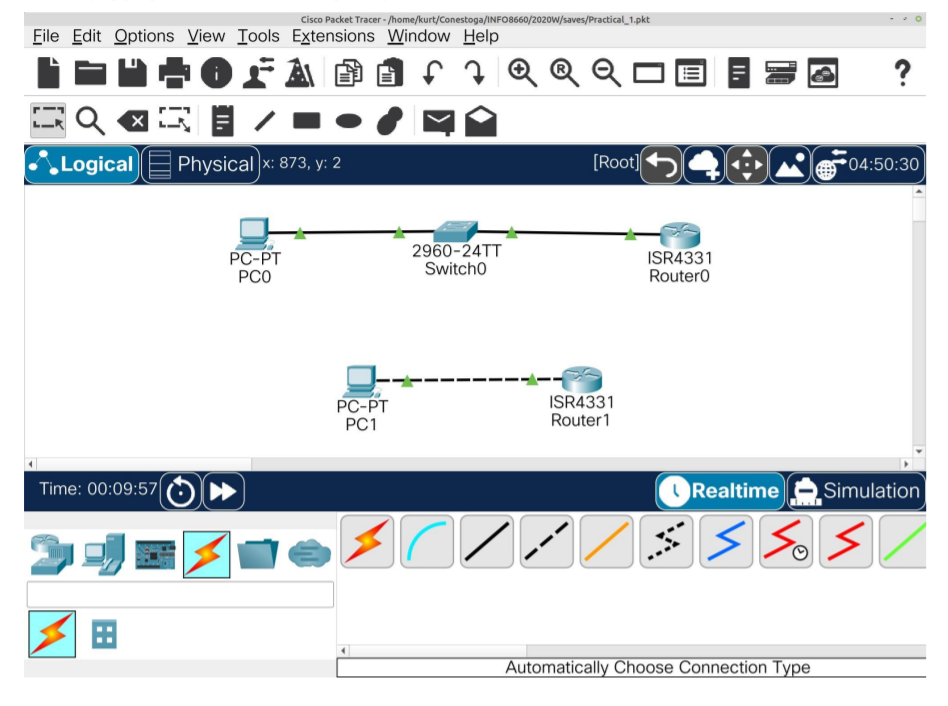
Cisco Packet Tracer- /home/kurt/Conestoga/INFO8660/2020W/saves/Practical_1.pkt Eile Edit Options View Tools Extensions Window Help Logical Physical] x: 873, y: 2 Time: 00:09:57 PC-PT PCO PC-PT PC1 2960-24TT Switcho 3 OZ QQO [Root] ISR4331 Router1 Z ISR4331 RouterO || 10 ? 04:50:30 Realtime Simulation ss3 Automatically Choose Connection Type
Step by Step Solution
There are 3 Steps involved in it

Get step-by-step solutions from verified subject matter experts
 Study Help