







Question: Instructions 1. For each table, append your student id along with the table name. For e.g. employee_student id (employee_T16363737) 2. Submit assignment in pdf format.
Instructions 1. For each table, append your student id along with the table name. For e.g. employee_student id (employee_T16363737) 2. Submit assignment in pdf format. 3. Format for questions: a. Question b. PL/ SQL solution or code c. Screenshot for output
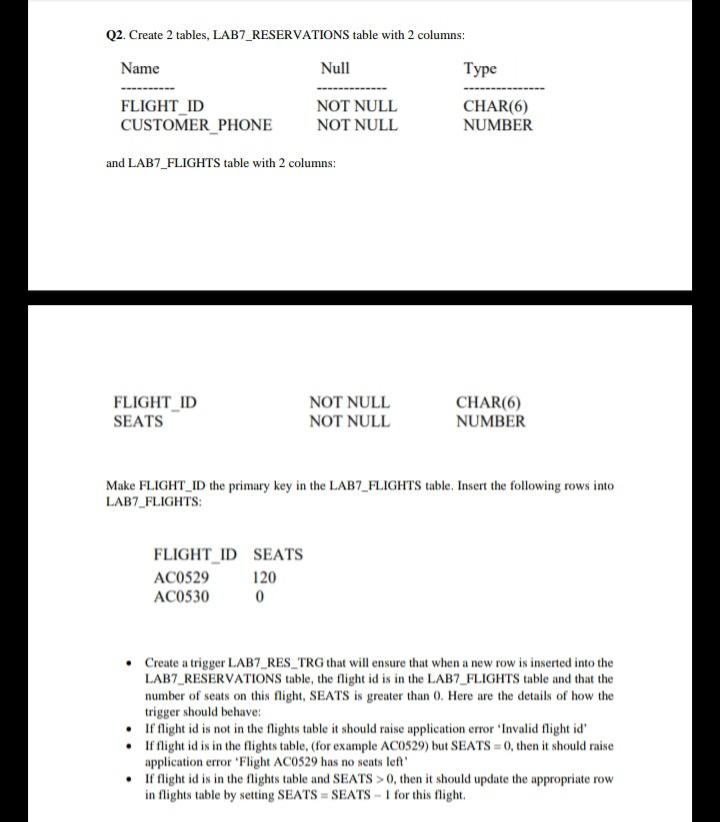
Q2. Create 2 tables, LAB7_RESERVATIONS table with 2 columns Name Null Type FLIGHT ID NOT NULL CHAR(6) CUSTOMER PHONE NOT NULL NUMBER and LAB7_FLIGHTS table with 2 columns: FLIGHT_ID SEATS NOT NULL NOT NULL CHAR(6) NUMBER Make FLIGHT_ID the primary key in the LAB7_FLIGHTS table, Insert the following rows into LAB7_FLIGHTS: FLIGHT ID SEATS AC0529 120 AC0530 0 Create a trigger LAB7_RES_TRG that will ensure that when a new row is inserted into the LAB7_RESERVATIONS table, the flight id is in the LAB7_FLIGHTS table and that the number of seats on this flight, SEATS is greater than 0. Here are the details of how the trigger should behave: If flight id is not in the flights table it should raise application error 'Invalid flight id' If flight id is in the flights table. (for example AC0529) but SEATS = 0, then it should raise application error 'Flight AC0529 has no seats left If flight id is in the flights table and SEATS > 0, then it should update the appropriate row in flights table by setting SEATS = SEATS - 1 for this flight Q2. Create 2 tables, LAB7_RESERVATIONS table with 2 columns Name Null Type FLIGHT ID NOT NULL CHAR(6) CUSTOMER PHONE NOT NULL NUMBER and LAB7_FLIGHTS table with 2 columns: FLIGHT_ID SEATS NOT NULL NOT NULL CHAR(6) NUMBER Make FLIGHT_ID the primary key in the LAB7_FLIGHTS table, Insert the following rows into LAB7_FLIGHTS: FLIGHT ID SEATS AC0529 120 AC0530 0 Create a trigger LAB7_RES_TRG that will ensure that when a new row is inserted into the LAB7_RESERVATIONS table, the flight id is in the LAB7_FLIGHTS table and that the number of seats on this flight, SEATS is greater than 0. Here are the details of how the trigger should behave: If flight id is not in the flights table it should raise application error 'Invalid flight id' If flight id is in the flights table. (for example AC0529) but SEATS = 0, then it should raise application error 'Flight AC0529 has no seats left If flight id is in the flights table and SEATS > 0, then it should update the appropriate row in flights table by setting SEATS = SEATS - 1 for this flight
Step by Step Solution
There are 3 Steps involved in it

Get step-by-step solutions from verified subject matter experts
 Study Help