







Question: Instructions: -Create a column titled Weighted Value and calculate the weighted value of each line item (Cost per unit X Annual Demand) -In the next
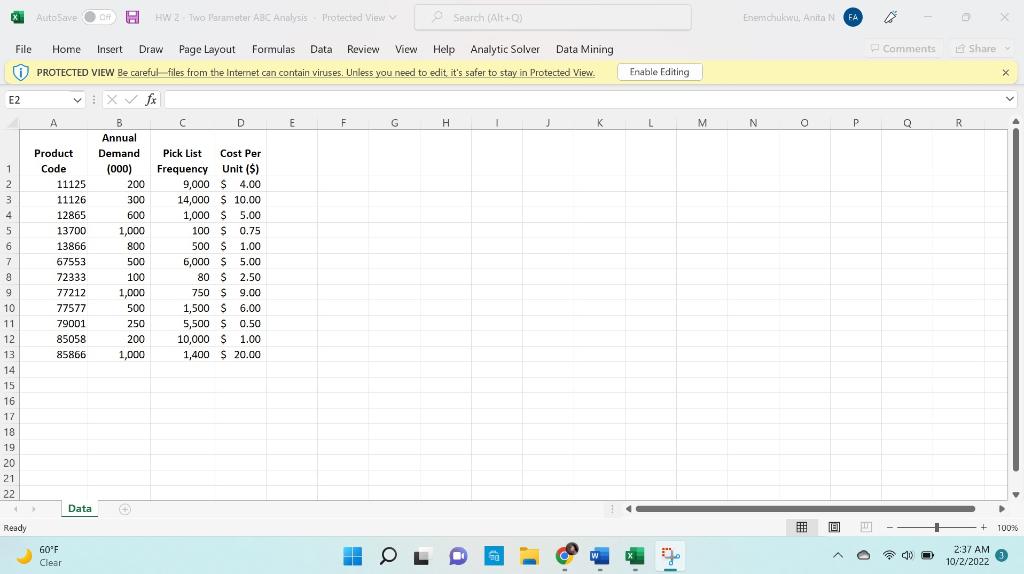
Instructions:
-Create a column titled Weighted Value and calculate the weighted value of each line item (Cost per unit X Annual Demand)
-In the next column, calculate % Weighted Value (Weighted value divided by Total Weighted Value)
-Sort data by % Weighted Value
-Assign primary ABC codes based on percentages. A common rule of thumb is A items equal 68% of the total, A+B items equal 95% of the total and C items equal the rest or 5% of the total. This is a rule of thumb only.
-Create a column for Volume %. Add the numbers in the Pick List Frequency column, then divide each item in the pick list frequency column by the total to get Volume %.
-Perform a two level sort. The first level is based on the ABC codes, the second is based on the Volume %.
-Assign secondary ABC codes based on percentages
File Home Insert Draw Page Layout Formulas Data Review View Help Analytic Solver Data Mining (i) PROTECTED VIEW Be careful- files from the Internet can contain viruses. Uniless you need to edit it's safer to stay in Protected ViewStep by Step Solution
There are 3 Steps involved in it

Get step-by-step solutions from verified subject matter experts
 Study Help