





Question: Instructions: Create a NetBeans Web project to demonstrate the use of HTML Form and JavaServer Pages. You can apply some CSS styles as you see
Instructions: Create a NetBeans Web project to demonstrate the use of HTML Form and JavaServer Pages. You can apply some CSS styles as you see fit. 1. Create an html page1 that functions as the interface of a Web calculator. It should include: ? A heading ? A form with two text inputs, four submit buttons (representing four math operators), and a reset button that can clear user inputs ? A table that holds form inputs ? A
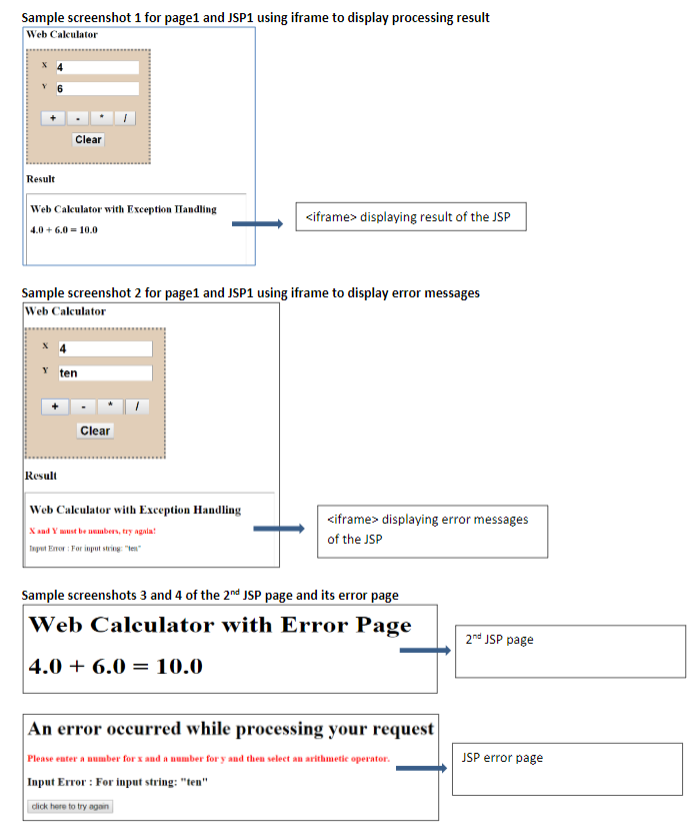
Sample screenshot 1 for page1 and JSP1 using iframe to display processing result Web Calculator Clear Result Web Calculator with Exception ITandling displaying result of the JSP 4.0+6.0-10.0 Sample screenshot 2 for page1 and JSP1 using iframe to display error messages Web Calculator Y ten Clear Resul Web Calculator with Exception Handling and Y ust be neabers, try agala gut Enor For input string e displaying error messages of the JSP Sample screenshots 3 and 4 of the 2nd JSP page and its error page Web Calculator with Error Page 4.0+ 6.0-10.0 2nd JSP page An error occurred while processing your request Please enter a number for x and a number for y and then select an arithmetic operator Input Error: For input string:"ten" click here to try again JSP error page Sample screenshot 1 for page1 and JSP1 using iframe to display processing result Web Calculator Clear Result Web Calculator with Exception ITandling displaying result of the JSP 4.0+6.0-10.0 Sample screenshot 2 for page1 and JSP1 using iframe to display error messages Web Calculator Y ten Clear Resul Web Calculator with Exception Handling and Y ust be neabers, try agala gut Enor For input string e displaying error messages of the JSP Sample screenshots 3 and 4 of the 2nd JSP page and its error page Web Calculator with Error Page 4.0+ 6.0-10.0 2nd JSP page An error occurred while processing your request Please enter a number for x and a number for y and then select an arithmetic operator Input Error: For input string:"ten" click here to try again JSP error page
Step by Step Solution
There are 3 Steps involved in it
1 Expert Approved Answer
Step: 1 Unlock

Question Has Been Solved by an Expert!
Get step-by-step solutions from verified subject matter experts
Step: 2 Unlock
Step: 3 Unlock

Students Have Also Explored These Related Databases Questions!