







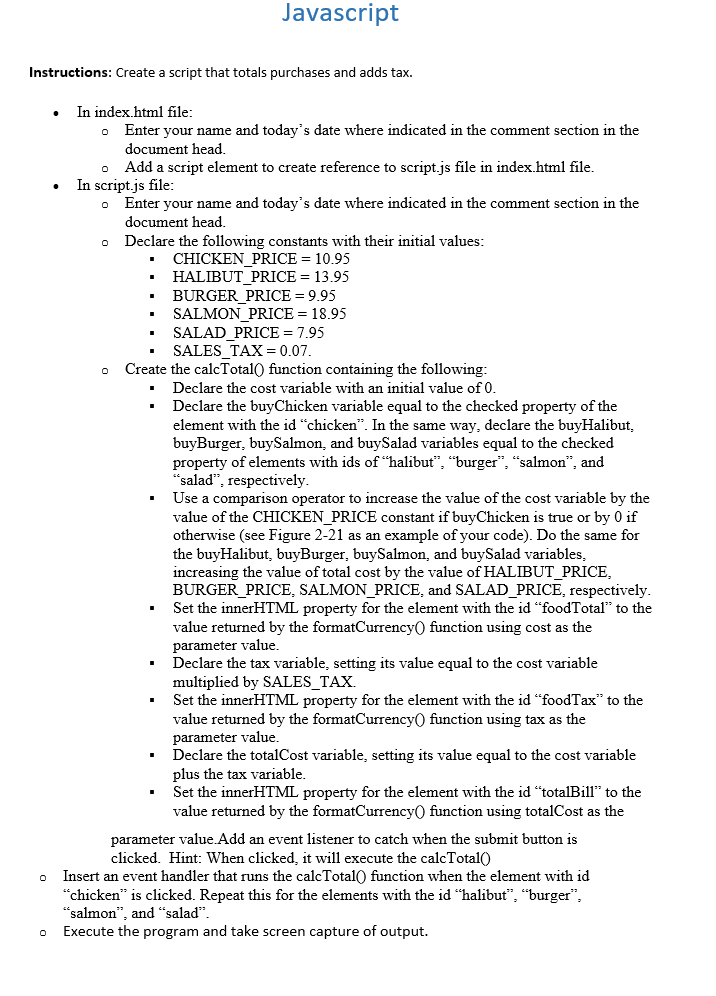
Question: Instructions: Create a script that totals purchases and adds tax. In index.html file: Enter your name and today's date where indicated in the comment section
Instructions: Create a script that totals purchases and adds tax.
In index.html file:
Enter your name and today's date where indicated in the comment section in the
document head.
Add a script element to create reference to script.js file in index.html file.
In script.js file:
Enter your name and today's date where indicated in the comment section in the
document head.
Declare the following constants with their initial values:
CHICKENPRICE
HALIBUTPRICE
BURGERPRICE
SALMONPRICE
SALADPRICE
SALESTAX
Create the calcTotal function containing the following:
Declare the cost variable with an initial value of
Declare the buyChicken variable equal to the checked property of the
element with the id "chicken". In the same way, declare the buyHalibut,
buyBurger, buySalmon, and buySalad variables equal to the checked
property of elements with ids of "halibut", "burger", "salmon", and
"salad", respectively.
Use a comparison operator to increase the value of the cost variable by the
value of the CHICKENPRICE constant if buyChicken is true or by if
otherwise see Figure as an example of your code Do the same for
the buyHalibut, buyBurger, buySalmon, and buySalad variables,
increasing the value of total cost by the value of HALIBUTPRICE,
BURGERPRICE, SALMONPRICE, and SALADPRICE, respectively.
Set the innerHTML property for the element with the id "foodTotal" to the
value returned by the formatCurrency function using cost as the
parameter value.
Declare the tax variable, setting its value equal to the cost variable
multiplied by SALESTAX.
Set the innerHTML property for the element with the id "foodTax" to the
value returned by the formatCurrency function using tax as the
parameter value.
Declare the totalCost variable, setting its value equal to the cost variable
plus the tax variable.
Set the innerHTML property for the element with the id "totalBill" to the
value returned by the formatCurrency function using totalCost as the
parameter value.Add an event listener to catch when the submit button is
clicked. Hint: When clicked, it will execute the calcTotal
Insert an event handler that runs the calcTotal function when the element with id
"chicken" is clicked. Repeat this for the elements with the id "halibut", "burger",
"salmon", and "salad".
Execute the program and take screen capture of output.
Step by Step Solution
There are 3 Steps involved in it
1 Expert Approved Answer
Step: 1 Unlock

Question Has Been Solved by an Expert!
Get step-by-step solutions from verified subject matter experts
Step: 2 Unlock
Step: 3 Unlock
 Study Help