







Question: Instructions DebugOne4.java GUI Viewer 1 import javax.swing.J0ptionPane; 2 public class Debugone4 The files provided in the code editor to the right contain syntax and/or logic
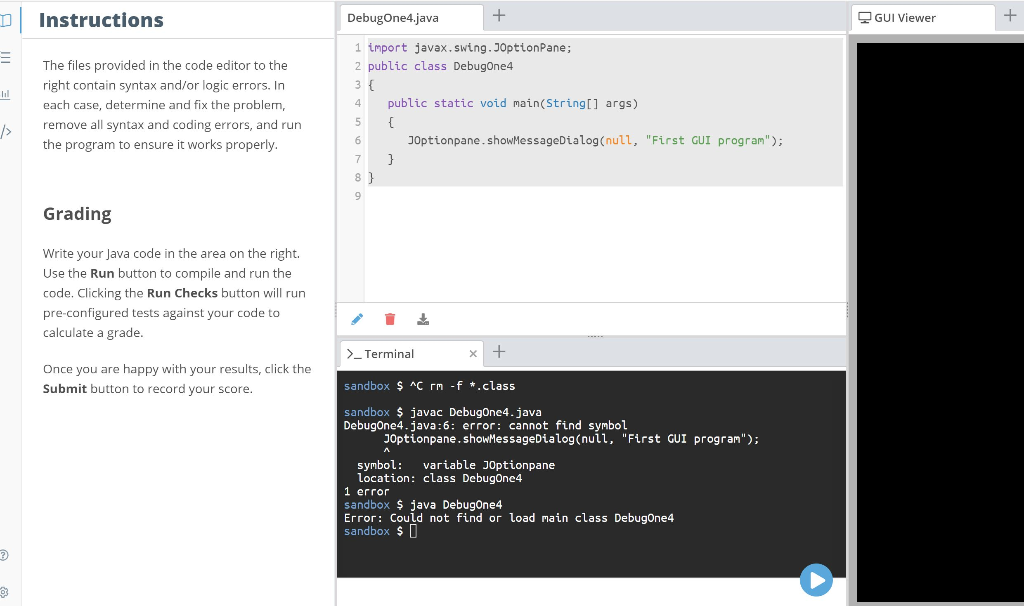
Instructions DebugOne4.java GUI Viewer 1 import javax.swing.J0ptionPane; 2 public class Debugone4 The files provided in the code editor to the right contain syntax and/or logic errors. In each case, determine and fix the problem, remove all syntax and coding errors, and run the program to ensure it works properly 4 public static void main(String[] args) Joptionpane.showMessageDialog (null, "First GUI program"; Grading Write your Java code in the area on the right. Use the Run button to compile and run the code. Clicking the Run Checks button will run pre-configured tests against your code to calculate a grade _Terminal sandbox $ AC rm f.class sandbox $ javac DebugOne4.java Once you are happy with your results, click the Submit button to record your score DebugOne4.java:6: error: cannot find symbol J0ptionpane.showMessageDialog (null, "First GUI program"); symbol variable JOptionpane location: class DebugOne4 1 error sandbox java DebugOne4 Error: Could not find or load main class DebugOne4 sandbox $[
Step by Step Solution
There are 3 Steps involved in it

Get step-by-step solutions from verified subject matter experts
 Study Help