







Question: Instructions & Requirements At the beginning of the program, include Introductory Comments as below. All your submissions should include a segment of introductory comments. Introductory
Instructions & Requirements
At the beginning of the program, include "Introductory Comments" as below. All your submissions should include a segment of introductory comments.
Introductory Comments:Add InLine comments to explain your logic, assumptions, details, etc. At least InLine comments are required.
InLine Comments: EX #Calculate the area of the rectangle
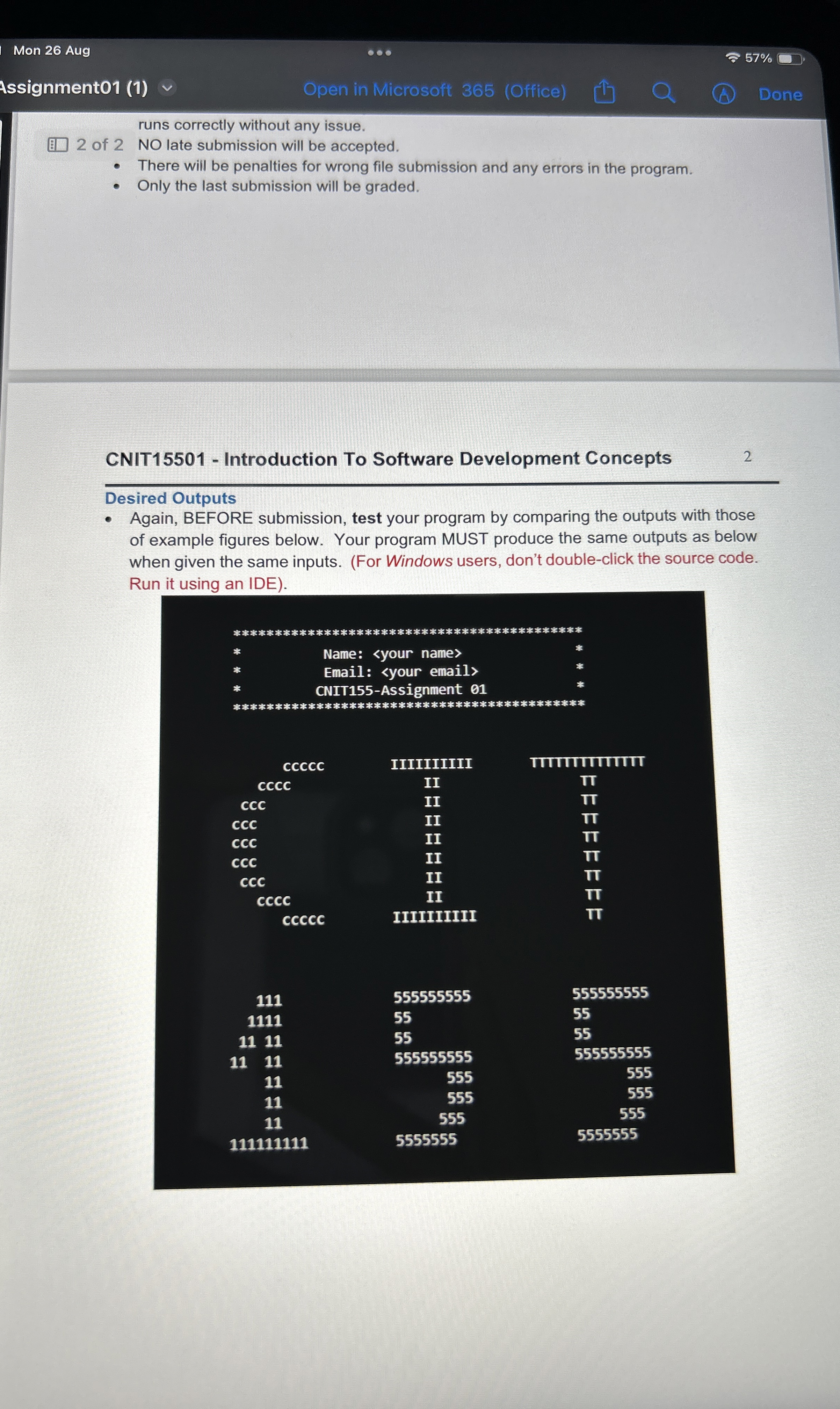
Write a Python program to display the required information See Desired Outputs
Resolve all the build errors if any and ignore the warnings.
Test your program and make sure it produces the desired outputs as Desired Outputs.
Save and close the program.
Submission
Submit the source code py file on Brightspace.
BEFORE submission, test your program by comparing the outputs with those of example figures below Desired Outputs
AFTER submission, download your submission and test your program whether if it runs correctly without any issue.
NO late submission will be accepted.
There will be penalties for wrong file submission and any errors in the program.
Only the last submission will be graded.
CNIT Introduction To Software Development Concepts
Again, BEFORE submission, test your program by comparing the outputs with those
Desired Outputs of example figures below. Your program MUST produce the same outputs as below when given the same inputs. For Windows users, don't doubleclick the source code. Run it using an IDE
Name:
Ema:
CNITAssignment
Mon Aug
Assignment
Open in Microsoft Office
Done
runs correctly without any issue.
of NO late submission will be accepted.
There will be penalties for wrong file submission and any errors in the program.
Only the last submission will be graded.
CNIT Introduction To Software Development Concepts
Desired Outputs
Again, BEFORE submission, test your program by comparing the outputs with those of example figures below. Your program MUST produce the same outputs as below when given the same inputs. For Windows users, don't doubleclick the source code. Run it using an IDE
tableName:
Step by Step Solution
There are 3 Steps involved in it
1 Expert Approved Answer
Step: 1 Unlock

Question Has Been Solved by an Expert!
Get step-by-step solutions from verified subject matter experts
Step: 2 Unlock
Step: 3 Unlock
 Study Help