







Question: Instructions: Use the provided Live Script for your lab write - up . Just like for all the other lab reports, unless otherwise specified, include
Instructions: Use the provided Live Script for your lab writeup Just like for all the other lab reports,
unless otherwise specified, include in your lab report all Mfiles, figures, MATLAB input commands, the
corresponding output, and the answers to the questions.
a Modify the function exwitheqs to solve the IVP for t using the MATLAB
routine ode Call the new function LABex
Let tY note the upper case Y be the output of ode and y and v the unknown functions.
Use the following commands to define the ODE:
function dYdtfty
yY; vY;
dYdtv;sintvy;
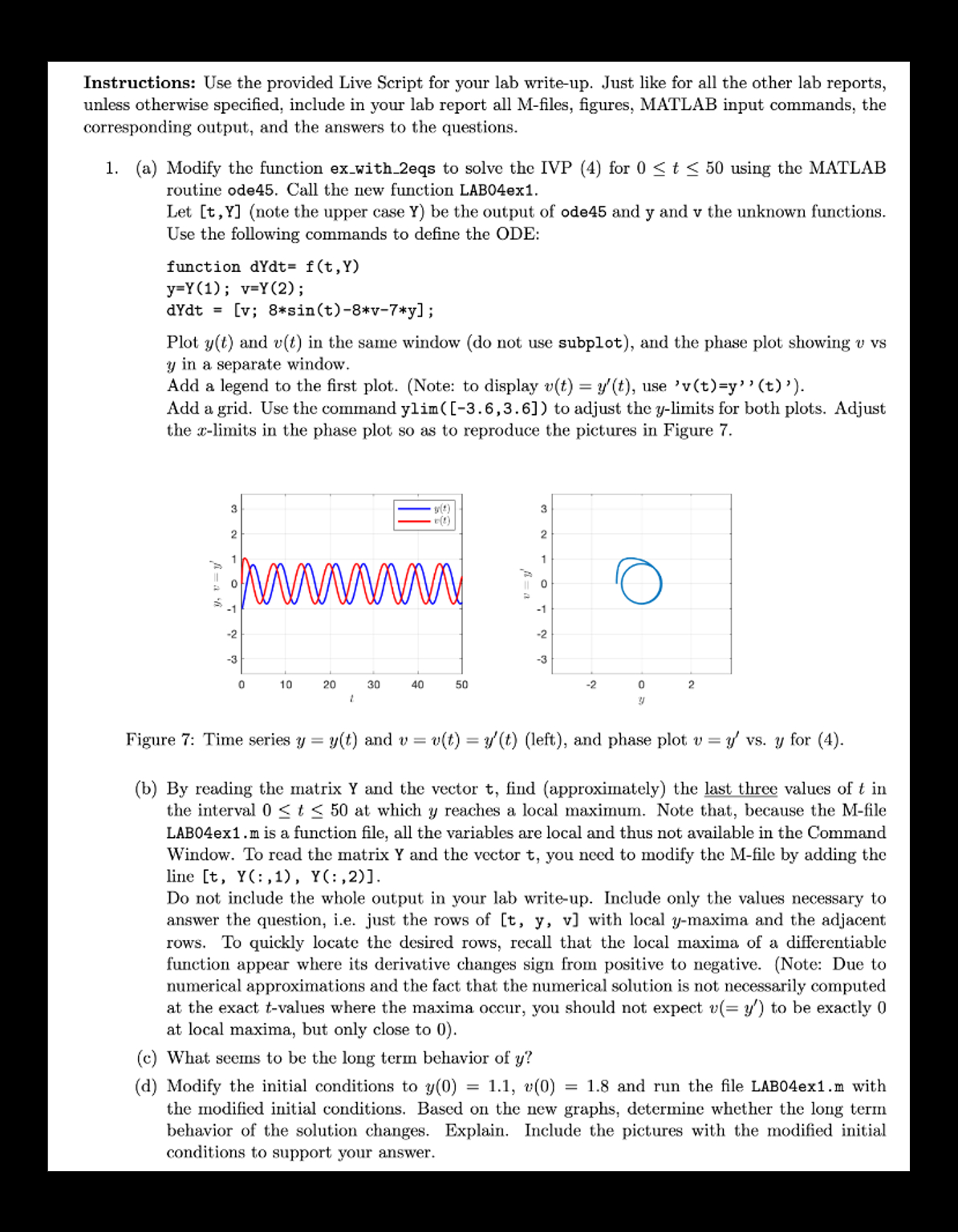
Plot yt and vt in the same window do not use subplot and the phase plot showing v vs
yvtyt use v ty t to adjust the ylimits for both plots. Adjust
the xlimits in the phase plot so as to reproduce the pictures in Figure
Figure : Time series yyt and vvtytleft and phase plot vy vs y for
b By reading the matrix Y and the vector t find approximately the last three values of t in
the interval t at which y reaches a local maximum. Note that, because the Mfile
LABex m is a function file, all the variables are local and thus not available in the Command
Window. To read the matrix Y and the vector t you need to modify the M file by adding the
line tY:Y:yv ytvalues where the maxima occur, you should not expect vy to be exactly
at local maxima, but only close to y
d Modify the initial conditions to yv and run the file LABexm with
the modified initial conditions. Based on the new graphs, determine whether the long term
behavior of the solution changes. Explain. Include the pictures with the modified initial
conditions to support your answer.
exwithparam
function exwithparam
t; tf ; y;
a ;
ty ode@fttfya;
dispy numstrtend numstryend
displength of y numstrlengthy
end
function dydt ftya
dydt ayexptexpt;
end
exwitheqs
t; tf ; y;;
a ; b ; c ; d ;
ty ode@fttfyabcd;
u y:; u y:; y in output has columns corresponding to u and u
figure;
subplot; plottub; ylabelu;
subplot; plotturo; ylabelu;
figure
plotuu; axis square; xlabelu; ylabelu; plot the phase plot
function dydt ftyabcd
u y; u y;
dydt aubuu ; cuduu;
end
Step by Step Solution
There are 3 Steps involved in it
1 Expert Approved Answer
Step: 1 Unlock

Question Has Been Solved by an Expert!
Get step-by-step solutions from verified subject matter experts
Step: 2 Unlock
Step: 3 Unlock
 Study Help