







Question: Intelx86 assembly language program .386 .model flat .code start PROC ; this is a comment - code starts here ; this is a comment -
.386
.model flat
.code
start PROC
; this is a comment - code starts here
; this is a comment - code ends here
ret
start endp
end start
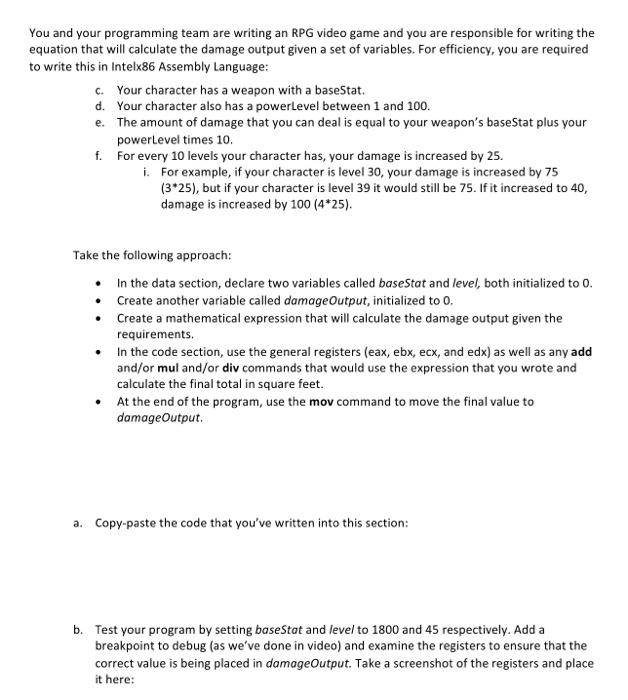
u and your programming team are writing an RPG video game and you are responsible for writing the quation that will calculate the damage output given a set of variables. For efficiency, you are required write this in Intelx86 Assembly Language: c. Your character has a weapon with a baseStat. d. Your character also has a powerLevel between 1 and 100. e. The amount of damage that you can deal is equal to your weapon's baseStat plus your powertevel times 10 . f. For every 10 levels your character has, your damage is increased by 25 . i. For example, if your character is level 30 , your damage is increased by 75 (325), but if your character is level 39 it would still be 75 . If it increased to 40 , damage is increased by 100(425). Take the following approach: - In the data section, declare two variables called basestat and level, both initialized to 0 . - Create another variable called damageOutput, initialized to 0 , - Create a mathematical expression that will calculate the damage output given the requirements. - In the code section, use the general registers (eax, ebx, ecx, and edx) as well as any add and/or mul and/or div commands that would use the expression that you wrote and calculate the final total in square feet. - At the end of the program, use the mov command to move the final value to damageOutput. a. Copy-paste the code that you've written into this section: b. Test your program by setting baseStat and level to 1800 and 45 respectively. Add a breakpoint to debug (as we've done in video) and examine the registers to ensure that the correct value is being placed in damageOutput. Take a screenshot of the registers and place it here
Step by Step Solution
There are 3 Steps involved in it

Get step-by-step solutions from verified subject matter experts
 Study Help