







Question: Your Task is to make the ASSEMBLY CODE necessary to BUBBLE_SORT the given ARRAYS from the assignment. DO NOT COPY ANSWERS FROM SOMEWHERE ELSE! YOU
Your Task is to make the ASSEMBLY CODE necessary to BUBBLE_SORT the given ARRAYS from the assignment. DO NOT COPY ANSWERS FROM SOMEWHERE ELSE! YOU WILL BE REPORTED!
Provide the Assembly Code and explaination!
THIS IS USING AN MSP430 CHIPSET!
THIS SHOULD BE TYPED AND/OR PLEASE BE READABLE!
THANK YOU!
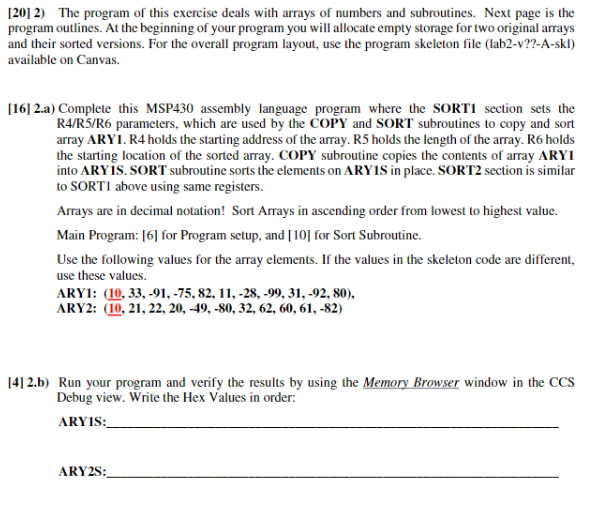
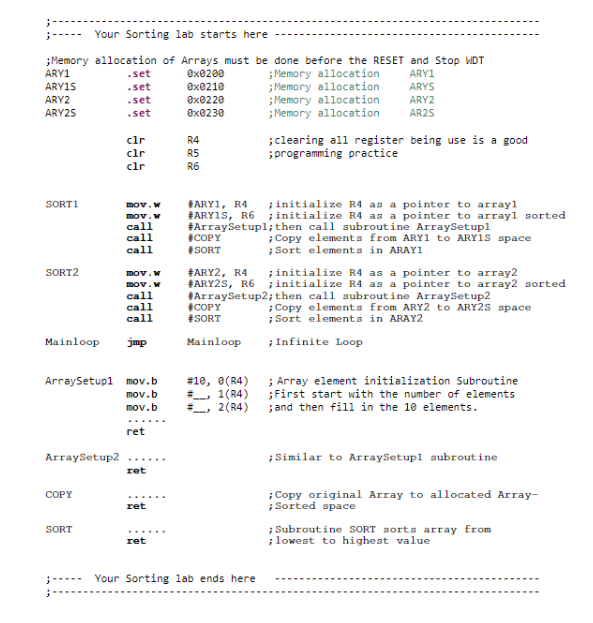
[20] 2) The program of this exercise deals with arrays of numbers and subroutines. Next page is the program outlines. At the beginning of your program you will allocate empty storage for two original arrays and their sorted versions. For the overall program layout, use the program skeleton file (lab2-v??-A-skl) available on Canvas. [16] 2.a) Complete this MSP430 assembly language program where the SORT1 section sets the R4/R5/R6 parameters, which are used by the COPY and SORT subroutines to copy and sort array ARY1. R4 holds the starting address of the array. R5 holds the length of the array. R6 holds the starting location of the sorted array. COPY subroutine copies the contents of array ARY1 into ARYS. SORT subroutine sorts the elements on ARY1S in place. SORT2 section is similar to SORTI above using same registers. Arrays are in decimal notation! Sort Arrays in ascending order from lowest to highest value. Main Program: [6] for Program setup, and [10] for Sort Subroutine. Use the following values for the array elements. If the values in the skeleton code are different, use these values. ARY1: (10, 33, -91, -75, 82, 11, -28,-99, 31,-92, 80), ARY2: (10, 21, 22, 20, -49,-80, 32, 62, 60, 61, -82) [4] 2.b) Run your program and verify the results by using the Memory Browser window in the CCS Debug view. Write the Hex Values in order: ARYIS: ARY2S: Your Sorting lab starts here ; Memory allocation of Arrays must be done before the RESET and Stop WDT ARY1 .set exe200 ; Memory allocation ARY1 ARY15 .set exe210 ; Memory allocation ARYS ARY2 .set exe220 ; Memory allocation ARY2 ARY25 .Set ex@230 ; Memory allocation AR25 cir R4 ;clearing all register being use is a good clr R5 ; programming practice clr R6 SORT1 mov. mov. call call call SORT2 mov. mov.W call call call #ARY1, R4 initialize R4 as a pointer to array1 #ARYAS, R6 initialize R4 as a pointer to arrayl sorted #Array Setupl;then call subroutine ArraySetupl COPY Copy elements from ARY1 to Arvis space SORT ; Sort elements in ARAY1 #ARY2, R4 initialize R4 as a pointer to array2 #ARY2S, R6 initialize R4 as a pointer to array2 sorted #ArraySetup2; then call subroutine ArraySetup2 #COPY ; Copy elements from ARY2 to ARY2s space #SORT Sort elements in ARAY2 Mainloop Infinite Loop Mainloop jmp ArraySetupl mov.b .b #10, (R4) ; Array element initialization Subroutine __. 1(R4) ;First start with the number of elements 2(R4) and then fill in the 1e elements. mov.b ret ArraySetup2 ; Similar to ArraySetupl subroutine ret COPY ret Copy original Array to allocated Array- Sorted space ; Subroutine SORT sorts array from lowest to highest value SORT ret Your Sorting lab ends here [20] 2) The program of this exercise deals with arrays of numbers and subroutines. Next page is the program outlines. At the beginning of your program you will allocate empty storage for two original arrays and their sorted versions. For the overall program layout, use the program skeleton file (lab2-v??-A-skl) available on Canvas. [16] 2.a) Complete this MSP430 assembly language program where the SORT1 section sets the R4/R5/R6 parameters, which are used by the COPY and SORT subroutines to copy and sort array ARY1. R4 holds the starting address of the array. R5 holds the length of the array. R6 holds the starting location of the sorted array. COPY subroutine copies the contents of array ARY1 into ARYS. SORT subroutine sorts the elements on ARY1S in place. SORT2 section is similar to SORTI above using same registers. Arrays are in decimal notation! Sort Arrays in ascending order from lowest to highest value. Main Program: [6] for Program setup, and [10] for Sort Subroutine. Use the following values for the array elements. If the values in the skeleton code are different, use these values. ARY1: (10, 33, -91, -75, 82, 11, -28,-99, 31,-92, 80), ARY2: (10, 21, 22, 20, -49,-80, 32, 62, 60, 61, -82) [4] 2.b) Run your program and verify the results by using the Memory Browser window in the CCS Debug view. Write the Hex Values in order: ARYIS: ARY2S: Your Sorting lab starts here ; Memory allocation of Arrays must be done before the RESET and Stop WDT ARY1 .set exe200 ; Memory allocation ARY1 ARY15 .set exe210 ; Memory allocation ARYS ARY2 .set exe220 ; Memory allocation ARY2 ARY25 .Set ex@230 ; Memory allocation AR25 cir R4 ;clearing all register being use is a good clr R5 ; programming practice clr R6 SORT1 mov. mov. call call call SORT2 mov. mov.W call call call #ARY1, R4 initialize R4 as a pointer to array1 #ARYAS, R6 initialize R4 as a pointer to arrayl sorted #Array Setupl;then call subroutine ArraySetupl COPY Copy elements from ARY1 to Arvis space SORT ; Sort elements in ARAY1 #ARY2, R4 initialize R4 as a pointer to array2 #ARY2S, R6 initialize R4 as a pointer to array2 sorted #ArraySetup2; then call subroutine ArraySetup2 #COPY ; Copy elements from ARY2 to ARY2s space #SORT Sort elements in ARAY2 Mainloop Infinite Loop Mainloop jmp ArraySetupl mov.b .b #10, (R4) ; Array element initialization Subroutine __. 1(R4) ;First start with the number of elements 2(R4) and then fill in the 1e elements. mov.b ret ArraySetup2 ; Similar to ArraySetupl subroutine ret COPY ret Copy original Array to allocated Array- Sorted space ; Subroutine SORT sorts array from lowest to highest value SORT ret Your Sorting lab ends here
Step by Step Solution
There are 3 Steps involved in it

Get step-by-step solutions from verified subject matter experts
 Study Help