







Question: IntList.java : public interface IntList { public void add(int value); public String toString(); public int size(); public int get(int index); public int indexOf(int value); public
 IntList.java :
public interface IntList { public void add(int value); public String toString(); public int size(); public int get(int index); public int indexOf(int value); public void add(int index, int value); public void remove(int index); public boolean equals(Object object); public void insertList(int index, LinkedIntList list); }
Node.java :
class Node { public int data; public Node next; }
LinkedIntListTest.java :
import static org.junit.Assert.assertEquals; import org.junit.AfterClass; import org.junit.BeforeClass; import org.junit.Test; public class LinkedIntListTest { // @Test(expected = IllegalStateException.class) // public void testIllegalStateExceptionIsThrown() { // LinkedIntList tester = new LinkedIntList(); // for (int x = 0; x
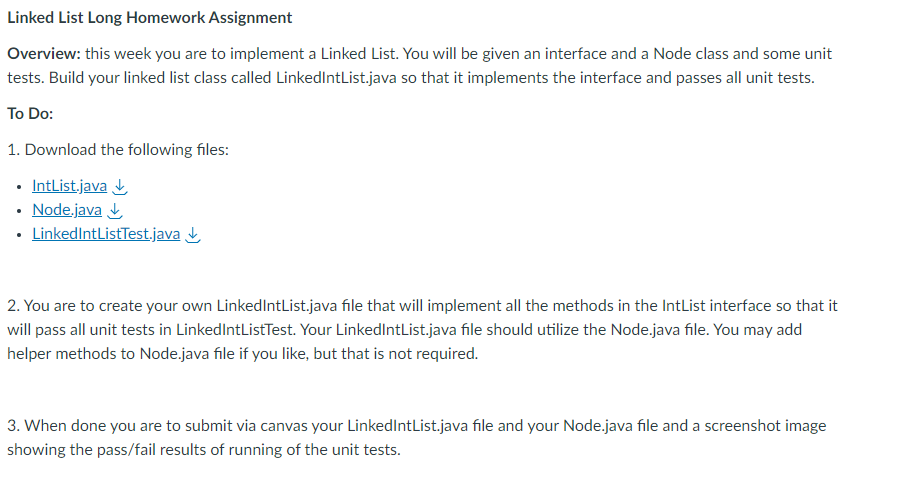
Linked List Long Homework Assignment Overview: this week you are to implement a Linked List. You will be given an interface and a Node class and some unit tests. Build your linked list class called LinkedlntList.java so that it implements the interface and passes all unit tests. To Do: 1. Download the following files: - IntList.java - Node.java - LinkedlntListTest.java 2. You are to create your own LinkedlntList.java file that will implement all the methods in the IntList interface so that it will pass all unit tests in LinkedlntListTest. Your LinkedlntList.java file should utilize the Node.java file. You may add helper methods to Node.java file if you like, but that is not required. 3. When done you are to submit via canvas your LinkedlntList.java file and your Node.java file and a screenshot image showing the pass/fail results of running of the unit tests
Step by Step Solution
There are 3 Steps involved in it

Get step-by-step solutions from verified subject matter experts
 Study Help