







Question: Intro to Microprocessers Lab Using MSP420 Microprocesser Launchpad The program of this exercise deals with arrays of numbers and subroutines. At the beginning of your
Intro to Microprocessers Lab
Using MSP420 Microprocesser Launchpad
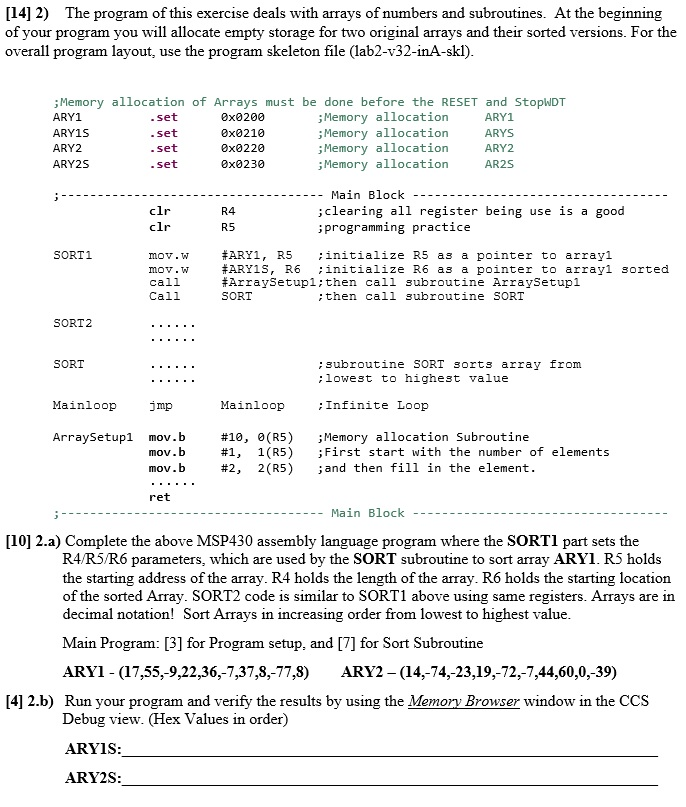
The program of this exercise deals with arrays of numbers and subroutines. At the beginning of your program you will allocate empty storage for two original arrays and their sorted versions. For the overall program layout, use the program skeleton file (lab2-v32-inA-skl). a) Complete the above MSP430 assembly language program where the SORT1 part sets the R4/R5/R6 parameters, which are used by the SORT subroutine to sort array ARY1. R5 holds the starting address of the array. R4 holds the length of the array. R6 holds the starting location of the sorted Array. SORT2 code is similar to SORT1 above using same registers. Arrays are in decimal notation! Sort Arrays in increasing order from lowest to highest value. Main Program: [3] for Program setup, and [7] for Sort Subroutine ARY1 - (17, 55, -9, 22, 36, -7, 37, 8, -77, 8) ARY2 - (14, -74, -23, 19, -72, -7, 44, 60, 0, -39) b) Run your program and verify the results by using the Memory Browser window in the CCS Debug view. (Hex Values in order)
Step by Step Solution
There are 3 Steps involved in it

Get step-by-step solutions from verified subject matter experts
 Study Help