







Question: Intro to Python: Implementing the Sensor Dictionary and List, and Applying a Filter I'm supposed to implement a menu that runs the function below. This
Intro to Python: Implementing the Sensor Dictionary and List, and Applying a Filter
I'm supposed to implement a menu that runs the function below.
This class is quite difficult for me despite it being intro OOP. The below program should be implelented with the instructions below.
Understand the Application
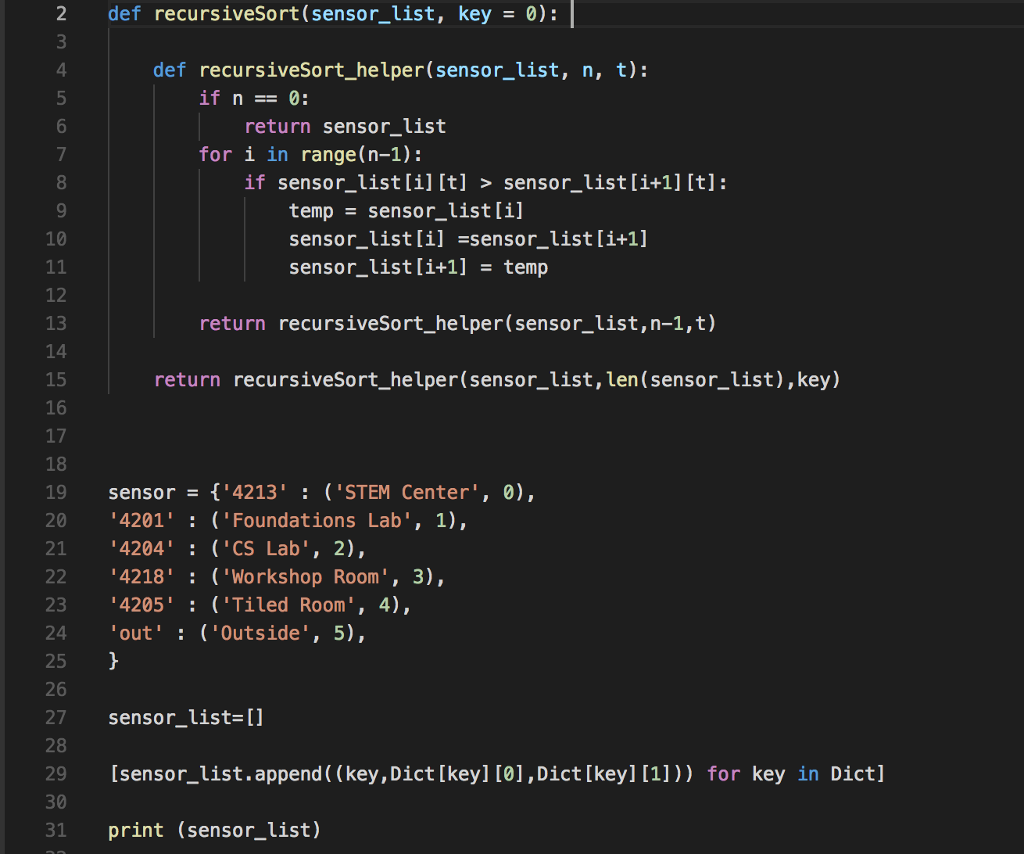
First of all, make sure your sensors dictionary, your routine to load the sensor list, and your recursiveSort() function are all brought in to your project (this is separate; i have these programs). The recursiveSort() function definition should be at the top of your program with your other function definitions. The other items should come just before the while loop that runs the menu. This is important because we want the scope of the variables to be local at the module level. If we instantiate them higher in the program, they will implicitly be global as they are accessible to the functions.
Have your program run the sort routine on the sensor list before the while loop that handles the menu - we only need to sort once. We want our sort to be on the room number.
Next we will implement menu item number 3 from the menu.
Eventually our program will display summary data from all the sensors in the STEM Center. We want to be able to restrict this to one room, or a group of rooms.
Right after you create sensor_list, create another list called filter_list, a list of ints that indicates which filters are active. From the start we want to include all the filters, so our list should be [0,1,2,3,4,5]. BUT - you should not hard code this or use a for loop with range(). What if we want to add another sensor, or use another group of sensors entirely? We want to be able to make that change in one place only. So load the list of ints from your sensors dictionary. The cool kids will use a list comprehension, but a for loop is fine (you can all be cool kids now, because you can just refer to the instructor solution from the last assignment to see how the list comprehension works).
Now we need a function that will print the list of filters, and note which ones are currently active. We will call this function printFilter(). printFilter should take two arguments, sensor_list and filter_list. It doesn't return anything since its sole job is to print to the screen.
Here's some sample output, assuming that all but filter 4204 (sensor 2) is active:
4201: Foundations Lab [ACTIVE] 4204: CS Lab 4205: Tiled Room [ACTIVE] 4213: STEM Center [ACTIVE] 4218: Workshop Room [ACTIVE] Out: Outside [ACTIVE]
This is a good time to do some testing to make sure you have this much working. No sense going on to the next step if this one isn't done!
Next we need to create a function called changeFilter(). changeFilter() should take three required arguments: sensors, sensor_list and filter_list. It returns nothing. Why does it return nothing, don't we need to know which filters are active in other parts of the program? Please discuss in the forums.
changeFilter() will repeatedly print the (filtered) sensor list and ask the user to enter one of the sensors to add to or remove from the filter list. The user can also enter x to exit. If the user enters an invalid sensor, the user gets an error message (see the sample run) but the loop continues. The function should be updating filter_list as the user adds or removes filters.
Finally, update the main menu so that it correctly calls changeFilter().
Here's a sample run of the complete program:
STEM Center Temperature Project Eric Reed Main Menu --------- 1 - Process a new data file 2 - Choose units 3 - Edit room filter 4 - Show summary statistics 5 - Show temperature by date and time 6 - Show histogram of temperatures 7 - Quit What is your choice? 3 4201: Foundations Lab [ACTIVE] 4204: CS Lab [ACTIVE] 4205: Tiled Room [ACTIVE] 4213: STEM Center [ACTIVE] 4218: Workshop Room [ACTIVE] Out: Outside [ACTIVE] Type the sensor number to toggle (e.g.4201) or x to end 4201 4201: Foundations Lab 4204: CS Lab [ACTIVE] 4205: Tiled Room [ACTIVE] 4213: STEM Center [ACTIVE] 4218: Workshop Room [ACTIVE] Out: Outside [ACTIVE] Type the sensor number to toggle (e.g.4201) or x to end 4205 4201: Foundations Lab 4204: CS Lab [ACTIVE] 4205: Tiled Room 4213: STEM Center [ACTIVE] 4218: Workshop Room [ACTIVE] Out: Outside [ACTIVE] Type the sensor number to toggle (e.g.4201) or x to end 4205 4201: Foundations Lab 4204: CS Lab [ACTIVE] 4205: Tiled Room [ACTIVE] 4213: STEM Center [ACTIVE] 4218: Workshop Room [ACTIVE] Out: Outside [ACTIVE] Type the sensor number to toggle (e.g.4201) or x to end 400 Invalid Sensor 4201: Foundations Lab 4204: CS Lab [ACTIVE] 4205: Tiled Room [ACTIVE] 4213: STEM Center [ACTIVE] 4218: Workshop Room [ACTIVE] Out: Outside [ACTIVE] Type the sensor number to toggle (e.g.4201) or x to end x Main Menu --------- 1 - Process a new data file 2 - Choose units 3 - Edit room filter 4 - Show summary statistics 5 - Show temperature by date and time 6 - Show histogram of temperatures 7 - Quit What is your choice?
Grading:
correct integration of the recursive function and associated variables
correct implementation of printFilterList()
correct implementation of changeFilter()
accurate run, including sufficient testing of cases
correct placement of function definitions (at the top of the program) and local variables (after all the function definitions)
correct formatting
updated docstring
*two* uses of list comprehension (sensor_list and filter_list)
2 def recursiveSort(sensor_list, key 0): 4 def recursiveSort_helper(sensor_list, n, t): 6 return sensor_list for i in range(n-1): if sensor listli][t] > sensor_list[i+1] [t]: temp sensor_list[i] sensor_listl1 sensor_LISt L1FI sensor_listli+1]temp 10 12 return recursiveSort_helper(sensor_list,n-1,t) 14 15 16 return recursiveSort_helper(sensor_list,len (sensor_list), key) 18 19 sensor 4213' 'STEM Center, 0), 20 4201': ('Foundations Lab', 1), 21 4204: ('CS Lab', 2), 22 4218' ('Workshop Room, 3), 23 4205: ('Tiled Room', 4), 4 out': ('Outside', 5), 25 27 sensor_list-[] 28 29 [sensor_list.append ( (key, Dict [keyl [0],Dict[key] [1])) for key in Dictl 30 31 print (sensor_list) 2 def recursiveSort(sensor_list, key 0): 4 def recursiveSort_helper(sensor_list, n, t): 6 return sensor_list for i in range(n-1): if sensor listli][t] > sensor_list[i+1] [t]: temp sensor_list[i] sensor_listl1 sensor_LISt L1FI sensor_listli+1]temp 10 12 return recursiveSort_helper(sensor_list,n-1,t) 14 15 16 return recursiveSort_helper(sensor_list,len (sensor_list), key) 18 19 sensor 4213' 'STEM Center, 0), 20 4201': ('Foundations Lab', 1), 21 4204: ('CS Lab', 2), 22 4218' ('Workshop Room, 3), 23 4205: ('Tiled Room', 4), 4 out': ('Outside', 5), 25 27 sensor_list-[] 28 29 [sensor_list.append ( (key, Dict [keyl [0],Dict[key] [1])) for key in Dictl 30 31 print (sensor_list)
Step by Step Solution
There are 3 Steps involved in it

Get step-by-step solutions from verified subject matter experts
 Study Help