







Question: Using C++ load text data file students.txt containing the data for a few students and build the students vector above. You must use std::ifstream for
Using C++
load text data file students.txt containing the data for a few students and build the students vector above. You must use std::ifstream for reading text file. Here's example of how to do it: #include #include #include
int main () { std::ifstream file("input.txt"); std::string str; while (std::getline(file, str)) { std::cout
1) For each student in the vector use toString() method to print the student info. 2) Compute the average for each student and then print student info using method toString() 3) Computer the average mark for each course. For example for course "Math for programmers" 2 students have taken this course, so find the average of the marks for the 2 and print it. 4) Do the same as 2 for course "Intro to Python". Then for anyone who has taken "Intro to Python" increase the mark by 5% and print the mark and the student name after the increase. Print the average mark for this course after the increase. 5) For each course, use method getLetterGrade() to print a table for each course, containing name of student and letter grade for each student who has taken the course. This means you must print 5 tables for the 5 different courses in the data file.
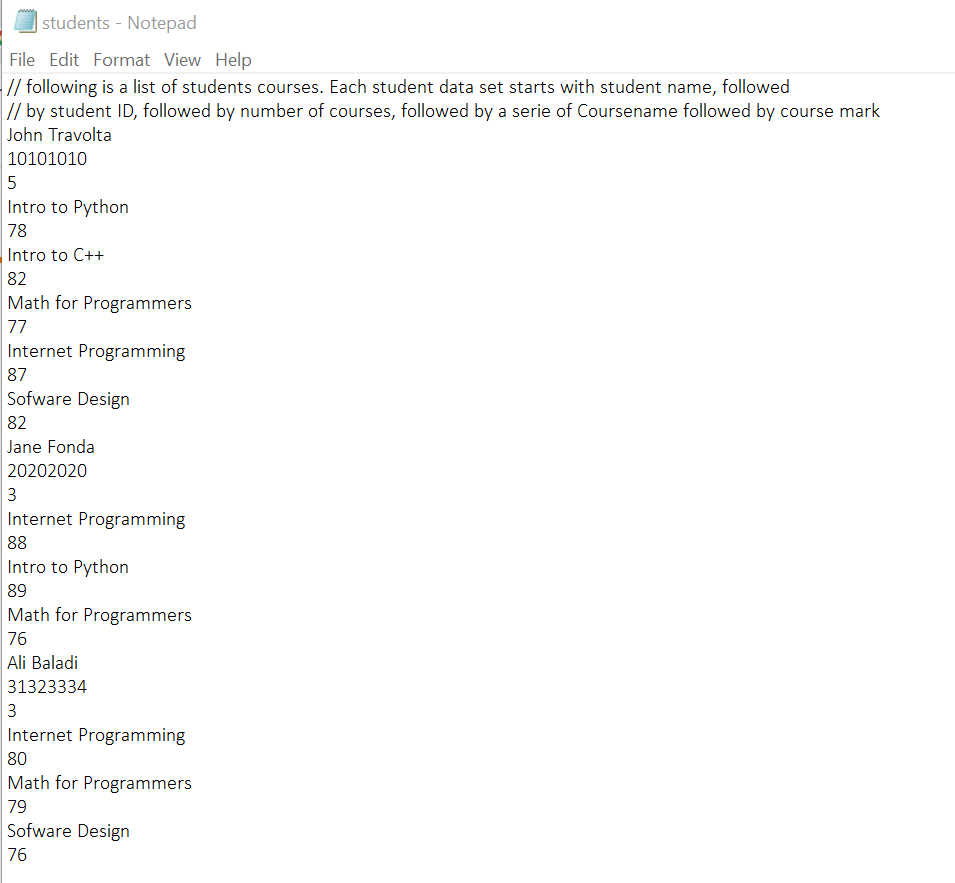
students - Notepad File Edit Format View Help // following is a list of students courses. Each student data set starts with student name, followed // by student ID, followed by number of courses, followed by a serie of Coursename followed by course mark John Travolta 10101010 5 Intro to Python 78 Intro to C++ 82 Math for Programmers 77 Internet Programming 87 Sofware Design 82 Jane Fonda 20202020 3 Internet Programming 88 Intro to Python 89 Math for Programmers 76 Ali Baladi 31323334 3 Internet Programming 80 Math for Programmers 79 Sofware Design 76
Step by Step Solution
There are 3 Steps involved in it

Get step-by-step solutions from verified subject matter experts
 Study Help