







Question: Introduction to Pythons ipaddress module using jupyter notebook. need help with steps 1-15 IPv6 addresses and networks in Python 3 In [9]: W # import
Introduction to Pythons "ipaddress" module using jupyter notebook. need help with steps 1-15
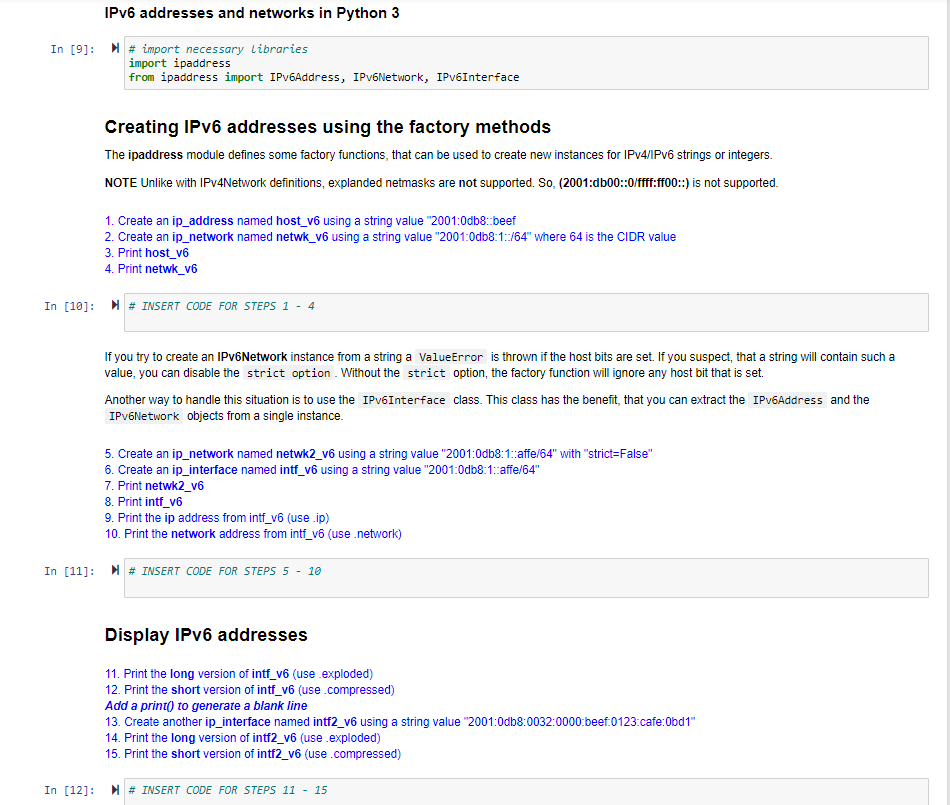
IPv6 addresses and networks in Python 3 In [9]: W # import necessary Libraries import ipaddress from ipaddress import IPV6Address, IPV6Network, IPV6Interface Creating IPv6 addresses using the factory methods The ipaddress module defines some factory functions, that can be used to create new instances for IPV4/IPV6 strings or integers. NOTE Unlike with IPv4Network definitions, explanded netmasks are not supported. So, (2001:db00::0/ffff:ff00::) is not supported. 1. Create an ip_address named host_v6 using a string value "2001:0db8:beef 2. Create an ip_network named netwk_v6 using a string value "2001:0db8:1:/64" where 64 is the CIDR value 3. Print host_v6 4. Print netwk_v6 In [10]: M # INSERT CODE FOR STEPS 1 - 4 If you try to create an IPv6Network instance from a string a ValueError is thrown if the host bits are set. If you suspect, that a string will contain such a value, you can disable the strict option . Without the strict option, the factory function will ignore any host bit that is set. Another way to handle this situation is to use the IPV6Interface class. This class has the benefit, that you can extract the IPV6Address and the IPV6Network objects from a single instance 5. Create an ip_network named netwk2_v6 using a string value "2001:0db8:1::affe/64" with "strict=False" 6. Create an ip_interface named intf_v6 using a string value "2001:0db8:1:affe/64" 7. Print netwk2_v6 8. Print intf_v6 9. Print the ip address from intf_v6 (use .ip) 10. Print the network address from intf_v6 (use .network) In [11]: W # INSERT CODE FOR STEPS 5 - 10 Display IPv6 addresses 11. Print the long version of intf_v6 (use .exploded) 12. Print the short version of intf_v6 (use .compressed) Add a print() to generate a blank line 13. Create another ip_interface named intf2_v6 using a string value "2001:0db8:0032:0000 beef:0123:cafe:0bd1" 14. Print the long version of intf2_v6 (use .exploded) 15. Print the short version of intf2_v6 (use .compressed) In [12]: M # INSERT CODE FOR STEPS 11 - 15
Step by Step Solution
There are 3 Steps involved in it

Get step-by-step solutions from verified subject matter experts
 Study Help