







Question: isk: Create a project called RandomMedian_FirstName_LastName or b6_FirstName_LastName. Remember to include comments summarizing the program. 1. Declare a Scanner that accepts input from the keyboard.
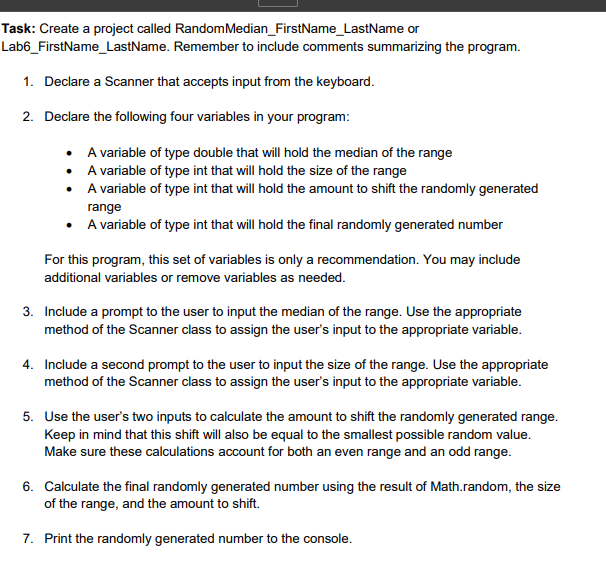
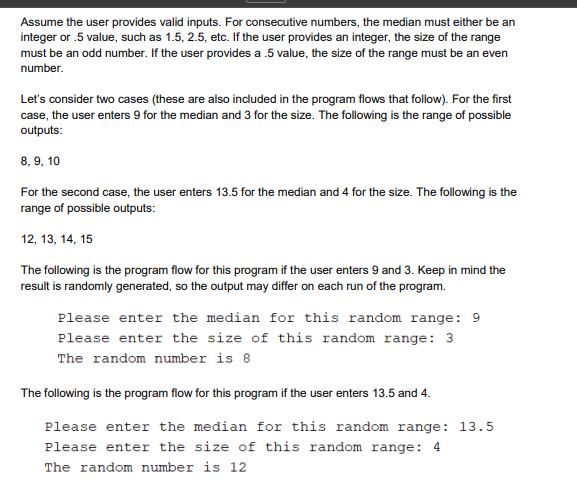
isk: Create a project called RandomMedian_FirstName_LastName or b6_FirstName_LastName. Remember to include comments summarizing the program. 1. Declare a Scanner that accepts input from the keyboard. 2. Declare the following four variables in your program: - A variable of type double that will hold the median of the range - A variable of type int that will hold the size of the range - A variable of type int that will hold the amount to shift the randomly generated range - A variable of type int that will hold the final randomly generated number For this program, this set of variables is only a recommendation. You may include additional variables or remove variables as needed. 3. Include a prompt to the user to input the median of the range. Use the appropriate method of the Scanner class to assign the user's input to the appropriate variable. 4. Include a second prompt to the user to input the size of the range. Use the appropriate method of the Scanner class to assign the user's input to the appropriate variable. 5. Use the user's two inputs to calculate the amount to shift the randomly generated range. Keep in mind that this shift will also be equal to the smallest possible random value. Make sure these calculations account for both an even range and an odd range. 6. Calculate the final randomly generated number using the result of Math.random, the size of the range, and the amount to shift. 7. Print the randomly generated number to the console. Assume the user provides valid inputs. For consecutive numbers, the median must either be an integer or .5 value, such as 1.5,2.5, etc. If the user provides an integer, the size of the range must be an odd number. If the user provides a .5 value, the size of the range must be an even number. Let's consider two cases (these are also included in the program flows that follow). For the first case, the user enters 9 for the median and 3 for the size. The following is the range of possible outputs: 8,9,10 For the second case, the user enters 13.5 for the median and 4 for the size. The following is the range of possible outputs: 12,13,14,15 The following is the program flow for this program if the user enters 9 and 3 . Keep in mind the result is randomly generated, so the output may differ on each run of the program. Please enter the median for this random range: 9 Please enter the size of this random range: 3 The random number is 8 The following is the program flow for this program if the user enters 13.5 and 4 . Please enter the median for this random range: 13.5 Please enter the size of this random range: 4 The random number is 12
Step by Step Solution
There are 3 Steps involved in it

Get step-by-step solutions from verified subject matter experts
 Study Help