







Question: PROJECI DESCRIPIION Perform various unit tests in Java using Junit testing. Software unit tests help the developer to verify that the logic of a piece
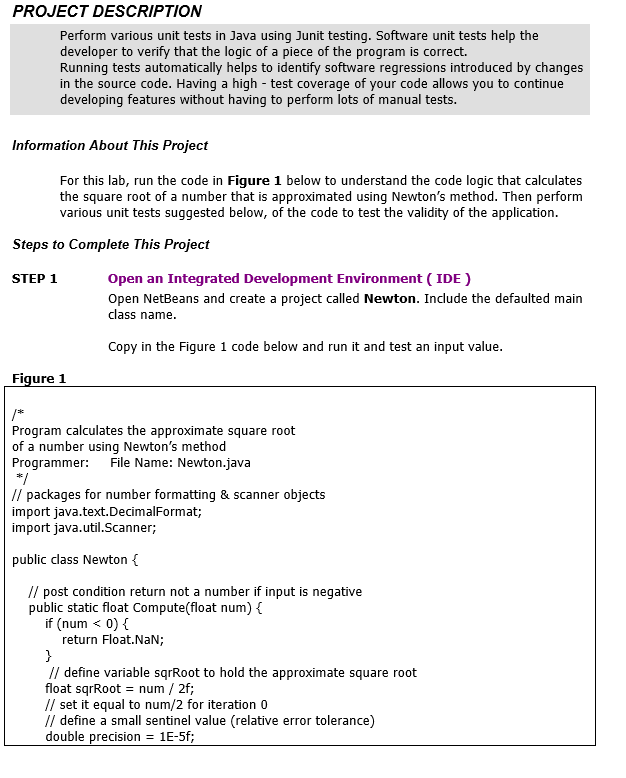
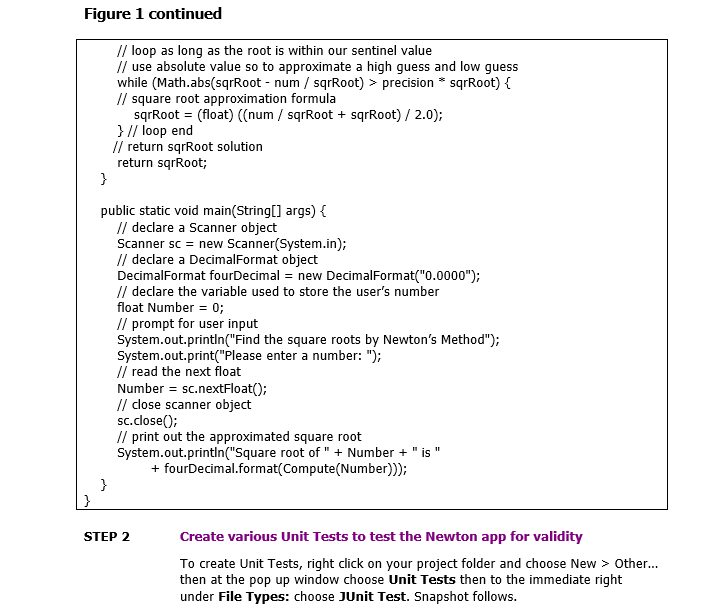
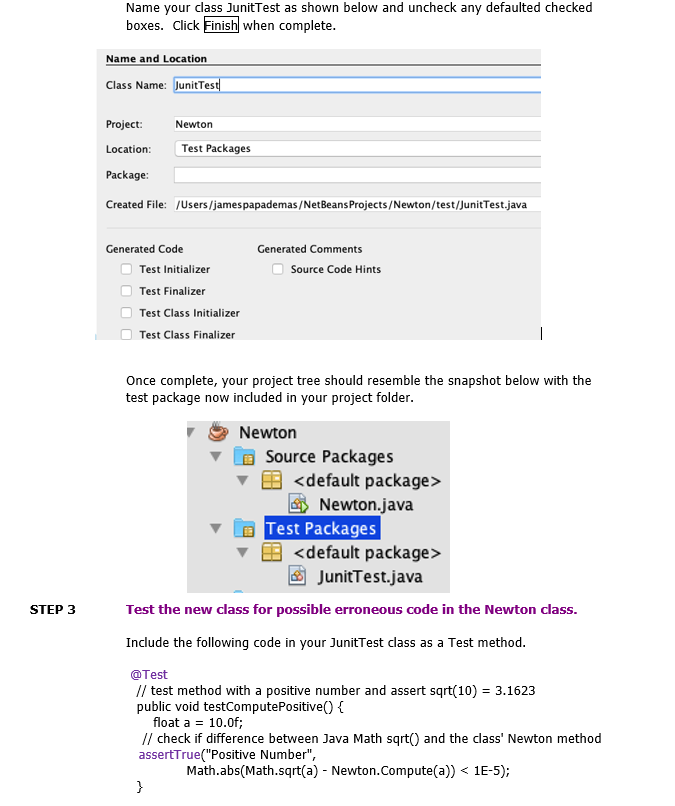
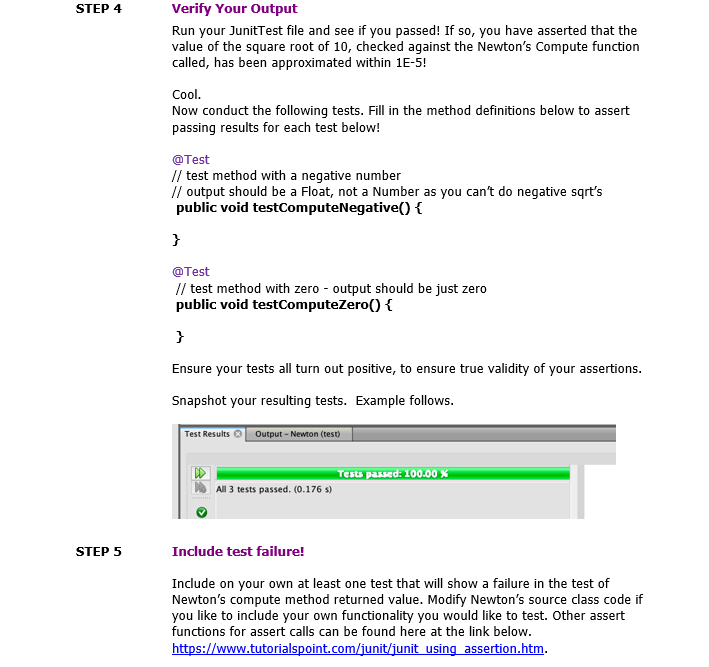
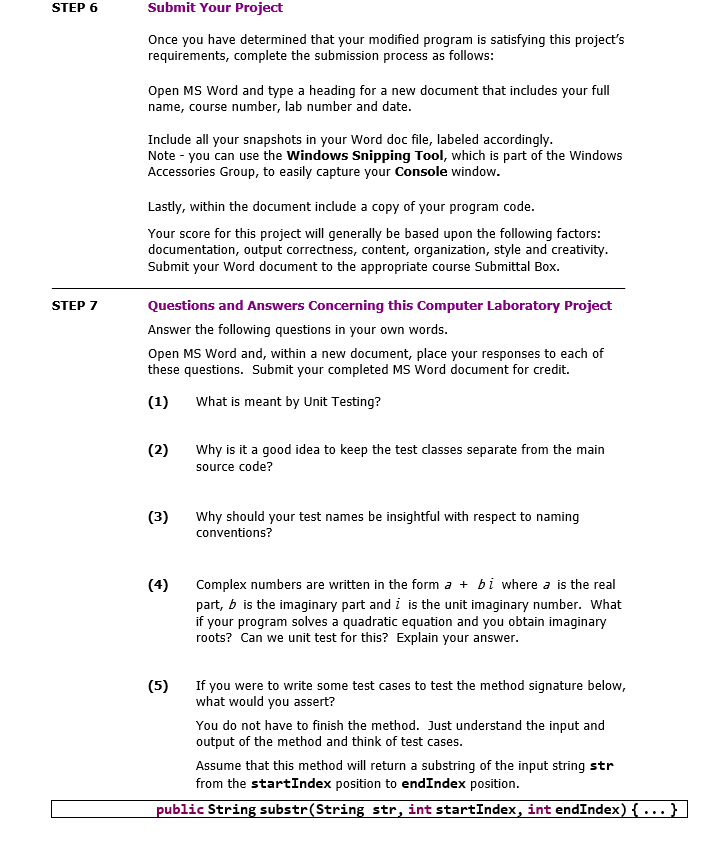
PROJECI DESCRIPIION Perform various unit tests in Java using Junit testing. Software unit tests help the developer to verify that the logic of a piece of the program is correct. Running tests automatically helps to identify software regressions introduced by changes in the source code. Having a high - test coverage of your code allows you to continue developing features without having to perform lots of manual tests. Information About This Project For this lab, run the code in Figure 1 below to understand the code logic that calculates the square root of a number that is approximated using Newton's method. Then perform various unit tests suggested below, of the code to test the validity of the application. Steps to Complete This Project STEP 1 Open an Integrated Development Environment (IDE ) Open NetBeans and create a project called Newton. Include the defaulted main class name. Copy in the Figure 1 code below and run it and test an input value. Figure 1 / Program calculates the approximate square root of a number using Newton's method Programmer: File Name: Newton.java / // packages for number formatting \& scanner objects import java.text.DecimalFormat; import java.util.Scanner; public class Newton \{ // post condition return not a number if input is negative public static float Compute(float num) \{ if ( num precision * sqrRoot) \{ // square root approximation formula sqrRoot = (float )(( num / sqrRoot + sqrRoot )/2.0); \} // loop end // return sqrRoot solution return sqrRoot; \} public static void main(String[] args) \{ // declare a Scanner object Scanner sc = new Scanner(System.in); // declare a DecimalFormat object DecimalFormat fourDecimal = new DecimalFormat ( " 0.0000); // declare the variable used to store the user's number float Number =0; // prompt for user input System.out.println("Find the square roots by Newton's Method"); System.out.print("Please enter a number: "); // read the next float Number = sc.nextFloat(); // close scanner object sc.close(); // print out the approximated square root System.out.println("Square root of " + Number + " is " + fourDecimal.format(Compute(Number))); \} STEP 2 Create various Unit Tests to test the Newton app for validity To create Unit Tests, right click on your project folder and choose New > Other... then at the pop up window choose Unit Tests then to the immediate right under File Types: choose JUnit Test. Snapshot follows. Name your class JunitTest as shown below and uncheck any defaulted checked boxes. Click Finish when complete. Name and Location Class Name: JunitTest Project: Newton Location: Test Packages Package: Created File: /Users/jamespapademas/NetBeansProjects/Newton/test/JunitTest.java Generated Code Generated Comments Test Initializer Source Code Hints Test Finalizer Test Class Initializer Test Class Finalizer Once complete, your project tree should resemble the snapshot below with the test package now included in your project folder. Test the new class for possible erroneous code in the Newton class. Include the following code in your JunitTest class as a Test method. @Test // test method with a positive number and assert sqrt(10)=3.1623 public void testComputePositive() \{ float a=10.0f; // check if difference between Java Math sqrt() and the class' Newton method assertTrue("Positive Number", Math.abs(Math.sqrt(a) - Newton.Compute(a)) precision * sqrRoot) \{ // square root approximation formula sqrRoot = (float )(( num / sqrRoot + sqrRoot )/2.0); \} // loop end // return sqrRoot solution return sqrRoot; \} public static void main(String[] args) \{ // declare a Scanner object Scanner sc = new Scanner(System.in); // declare a DecimalFormat object DecimalFormat fourDecimal = new DecimalFormat ( " 0.0000); // declare the variable used to store the user's number float Number =0; // prompt for user input System.out.println("Find the square roots by Newton's Method"); System.out.print("Please enter a number: "); // read the next float Number = sc.nextFloat(); // close scanner object sc.close(); // print out the approximated square root System.out.println("Square root of " + Number + " is " + fourDecimal.format(Compute(Number))); \} STEP 2 Create various Unit Tests to test the Newton app for validity To create Unit Tests, right click on your project folder and choose New > Other... then at the pop up window choose Unit Tests then to the immediate right under File Types: choose JUnit Test. Snapshot follows. Name your class JunitTest as shown below and uncheck any defaulted checked boxes. Click Finish when complete. Name and Location Class Name: JunitTest Project: Newton Location: Test Packages Package: Created File: /Users/jamespapademas/NetBeansProjects/Newton/test/JunitTest.java Generated Code Generated Comments Test Initializer Source Code Hints Test Finalizer Test Class Initializer Test Class Finalizer Once complete, your project tree should resemble the snapshot below with the test package now included in your project folder. Test the new class for possible erroneous code in the Newton class. Include the following code in your JunitTest class as a Test method. @Test // test method with a positive number and assert sqrt(10)=3.1623 public void testComputePositive() \{ float a=10.0f; // check if difference between Java Math sqrt() and the class' Newton method assertTrue("Positive Number", Math.abs(Math.sqrt(a) - Newton.Compute(a))
Step by Step Solution
There are 3 Steps involved in it

Get step-by-step solutions from verified subject matter experts
 Study Help