







Question: IT - 1 4 5 Module 5 - 4 Milestone: Menu Loop and Monkey Intake Overview: Nearly every Java application involves multiple classes. As you
IT Module Milestone: Menu Loop and Monkey Intake
Overview: Nearly every Java application involves multiple classes. As you have learned, designing a program around classes and objects is a key feature of objectoriented programming OOP This approach provides many benefits, such as more readable and maintainable code. In describing the relationship between classes and objects, the class is the blueprint on which the object is created. When creating multiple classes, you must make certain that the classes can work together within a program. You must make certain that any relationships, such as inheritance, are properly implemented in the code. You will discover other relationship types for classes. The relationship types are like the individual engine components that perform specific tasks, sometimes handing off information to one another. This action also involves having a main method that runs the program, usually in a special class called the Driver class. The Driver class acts as the entry point for the program. Each Java application can only have one main method.
In this assignment, you will gain experience putting together a multipleclass program by creating a class that inherits from another existing class. You will also modify or implement methods in the Driver class. Inheritance is a powerful tool in programming. Inheritance allows one class to use code found in a parent class without duplicating the parents code. This milestone will also allow you to begin coding a part of the solution for Project Two. You can get feedback on your work before you complete the full project in Module Seven.
Directions:
Review the Grazioso Salvare Specification Document in the Supporting Materials section to understand your clients requirements. As you read, pay close attention to the attributes and methods that you must implement into the program.
Open the Virtual Lab by clicking the link in the Virtual Lab Access module. Then open the Eclipse IDE. Follow the Uploading Files to Eclipse tutorial to help upload the Grazioso.zip folder to Eclipse. Both resources are linked in the Supporting Materials section below. The Grazioso.zip folder contains three starter code files: Driver.java, RescueAnimal.java, and Dog.java. Once you have uploaded the files, compile the code. Although the program is not complete, it should compile without error.
Read through the code for each class that you have been given to understand why the functionality of the overall application has been broken down into multiple classes. Reading through the code will also help you understand what code has been created and what code must be modified or created to meet the requirements.
You have been asked to demonstrate industry standard best practices in all the code that you create to ensure clarity, consistency, and efficiency among all software developers working on the program. Include the following items in your code for each class:
Inline comments that denote your changes and briefly describe the functionality of each method or element of the class
Commenting code is crucial for several reasons. Commenting code provides humanreadable explanations of the codes functionality. The comments make it easier for other developers or even the original coder to understand and maintain the code after some time. Clear and concise comments act as documentation. Comments offer insights into the logic, purpose, and usage of different sections of the code. Comments become especially valuable in collaborative projects or when handing over code to other developers. Comments can also help identify potential issues, edge cases, or important considerations that help communication between developers. Welldocumented code accelerates the development process and contributes to overall maintainability, which reduces the likelihood of errors and makes code more adaptable to changes and improvements.
Appropriate variable and method naming conventions
This can be a difficult task. Avoid giving your variables and methods overly generic names like number or method Instead, use succinct, meaningful names.
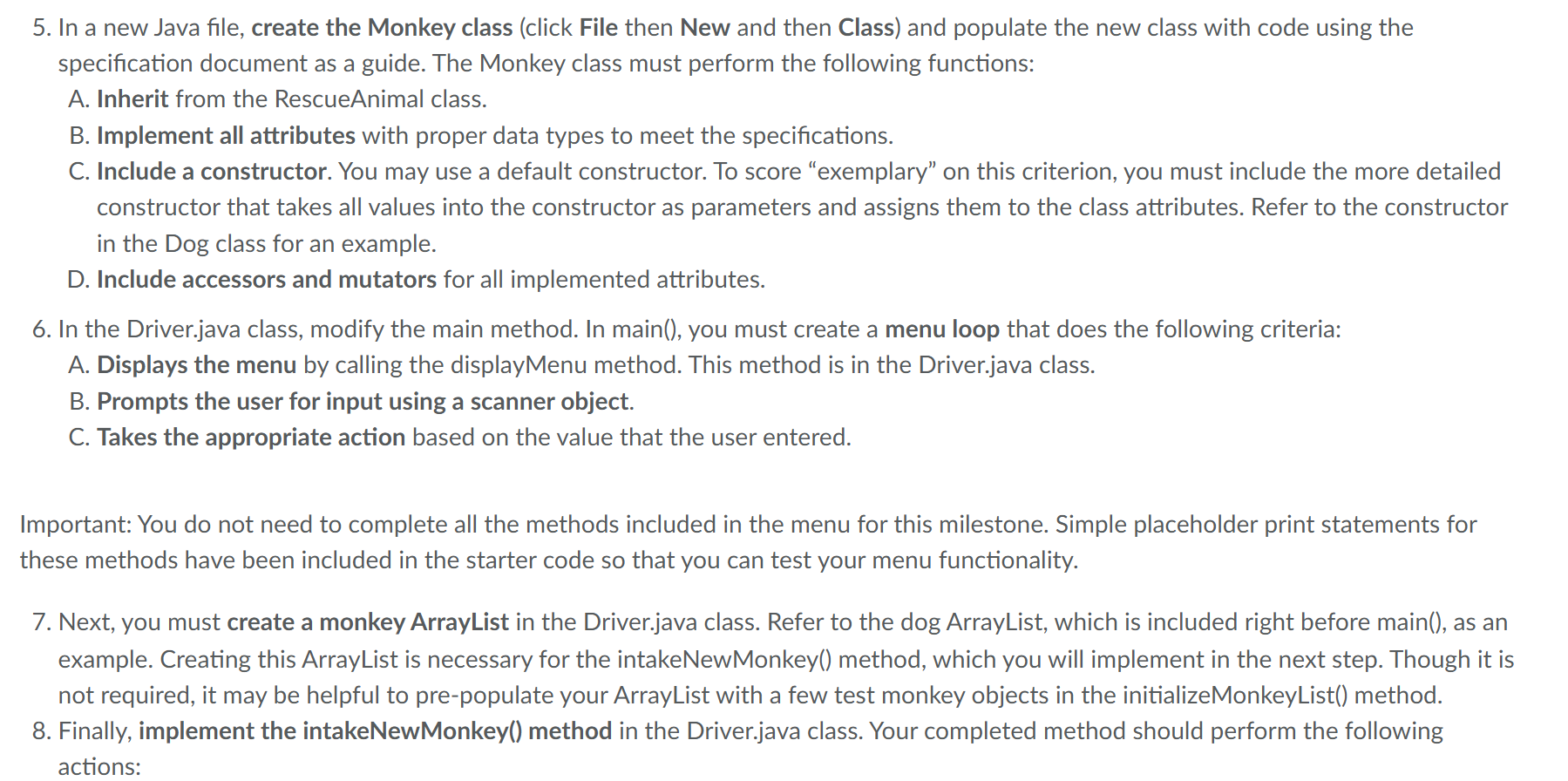
PLease see the photo attachements further details:
Step by Step Solution
There are 3 Steps involved in it
1 Expert Approved Answer
Step: 1 Unlock

Question Has Been Solved by an Expert!
Get step-by-step solutions from verified subject matter experts
Step: 2 Unlock
Step: 3 Unlock
 Study Help