







Question: its a microprocessor course (8086) imagine we have a circuit and DC motor and when want to write the code to do the requirements above
its a microprocessor course (8086)
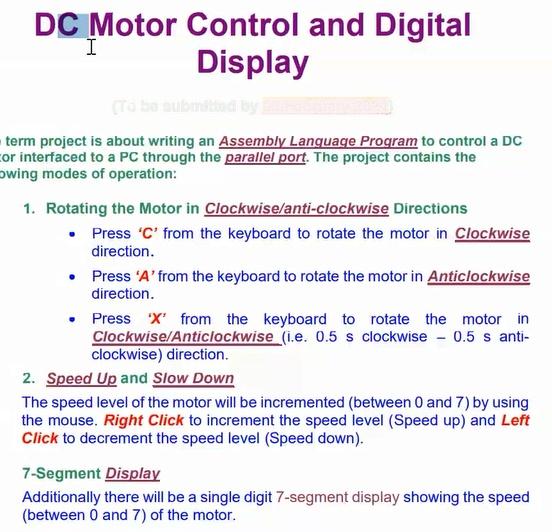
imagine we have a circuit and DC motor and when want to write the code to do the requirements above .
DC Motor Control and Digital Display I term project is about writing an Assembly Language Program to control a DC or interfaced to a PC through the parallel port. The project contains the owing modes of operation: 1. Rotating the Motor in Clockwise/anti-clockwise Directions Press 'C' from the keyboard to rotate the motor in Clockwise direction. Press 'A' from the keyboard to rotate the motor in Anticlockwise direction. Press 'X' from the keyboard to rotate the motor in Clockwise/Anticlockwise (i.e. 0.5 s clockwise - 0.5 s anti- clockwise) direction. 2. Speed Up and Slow Down The speed level of the motor will be incremented (between 0 and 7) by using the mouse. Right Click to increment the speed level (Speed up) and Left Click to decrement the speed level (Speed down). 7-Segment Display Additionally there will be a single digit 7-segment display showing the speed (between 0 and 7) of the motor. DC Motor Control and Digital Display I term project is about writing an Assembly Language Program to control a DC or interfaced to a PC through the parallel port. The project contains the owing modes of operation: 1. Rotating the Motor in Clockwise/anti-clockwise Directions Press 'C' from the keyboard to rotate the motor in Clockwise direction. Press 'A' from the keyboard to rotate the motor in Anticlockwise direction. Press 'X' from the keyboard to rotate the motor in Clockwise/Anticlockwise (i.e. 0.5 s clockwise - 0.5 s anti- clockwise) direction. 2. Speed Up and Slow Down The speed level of the motor will be incremented (between 0 and 7) by using the mouse. Right Click to increment the speed level (Speed up) and Left Click to decrement the speed level (Speed down). 7-Segment Display Additionally there will be a single digit 7-segment display showing the speed (between 0 and 7) of the motor
Step by Step Solution
There are 3 Steps involved in it

Get step-by-step solutions from verified subject matter experts
 Study Help