







Question: | J K M N P R Oct NON Jun 358 20 349 10 Aug 299 | 45 Sep 320 20 678 21 Dec 765
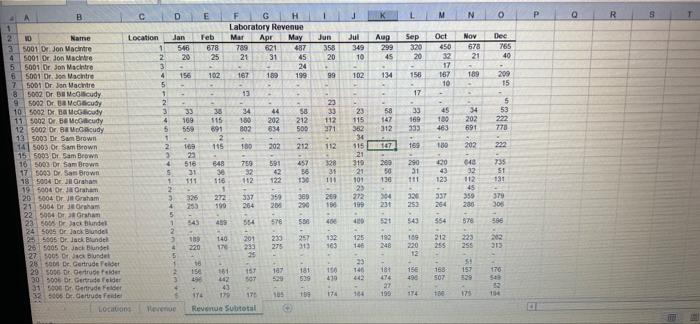
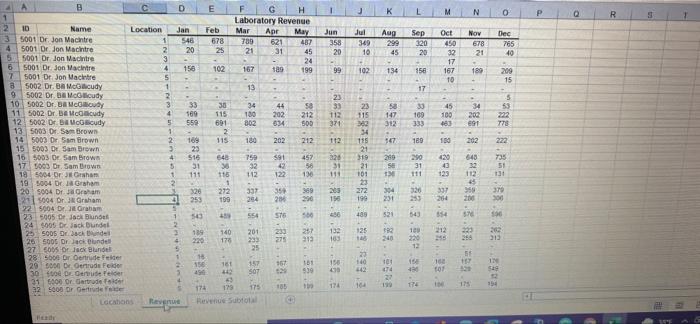
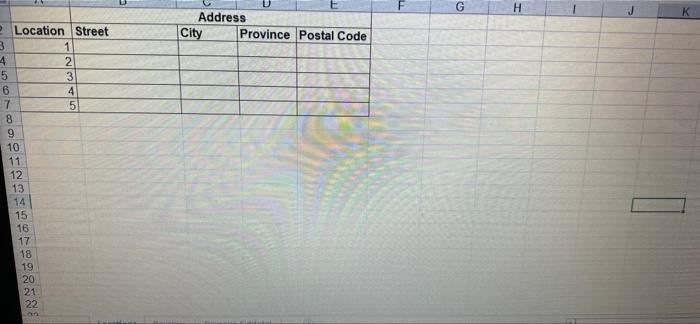
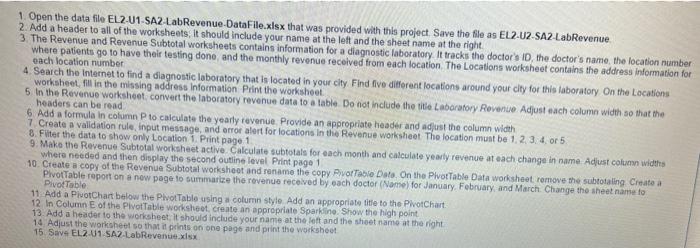
| J K M N P R Oct NON Jun 358 20 349 10 Aug 299 | 45 Sep 320 20 678 21 Dec 765 40 99 102 134 189 200 15 17 23 33 112 971 5 53 222 778 115 202 312 , 112 222 A B E D E H Laboratory Revenue 2 Name Location Jan Feb Mar App May 5001 Dr. Jon Macintre 546 678 789 P1 487 4 5001 Dr Jon Machine 2 20 25 21 31 45 5 5001 Dr Jon Macinto 3 24 5001 Dr.Jon Macintre 4 156 102 167 159 199 7 5001 Dr. Jon Macintre 5 8 5002 Dr. McGloudy 1 13 9 5002 Dracudy 2 10. PR92 IS HD HISE cally 3 38 34 12.92 : echarly 169 180 202 212 12 5002 Dr Budy 5 559 891 802 634 505 13 5003 Dr Sam Brown 1 2 14 5003 Or Sam Brown 2 115 100 202 212 | 19 500 Dr. F#Dr 3 1. Anna gram 4 516 540 759 591 457 175009 D. San Brown 31 32 56 181 5004 Darahan 1 111 110 112 122 | 2 9 20 5004 Br J Graham 326 337 350 36 21 2004 Dr Jura 4 255 999 204 201 290 22 1. Ira 5 3. Ance hung 576 508 24 5095 Or Jack Bundet 15095 Or Jack Blundel 140 201 230 257 29|| .on. c Bundel 220 275 313 275005 Bundet 28 25 Dr. Gertrude Sir petryer Fader 154 161 151 181 305096 Dr. Gertrude folder 539 31 50 Derde Feder 43 32 500 Dr. Gertrude de 171 LOCO Nevenue Revenue Subtotal 310 , 200 128 31 111 51 , .... 32255% ........ 3,5,,,, : 9s: 5 ,E'S ,, .,...ww.mm 100 272 199 269 190 379 306 400 400 554 :HE'S 396 125 132 E 192 248 22 313 145 176 54 419 474 TP4 164 195 K L M N P R Sep Jun 358 20 Jul 369 10 Aug 299 45 Oct 450 32 17 167 TO Ang EPS 21 Dec 765 40 99 102 134 189 209 15 17 $ 34 sa 147 32 45 103 112 222 EST 112 115 507 150 202 A B D EF G H Laboratory Revenue 2 Name Location Jan Feb Mar Apr 5001 Dr Jon Macintre May 546 678 621 487 5001 Dr. Jon Macintre 2 20 25 5 31 45 5001 Dr Jon Madintre 3 24 5001 Dr. Jon Macintre 4 156 102 199 T 5001 Dr Jon Macintre 5 5002 Dr. Ba Milicudy 1 9 5002 Dr McGcudy 10 2002 Dr.Blen C., 33 11 5002 Dr. Beccy 4 569 115 202 212 12 5002 Dr. Buciudy 559 601 13 Ep3533" Brow 1 2 14 5003 Dr Sam Brown 169 115 202 212 | 3D, Heign 23 1 ,AI 4 516 591 457 17 1003 Dr. Sam Brown 5 31 30 42 18 5004 Orhan 111 116 122 1 14 OF JUAN 40 64 Dr. Jess 326 272 35 989 25004 Dr. Graham 41 255 199 200 22 5004 Dr Graham 23 5005 Jack Blunt 576 24 S006 Dr. Jack Dunde Back 19 140 247 26 Sos Or Blundell 220 178 212 7-10 or lack Blundel 285609 Dr Oedeelte 29 Dr. Gertruds Feide 15 161 157 30 Dr. Gertrude Peider 939 21 000 Or Gertrude folder 22 [] 174 173 105 Locations Revenue Revenue Sub 648 280 SE TA ? ; B,,,,,, Agggg 2,,, , : 8: 129 ,,,, *39*8.8.8. 112 , ,,n=,=, 394 231 P 337 264 521 212 2. 240 012 140 11 0 Ste 11 T4 27 190 175 G H K Address City Province Postal Code Location Street 3 1 4 2 5 3 6 4 7 5 8 9 10 11 12 13 14 15 16 17 18 19 20 21 22 1. Open the data file EL 2.01-SA2 LabRevenue DataFile.xlsx that was provided with this project. Save the file as EL2-U2-SA2 LabRevenue 2. Add a header to all of the worksheets. It should include your name at the left and the sheet name at the right 3. The Revenue and Revenue Subtotal worksheets contains information for a diagnostic laboratory. It tracks the doctor's ID, the doctor's name, the location number where patients go to have their testing done and the monthly revenue received from each location. The Locations worksheet contains the address information for each location number 4. Search the Internet to find a diagnostic laboratory that is located in your city Find five different locations around your city for this laboratory on the Locations worksheet, fill in the missing address Information Print the worksheet 5. In the Revenue worksheet convert the laboratory revenue data to a table Do not include the title Laboratory Revenue Adjust each column width so that the headers can be read 6 Add a formula in column P to calculate the yearly revenue Provide an appropriate header and adjust the column width 7 Create a validation rule, input message, and error alert for locations in the Revenue worksheet The location must be 1.2.3.4 or 5 8. Filter the data to show only Location 1. Print page 1 9. Make the Revenue Subtotal worksheet active Calculate subtotals for each month and calculate yearly revenue at each change in name. Adjust column widths where needed and then display the second outline level Print page 1 10. Create a copy of the Revenue Subtotal worksheet and rename the copy Pivot Table Date. On the Plvot Table Data worksheet remove the subtotaling Create a PlvotTable report on a new page to summarize the revenue received by each doctor (Name) for January February, and March Change the sheet name to Pivot Table 11 Add a PivotChart below the Pivot Table using a column style Add an appropriate title to the PivotChart 12 In Column of the Pivot Table worksheet create an appropriate Sparkline. Show the high point 13. Add a header to the worksheet. It should include your name at the left and the sheet name at the right 14 Adjust the worksheet so that it prints on one page and print the worksheet 15 Save EL2-01 SA2 LabRevenue.xlsx | J K M N P R Oct NON Jun 358 20 349 10 Aug 299 | 45 Sep 320 20 678 21 Dec 765 40 99 102 134 189 200 15 17 23 33 112 971 5 53 222 778 115 202 312 , 112 222 A B E D E H Laboratory Revenue 2 Name Location Jan Feb Mar App May 5001 Dr. Jon Macintre 546 678 789 P1 487 4 5001 Dr Jon Machine 2 20 25 21 31 45 5 5001 Dr Jon Macinto 3 24 5001 Dr.Jon Macintre 4 156 102 167 159 199 7 5001 Dr. Jon Macintre 5 8 5002 Dr. McGloudy 1 13 9 5002 Dracudy 2 10. PR92 IS HD HISE cally 3 38 34 12.92 : echarly 169 180 202 212 12 5002 Dr Budy 5 559 891 802 634 505 13 5003 Dr Sam Brown 1 2 14 5003 Or Sam Brown 2 115 100 202 212 | 19 500 Dr. F#Dr 3 1. Anna gram 4 516 540 759 591 457 175009 D. San Brown 31 32 56 181 5004 Darahan 1 111 110 112 122 | 2 9 20 5004 Br J Graham 326 337 350 36 21 2004 Dr Jura 4 255 999 204 201 290 22 1. Ira 5 3. Ance hung 576 508 24 5095 Or Jack Bundet 15095 Or Jack Blundel 140 201 230 257 29|| .on. c Bundel 220 275 313 275005 Bundet 28 25 Dr. Gertrude Sir petryer Fader 154 161 151 181 305096 Dr. Gertrude folder 539 31 50 Derde Feder 43 32 500 Dr. Gertrude de 171 LOCO Nevenue Revenue Subtotal 310 , 200 128 31 111 51 , .... 32255% ........ 3,5,,,, : 9s: 5 ,E'S ,, .,...ww.mm 100 272 199 269 190 379 306 400 400 554 :HE'S 396 125 132 E 192 248 22 313 145 176 54 419 474 TP4 164 195 K L M N P R Sep Jun 358 20 Jul 369 10 Aug 299 45 Oct 450 32 17 167 TO Ang EPS 21 Dec 765 40 99 102 134 189 209 15 17 $ 34 sa 147 32 45 103 112 222 EST 112 115 507 150 202 A B D EF G H Laboratory Revenue 2 Name Location Jan Feb Mar Apr 5001 Dr Jon Macintre May 546 678 621 487 5001 Dr. Jon Macintre 2 20 25 5 31 45 5001 Dr Jon Madintre 3 24 5001 Dr. Jon Macintre 4 156 102 199 T 5001 Dr Jon Macintre 5 5002 Dr. Ba Milicudy 1 9 5002 Dr McGcudy 10 2002 Dr.Blen C., 33 11 5002 Dr. Beccy 4 569 115 202 212 12 5002 Dr. Buciudy 559 601 13 Ep3533" Brow 1 2 14 5003 Dr Sam Brown 169 115 202 212 | 3D, Heign 23 1 ,AI 4 516 591 457 17 1003 Dr. Sam Brown 5 31 30 42 18 5004 Orhan 111 116 122 1 14 OF JUAN 40 64 Dr. Jess 326 272 35 989 25004 Dr. Graham 41 255 199 200 22 5004 Dr Graham 23 5005 Jack Blunt 576 24 S006 Dr. Jack Dunde Back 19 140 247 26 Sos Or Blundell 220 178 212 7-10 or lack Blundel 285609 Dr Oedeelte 29 Dr. Gertruds Feide 15 161 157 30 Dr. Gertrude Peider 939 21 000 Or Gertrude folder 22 [] 174 173 105 Locations Revenue Revenue Sub 648 280 SE TA ? ; B,,,,,, Agggg 2,,, , : 8: 129 ,,,, *39*8.8.8. 112 , ,,n=,=, 394 231 P 337 264 521 212 2. 240 012 140 11 0 Ste 11 T4 27 190 175 G H K Address City Province Postal Code Location Street 3 1 4 2 5 3 6 4 7 5 8 9 10 11 12 13 14 15 16 17 18 19 20 21 22 1. Open the data file EL 2.01-SA2 LabRevenue DataFile.xlsx that was provided with this project. Save the file as EL2-U2-SA2 LabRevenue 2. Add a header to all of the worksheets. It should include your name at the left and the sheet name at the right 3. The Revenue and Revenue Subtotal worksheets contains information for a diagnostic laboratory. It tracks the doctor's ID, the doctor's name, the location number where patients go to have their testing done and the monthly revenue received from each location. The Locations worksheet contains the address information for each location number 4. Search the Internet to find a diagnostic laboratory that is located in your city Find five different locations around your city for this laboratory on the Locations worksheet, fill in the missing address Information Print the worksheet 5. In the Revenue worksheet convert the laboratory revenue data to a table Do not include the title Laboratory Revenue Adjust each column width so that the headers can be read 6 Add a formula in column P to calculate the yearly revenue Provide an appropriate header and adjust the column width 7 Create a validation rule, input message, and error alert for locations in the Revenue worksheet The location must be 1.2.3.4 or 5 8. Filter the data to show only Location 1. Print page 1 9. Make the Revenue Subtotal worksheet active Calculate subtotals for each month and calculate yearly revenue at each change in name. Adjust column widths where needed and then display the second outline level Print page 1 10. Create a copy of the Revenue Subtotal worksheet and rename the copy Pivot Table Date. On the Plvot Table Data worksheet remove the subtotaling Create a PlvotTable report on a new page to summarize the revenue received by each doctor (Name) for January February, and March Change the sheet name to Pivot Table 11 Add a PivotChart below the Pivot Table using a column style Add an appropriate title to the PivotChart 12 In Column of the Pivot Table worksheet create an appropriate Sparkline. Show the high point 13. Add a header to the worksheet. It should include your name at the left and the sheet name at the right 14 Adjust the worksheet so that it prints on one page and print the worksheet 15 Save EL2-01 SA2 LabRevenue.xlsx
Step by Step Solution
There are 3 Steps involved in it

Get step-by-step solutions from verified subject matter experts
 Study Help