







Question: Java Assignment using netbeans Requirements One class, one file . Don't create multiple classes in the same .java file. Don't use static variables and methods
Java Assignment using netbeans
Requirements
One class, one file. Don't create multiple classes in the same .java file.
Don't use static variables and methods
Encapsulation: make sure you protect your class variables and provide access to them through get and set methods
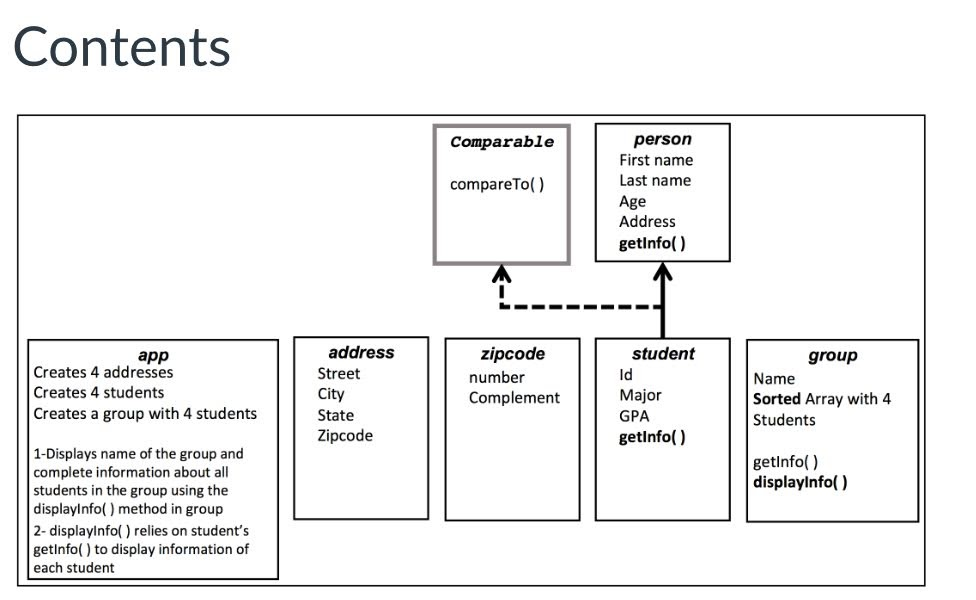
Create 6 classes:
app
address
zipcode
student
group
person
The application app will:
create 4 addresses
create 4 students
create a group with a name and 4 students
Then using the group object that was createddisplay the group information using the group method displayInfo( )
displayInfo( ) uses the method getInfo( ) in the student class
the students will be listed sorted by last name as specified below.
The address class has the following attributes
street (a string with address number and street name)
city
state
zipcode
The zipcode class has the following attributes:
number
complement
The person class has the following
attributes:
first name
last name
age
address
methods
getInfo( ) which returns the complet person information as a String
The student class extends the class person and implements the Comparable interface, and has the following
attributes:
id
major
gpa
methodsgetInfo( ) which returns the complet student information as a String
getInfo( ) overrides getInfo( ) from person
compareTo( )
compareTo( ) overrides compareTo( ) from Comparable
The group class has the following attributes:
name
4 students in an array
the array should be sorted by last name
sort will be done using the sort method available in Java's Arrays (Links to an external site.)Links to an external site. class or in the ArrayList (Links to an external site.)Links to an external site.class, that's why you need to implement the comparable interface in the student class.
methodsgetInfo() which returns a String with the group's name and student's information
getInfo uses the student's method getInfo( ) to retrive each student's information
displayInfo( ) uses a "System.out.println" to display the group name and students information
getAverageGPA() which calculates the average GPA in the group and returns a double number
search(int n) which searches for a student in the group with the id as input parameter and returns a student object. If the student is not found, it returns null
Contents person First name Last name Age Address getlnfo) Comparable compareTo() address Street City State Zipcode zipcode number Complement student Id Major GPA getlnfo) app group Creates 4 addresses Creates 4 students Creates a group with 4 students Name Sorted Array with 4 Students 1-Displays name of the group and complete information about al students in the group using the displaylnfo() method in group 2- displaylnfo) relies on student's getlnfo() to display information of each student getlnfo() displaylnfol()
Step by Step Solution
There are 3 Steps involved in it

Get step-by-step solutions from verified subject matter experts
 Study Help