







Question: Java bank program Please download and use the classes : BankGUI, BankApp public class BankApp { public Bank bank; /** Creates a new instance of
Java bank program
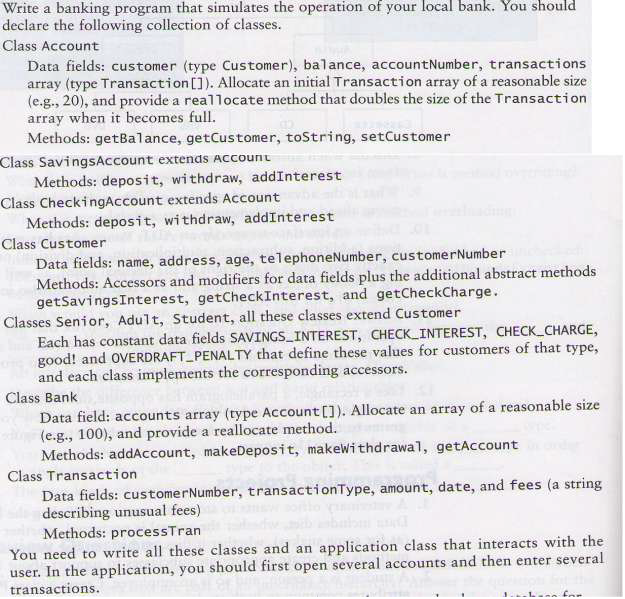
Please download and use the classes : BankGUI, BankApp
public class BankApp {
public Bank bank;
/** Creates a new instance of BankApp */
public BankApp() {
bank = new Bank();
}
/**
* @param args the command line arguments
*/
public static void main(String[] args) {
// TODO code application logic here
BankApp bankApp = new BankApp();
BankGUI gui = new BankGUI();
gui.processCommands(bankApp.bank);
}
}
import javax.swing.*;
/**************************************************************
* This class is an implementation of PDUserInterface
* that uses JOptionPane to display the menu of command choices.
* @author Rafael
*/
public class BankGUI {
/** A reference to the Bank object to be processed.
Globally available to the command-processing methods.
*/
private Bank theBank = null;
// Methods
/** Method to display the command choices and process user
commands.
pre: The bank exists and has accounts.
post: Accounts are updated based on user commands.
@param bank A reference to the Bank
to be processed.
*/
public void processCommands(Bank bank) {
String[] commands = {"Add Account",
"Deposit",
"Withdrawal",
"Check Account",
"Exit"};
theBank = bank;
int choice;
do {
choice = JOptionPane.showOptionDialog(
null, // No parent
"Select action", // Prompt message
"Bank System", // Window title
JOptionPane.YES_NO_CANCEL_OPTION, // Option type
JOptionPane.QUESTION_MESSAGE, // Message type
null, // Icon
commands, // List of commands
commands[commands.length - 1]); // Default choice
switch (choice) {
case 0: doAddAccount(); break;
case 1: doDeposit(); break;
case 2: doWithdrawal(); break;
case 3: doCheckAccount(); break;
case 4: System.exit(0);
}
} while (choice
System.exit(0);
}
/** Method to add an account.
pre: The bank exists and has accounts and customers.
post: A new account is created
*/
private void doAddAccount() {
// Request the name
String customerName = JOptionPane.showInputDialog(
"Enter Customer Name");
if (customerName == null) {
return; // Dialog was cancelled.
}
// Request the address
String customerAddress = JOptionPane.showInputDialog(
"Enter Customer Address");
if (customerAddress == null) {
return; // Dialog was cancelled.
}
// Request the age
String age = JOptionPane.showInputDialog("Enter Customer Age");
if (age == null) {
return; // Dialog was cancelled.
}
int customerAge = Integer.parseInt(age);
// Request the phone number
String customerPhoneNumber = JOptionPane.showInputDialog(
"Enter Customer Phone Number");
if (customerPhoneNumber == null) {
return; // Dialog was cancelled.
}
//Request type of customer
String[] custType = {"Senior", "Adult", "Student", "Cancel"};
int choice;
choice = JOptionPane.showOptionDialog(
null, // No parent
"Select customer type", // Prompt message
"Bank System", // Window title
JOptionPane.YES_NO_CANCEL_OPTION, // Option type
JOptionPane.QUESTION_MESSAGE, // Message type
null, // Icon
custType, // List of commands
custType[custType.length - 1]); // Default choice
if (choice == custType.length - 1){
return; //Dialog was cancelled.
}
int customerType = choice;
//Request type of account
String[] commands = {"Savings", "Checking", "Cancel"};
choice = JOptionPane.showOptionDialog(
null, // No parent
"Select account type", // Prompt message
"Bank System", // Window title
JOptionPane.YES_NO_CANCEL_OPTION, // Option type
JOptionPane.QUESTION_MESSAGE, // Message type
null, // Icon
commands, // List of commands
commands[commands.length - 1]); // Default choice
if (choice == commands.length - 1){
return; //Dialog was cancelled.
}
String theNumber = theBank.addAccount(customerName,
customerAddress, customerAge,
customerPhoneNumber, customerType, choice);
String message = null;
message = "Account " + theNumber + " created.";
// Display confirmation message.
JOptionPane.showMessageDialog(null, message);
}
/** Method to deposit.
pre: The bank exists and has accounts.
post: Balance in accounts increases.
*/
private void doDeposit() {
// Request the account number.
String accountNumber = JOptionPane.showInputDialog(
"Enter Account Number");
if (accountNumber == null) {
return; // Dialog was cancelled.
}
String theAmount = JOptionPane.showInputDialog("Enter Amount");
if (theAmount == null) {
return; // Dialog was cancelled.
}
double amount = Double.parseDouble(theAmount);
// Look up the name.
String theBalance = theBank.makeDeposit(accountNumber, amount);
String message = null;
if (theBalance != null) { // Name was found.
message = "Account " + accountNumber + " new balance $" +
theBalance;
} else { // Name was not found.
message = accountNumber + " does not exist";
}
// Display the result.
JOptionPane.showMessageDialog(null, message);
}
/** Method to withdrawal.
pre: The bank exists and has accounts.
post: Balance in accounts decreases.
*/
private void doWithdrawal() {
// Request the account number.
String accountNumber = JOptionPane.showInputDialog(
"Enter Account Number");
if (accountNumber == null) {
return; // Dialog was cancelled.
}
String theAmount = JOptionPane.showInputDialog("Enter Amount");
if (theAmount == null) {
return; // Dialog was cancelled.
}
double amount = Double.parseDouble(theAmount);
// Look up the name.
String theBalance = theBank.makeWithdrawal(accountNumber, amount);
String message = null;
if (theBalance != null) { // Name was found.
message = "Account " + accountNumber + " new balance $" +
theBalance;
} else { // Name was not found.
message = accountNumber + " does not exist";
}
// Display the result.
JOptionPane.showMessageDialog(null, message);
}
/** Method to deposit.
pre: The bank exists and has accounts.
*/
private void doCheckAccount() {
// Request the account number.
String accountNumber = JOptionPane.showInputDialog(
"Enter Account Number");
if (accountNumber == null) {
return; // Dialog was cancelled.
}
// Look up the number.
String theAccount = theBank.getAccount(accountNumber);
String message = null;
if (theAccount != null) { // Name was found.
message = theAccount;
} else { // Name was not found.
message = accountNumber + " does not exist";
}
// Display the result.
JOptionPane.showMessageDialog(null, message);
}
}
The following are the values for the constants in the classes:

public class Bank { private Account[] accounts; private int size; private int capacity; private static final int SAVINGS = 0; private static final int CHECKING = 1; private static final int SENIOR = 0; private static final int ADULT = 1; private static final int STUDENT = 2; private static final int INIT_CAPACITY = 100; /** Creates a new instance of Bank */ public Bank() ;
/******************************************************************** * Creates a new account. * pre: customer information must be not null and types must be valid * post: New account added to bank * @param customerName String Account owner's name * @param customerAddress String Owner's address * @param customerAge int Owner's age (in years) * @param customerPhoneNumber String Owner's phone number * @param customerType int Owner's type of customer within bank * @param typeAccount int Account type (savings or checking) * @return String New account number */ public String addAccount(String customerName, String customerAddress, int customerAge, String customerPhoneNumber, int customerType, int typeAccount); /*********************************************************************** * Make a deposit into account. * pre: amount must be a positive integer * post: Account's balance increases * @param accountNumber String Account's number * @param amount double Amount to deposit * @return double New balance */ public String makeDeposit(String accountNumber, double amount); /*********************************************************************** * Make a withdrawal from account. * pre: amount must be a positive integer * post: Account's balance decreases * @param accountNumber String Account's number * @param amount double Amount to withdraw * @return double New balance */ public String makeWithdrawal(String accountNumber, double amount){ int index = find(accountNumber); accounts[index].withdrawal(amount); return Double.toString(accounts[index].getBalance()); }
/*********************************************************************** * Returns account information as a string so it can be displayed * @param accountNumber String Account's number * @return String Account information as a String object */ public String getAccount(String accountNumber); /*********************************************************************** * Given an account number tells if the account exists or not * @param accountNumber String Account's number * @return int TRUE if accountNumber exists in accounts[]. Otherwise, -1. */ private int find(String accountNumber);
/***********************************************************************
/** You need to create private method : Allocate to allocate a new array to hold the transactions. */ private void reallocate() }
Step by Step Solution
There are 3 Steps involved in it

Get step-by-step solutions from verified subject matter experts
 Study Help