







Question: Java case: You as a programmer are asked to create an application to view product data from the database, and to enter product data into
Java case:
You as a programmer are asked to create an application to view product data from the database, and to enter product data into the database. You must make the application based on the following conditions: 1. Product Form In this frame you are asked to display product data from the database to the JTable. This frame has been created. Your job is to complete the source code in the refreshData () method. The following is the product table and source code:
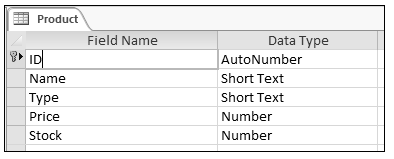
ProductFrame class
| public final class ProductFrame extends JFrame {
// table private JScrollPane scrollPane = new JScrollPane(); private JTable table = new JTable(); private DefaultTableModel dtm = new DefaultTableModel();
// label private JLabel titleLabel = new JLabel("Product");
// connection private Connect conn = new Connect(); private ResultSet rs = null; private ResultSetMetaData rsm = null; private Vector private Vector
public ProductFrame() { createForm();
this.add(titleLabel, BorderLayout.NORTH); this.add(scrollPane, BorderLayout.CENTER);
scrollPane.setViewportView(table); table.setModel(dtm);
refreshData();
this.setVisible(true); }
public void refreshData() { // lengkapi code disini
}
private void createForm() { this.setTitle("Product Form"); this.setSize(400, 200); this.setDefaultCloseOperation(JFrame.EXIT_ON_CLOSE); this.setLocationRelativeTo(null); } } |
Connect Class
| public class Connect { private Statement st; private Connection con;
public Connect() { try { Class.forName("sun.jdbc.odbc.JdbcOdbcDriver"); con = DriverManager.getConnection("jdbc:odbc:driver={Microsoft Access Driver (*.mdb, *.accdb)}; DBQ=" + System.getProperty("user.dir") + "/shop.mdb"); st = con.createStatement(1004, 1008); System.out.println("Connection Successful"); } catch (Exception e) { e.printStackTrace(); System.out.println("Connection Error"); } }
public ResultSet executeQuery(String query) { ResultSet rs = null; try { rs = st.executeQuery(query); } catch (SQLException e) { e.printStackTrace(); System.out.println("Connection Error"); } return rs; }
public void executeUpdate(String query) { try { st.executeUpdate(query); } catch (SQLException e) { e.printStackTrace(); System.out.println("Connection Error"); } } |
2. Insert Form In this frame, you are asked to create a frame to enter product data into the database. You are asked to make a frame like the one below.
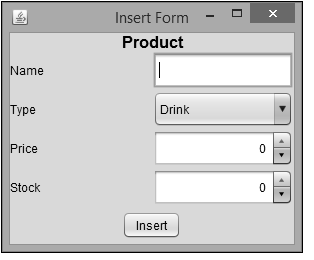
In the ComboBox Type, users can only select "Drink" and "Food". When the user clicks the Insert button, the application will do:
- Name Validation is required
- Price validation must be between 1 and 200000
- Stock validation must be between 1 and 100
- If all data is correct, the application will enter the product data into the database
Product Field Name ID Name Type Price Stock Data Type AutoNumber Short Text Short Text Number Number x Insert Form Product Name Type Drink Price 0 Stock 0 Insert Product Field Name ID Name Type Price Stock Data Type AutoNumber Short Text Short Text Number Number x Insert Form Product Name Type Drink Price 0 Stock 0 Insert
Step by Step Solution
There are 3 Steps involved in it

Get step-by-step solutions from verified subject matter experts
 Study Help