







Question: Java Classes Calculator Edit the Java application configuration first and add the two program arguments to be passed in. Pass in two arguments when the
Java Classes Calculator
Edit the Java application configuration first and add the two program arguments to be passed in.
Pass in two arguments when the program starts - for example, integers like 5 10. This application will perform four operations on these two values: addition, subtraction, multiply & division and it will print out the results. The two arguments get passed into the main method as a String array in the variable object named args[]. Remember they get passed in as Strings so you need to parse them into integers using the Integer.parseInt(args[0]) before you can treat them as integers.
Create a new file Java class called Calculate.java. This class Calculate will contain two static public methods addition() and subtraction() which you call in the Lab7 class using the Calculate class name. The Calculate class will also contain two non-static public methods multiply() and division() which you call using the Calculate object that you create. All these methods will accept two integers as input variables and will return an integer result value.
Modify the main method in Lab7 to make calls to all four of the Calculate class methods addition(), subtraction(), multiply() and division() and print out the results to the terminal. Remember how you call static and non-static methods are different. Please upload your code and the screenshot.
Example:
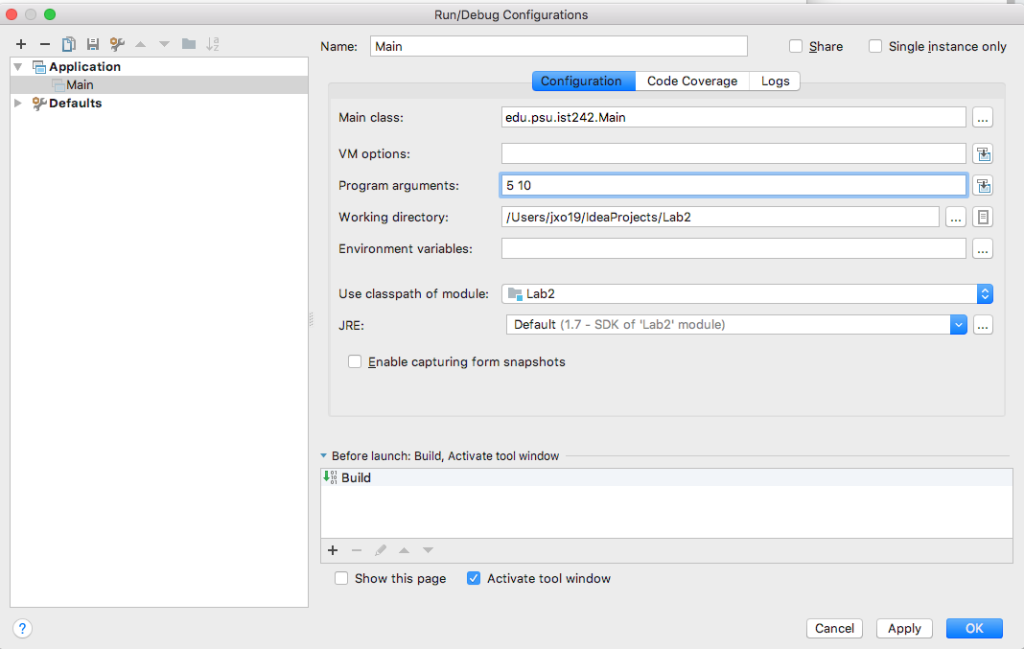
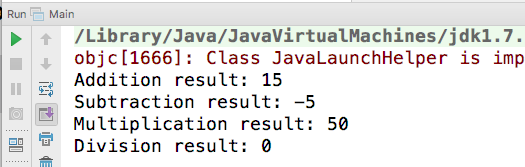
Run/Debug Configurations Name: Main O share O Single instance only Application Main Defaults nfiguration Code Coverage Logs Main class VM options: Program arguments Working directory Environment variables edu.psu.ist242.Main 5 10 /Users/jxo19/IdeaProjects/La b2 Use classpath of module:Lab2 JRE: Default (1.7-SDK of 'Lab2' module) Enable capturing form snapshots Before launch: Build, Activate tool window Build Show this page Activate tool window Cancel ApplyOK Run Main /Library/Java/JavaVirtualMachines/jdk1.7. objc[1666]: Class JavaLaunchHelper is imp Addition result: 15 Subtraction result: -5 Multiplication result 50 Division result: 0
Step by Step Solution
There are 3 Steps involved in it

Get step-by-step solutions from verified subject matter experts
 Study Help