







Question: JAVA EXCEPTION HANDLING Create a user defined exception sub class that accepts an integer in its constructor. Extend the Exception class Have a private value
JAVA EXCEPTION HANDLING
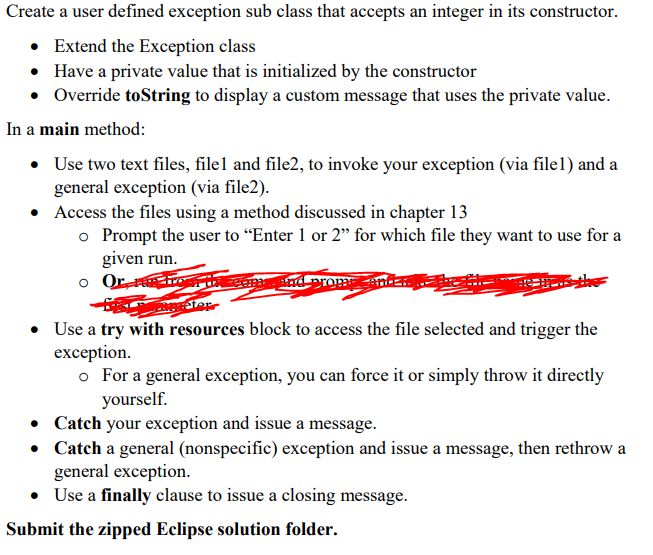
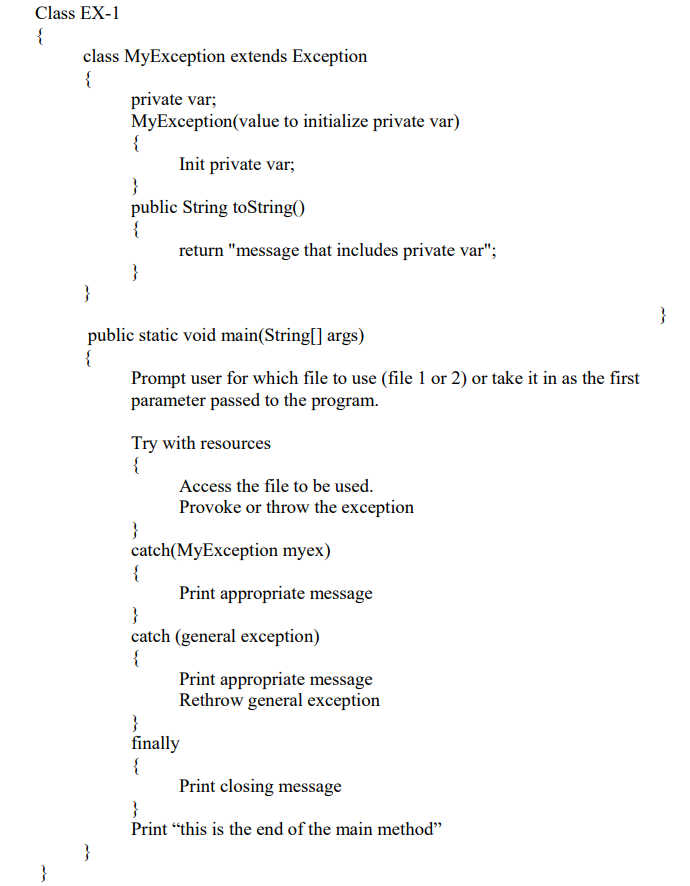
Create a user defined exception sub class that accepts an integer in its constructor. Extend the Exception class Have a private value that is initialized by the constructor Override toString to display a custom message that uses the private value. In a main method: Use two text files, filel and file2, to invoke your exception (via filel) and a general exception (via file2). Access the files using a method discussed in chapter 13 o Prompt the user to Enter 1 or 2 for which file they want to use for a given run. and prom Berator Use a try with resources block to access the file selected and trigger the exception. o For a general exception, you can force it or simply throw it directly yourself. Catch your exception and issue a message. Catch a general (nonspecific) exception and issue a message, then rethrow a general exception. Use a finally clause to issue a closing message. Submit the zipped Eclipse solution folder. Class EX-1 { class MyException extends Exception private var; MyException(value to initialize private var) { Init private var; } public String toStringo { return "message that includes private var"; } } } public static void main(String[] args) { Prompt user for which file to use (file 1 or 2) or take it in as the first parameter passed to the program. Try with resources { Access the file to be used. Provoke or throw the exception } catch(MyException myex) { Print appropriate message } catch (general exception) { Print appropriate message Rethrow general exception } finally { { Print closing message } Print this is the end of the main method }
Step by Step Solution
There are 3 Steps involved in it

Get step-by-step solutions from verified subject matter experts
 Study Help