







Question: JAVA FX problem create a new Java class, Board, which extends javafx.Application, that draws a 600x519 pixel window. Set the window title to Board. Draw
JAVA FX problem
create a new Java class, Board, which extends javafx.Application, that draws a 600x519 pixel window. Set the window title to "Board".
Draw a triangle
Create an upright 200x200x200 equilateral triangle within the scene you made in step 1. Use the Polygon class. Make the vertices centered around (0,0), and afterward use setLayoutX() and setLayoutY() to recenter the triangle in the middle of your window. Set the fill color of the triangle to LIGHTGREY.
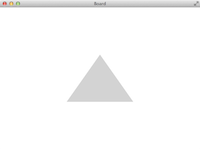
Hint: Relative to the center of the triangle, the apex of the triangle should be at (0.0, -86.6), and the right and left corners of the base should be (100.0, 86.6) and (-100.0, 86.6), where 100 = 200/2 and 86.6 = sqrt((200*200)-(100*100))/2;
Create an inner class
Create an inner class, Triangle, which extends Polygon and has a constructor with signature Triangle(double x, double y, double side). This should create an upright equilateral triangle, centered at (x,y), with sides of length side.
Comment out the code you wrote in step 2 (that drew the triangle with Polygon), and replace it with the creation of a Triangle. Set the fill color of the new triangle to LIGHTGREY. Don't forget to add your triangle to the root group.
Fill the board with triangles
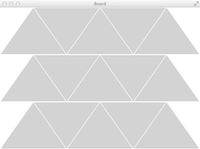
Fill the board with a grid of triangles, storing each triangle in an ArrayList. You should fit exactly three rows (each 173.2 pixels apart), each row having five triangles (three upright and two inverted). You will need to use the setRotate() method to invert some of the triangles.
Create a white border
Reduce the size of each triangle to 196 pixels, while maintaining the spacing as if they were size 200. This should create the effect of a white border around each triangle.
Finish up
Step by Step Solution
There are 3 Steps involved in it

Get step-by-step solutions from verified subject matter experts
 Study Help