







Question: JAVA GUI BY SWING, please help me. the deadline due date is today... i need exeprt help i have done only the first picture(white on),
JAVA GUI BY SWING, please help me.
the deadline due date is today...
i need exeprt help 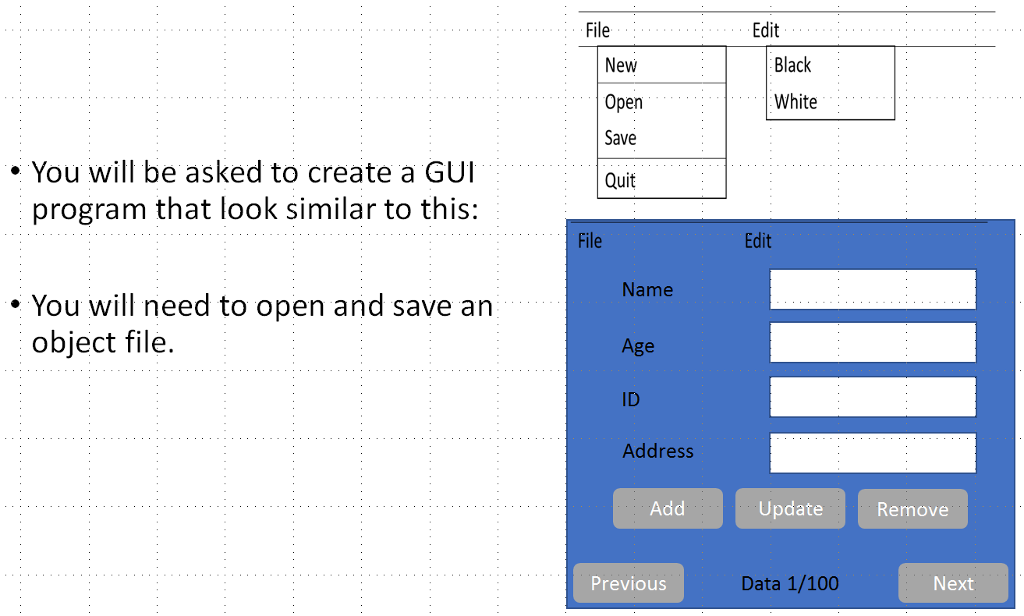
i have done only the first picture(white on), but i dunno how to solve blue one.
please help me guys
-----------------------------------------------
import javax.swing.*; import java.awt.*; import java.awt.event.ActionEvent; import java.awt.event.ActionListener; import java.text.DecimalFormat;
public class MortgageLoanCalculator extends JFrame implements ActionListener { private JFrame firstFrame, secondFrame, AboutFrame; private JMenuBar theMenuBar; private JMenu menuOne, menuTwo; private JMenuItem firstMenuItems; private JButton CancelBtn, ComputeBtn; private JTextField loanAmount, interestRate, loanPeriod; private JLabel loanAmountlbl, interestRatelbl, loanPeriodlbl; private JTextArea loanPayoutDetails;
Container FrameOnecontentPane, FrameTwocontentPane; JPanel leftPanel, rightPanel;
public static void main(String[] args) { MortgageLoanCalculator mortgageLoanCalculator = new MortgageLoanCalculator(); }
public void changeBlack() { Container container = getContentPane(); container.setBackground(Color.BLACK); } public void changeWhite() { Container container = getContentPane(); container.setBackground(Color.WHITE); }
public MortgageLoanCalculator() { DrawPanel(); } public void DrawPanel() { firstFrame = new JFrame("FIRST FRAME"); firstFrame.setSize(300,300); firstFrame.setVisible(true); theMenuBar = new JMenuBar();
menuOne = new JMenu("File"); firstMenuItems = new JMenuItem("New"); firstMenuItems.addActionListener(this); menuOne.add(firstMenuItems);
firstMenuItems = new JMenuItem("Open"); firstMenuItems.addActionListener(this); menuOne.add(firstMenuItems); theMenuBar.add(menuOne);
firstMenuItems = new JMenuItem("Save"); firstMenuItems.addActionListener(this); menuOne.add(firstMenuItems); theMenuBar.add(menuOne);
firstMenuItems = new JMenuItem("Quit"); firstMenuItems.addActionListener(this); menuOne.add(firstMenuItems); theMenuBar.add(menuOne);
menuTwo = new JMenu("Edit"); firstMenuItems = new JMenuItem("Black"); firstMenuItems.addActionListener(this); menuTwo.add(firstMenuItems); theMenuBar.add(menuTwo); this.changeBlack;
firstMenuItems = new JMenuItem("White"); firstMenuItems.addActionListener(this); menuTwo.add(firstMenuItems); theMenuBar.add(menuTwo); this.changeWhite();
firstFrame.setJMenuBar(theMenuBar);
secondFrame = new JFrame("SECOND FRAME"); secondFrame.setSize(1200,800); secondFrame.setVisible(false);
leftPanel = new JPanel(new FlowLayout()); leftPanel.setBorder(BorderFactory.createTitledBorder("Enter loan Details:"));
loanAmountlbl = new JLabel("LOAN AMOUNT"); interestRatelbl = new JLabel("INTEREST AMOUNT"); loanPeriodlbl = new JLabel("LOAN PERIOD"); loanAmount = new JTextField(20); interestRate = new JTextField(20); loanPeriod = new JTextField(20);
CancelBtn = new JButton("Cancel"); CancelBtn.addActionListener(this); ComputeBtn = new JButton("Compute"); ComputeBtn.addActionListener(this);
leftPanel.add(loanAmountlbl); leftPanel.add(loanAmount); leftPanel.add(interestRatelbl); leftPanel.add(interestRate); leftPanel.add(loanPeriodlbl); leftPanel.add(loanPeriod); leftPanel.add(CancelBtn); leftPanel.add(ComputeBtn);
leftPanel.setVisible(true);
rightPanel = new JPanel(new FlowLayout()); rightPanel.setBorder(BorderFactory.createTitledBorder("The loan Payout calculation is: ")); loanPayoutDetails = new JTextArea("", 40, 100); loanPayoutDetails.setBorder(BorderFactory.createLineBorder(Color.BLACK)); rightPanel.add(loanPayoutDetails); FrameTwocontentPane = new Container(); FrameTwocontentPane.setLayout(new FlowLayout());
FrameTwocontentPane.add(leftPanel, BorderLayout.NORTH); FrameTwocontentPane.add(rightPanel, BorderLayout.SOUTH); secondFrame.add(FrameTwocontentPane);
AboutFrame = new JFrame("ABOUT"); AboutFrame.setSize(100, 100); AboutFrame.setVisible(false);
AboutFrame.add(new JTextField("Made by Tima Tirah")); }
public void actionPerformed(ActionEvent arg0) { String menuName; menuName = arg0.getActionCommand(); if(menuName.equals("New Table")) { firstFrame.setVisible(false); AboutFrame.setVisible(false); secondFrame.setVisible(true); }
else if(menuName.equals("Quit")) { System.exit(0); }
else if(menuName.equals("About")) { AboutFrame.setVisible(true); }
if(menuName.equals("Cancel")) { firstFrame.setVisible(true); secondFrame.setVisible(false); }
else if(menuName.equals("Compute")) { CalculateLoanPayment(); } }
public void CalculateLoanPayment() { double loanAmountVal, interestRateVal, loanPeriodVal; double monthlyEMI, monthlyRate, loanPeriodlnMonth; int loop; double intlnEMI, prilnEMI, balLoan;
DecimalFormat decimalPlaces = new DecimalFormat("#,###,##0.00"); try { loanAmountVal = Double.parseDouble(loanAmount.getText()); interestRateVal = Double.parseDouble(interestRate.getText()); loanPeriodVal = Double.parseDouble(loanPeriod.getText());
monthlyRate = interestRateVal / 12; monthlyRate = monthlyRate / 100; loanPeriodlnMonth = loanPeriodVal * 12;
monthlyEMI = ((loanAmountVal * monthlyRate * Math.pow((1+monthlyRate), loanPeriodlnMonth)) / (Math.pow((1+monthlyRate), loanPeriodlnMonth)-1));
loanPayoutDetails.setText(""); loanPayoutDetails.append("Interest" + "|t" + "Principal" + "|t" + "Unpaid Bal" + "|n"); balLoan = loanAmountVal;
for(loop=1; loop
loanPayoutDetails.append(decimalPlaces.format(intlnEMI)+"|t" + decimalPlaces.format(prilnEMI) + "|t" + decimalPlaces.format(balLoan) + "|n"); } }
catch(Exception raisedException) { loanPayoutDetails.append("Please enter valid input values"); loanAmount.setText(""); interestRate.setText(""); loanPeriod.setText(""); } } }
File Edit Black New Open Save Quit White You will be asked to create a GUI program that look similar to this: File Edit You will need to open and save an Name object file. Age ID Address Add Update Renove Previous Data 1/100 Next File Edit Black New Open Save Quit White You will be asked to create a GUI program that look similar to this: File Edit You will need to open and save an Name object file. Age ID Address Add Update Renove Previous Data 1/100 Next
Step by Step Solution
There are 3 Steps involved in it

Get step-by-step solutions from verified subject matter experts
 Study Help