







Question: JAVA HELP NEEDED ------------------------------- Create a class named App2 which provides a GUI window for entering & saving question & answer text for a flashcard
JAVA HELP NEEDED
-------------------------------
Create a class named App2 which provides a GUI window for entering & saving question & answer text for a flashcard application.
1) The window will contain one panel that holds three text boxes (JTextFields), one button (JButton), and one QAData object.
a) The first two text boxes will be for answers and questions and should be labeled
b) Users can enter text into the text boxes
c) The third text box will contain a user-specified file path, e.g., C:/myfolder/myfile.dat
d) When the application launches, all text boxes will be empty
e) The button will be labeled update, i.e., JButton.setText("update");
f) Whenever the button is is clicked, the text boxes will be cleared
2) The App2 file should contain a supplementary class, QAData, which contains separate arrays of question and answer Strings and implements the Serializable interface. This class should follow the App2 class in the same file. When the button is clicked, the application will:
a) Load a QAData object from the user-specified file path (note: if no file is found with the path, the question & answer arrays should be created with size zero)
b) Add the String in the question text box to the question array
c) Add the String in the answer box to the answer array
d) Save the updated QAData object to the user-specified file path
Note: There are known problems with saving to a drive root folder (e.g., C:/) in Windows 10 and later. It is strongly recommended to test your application within a nested folder (e.g., C:/myfolder/).
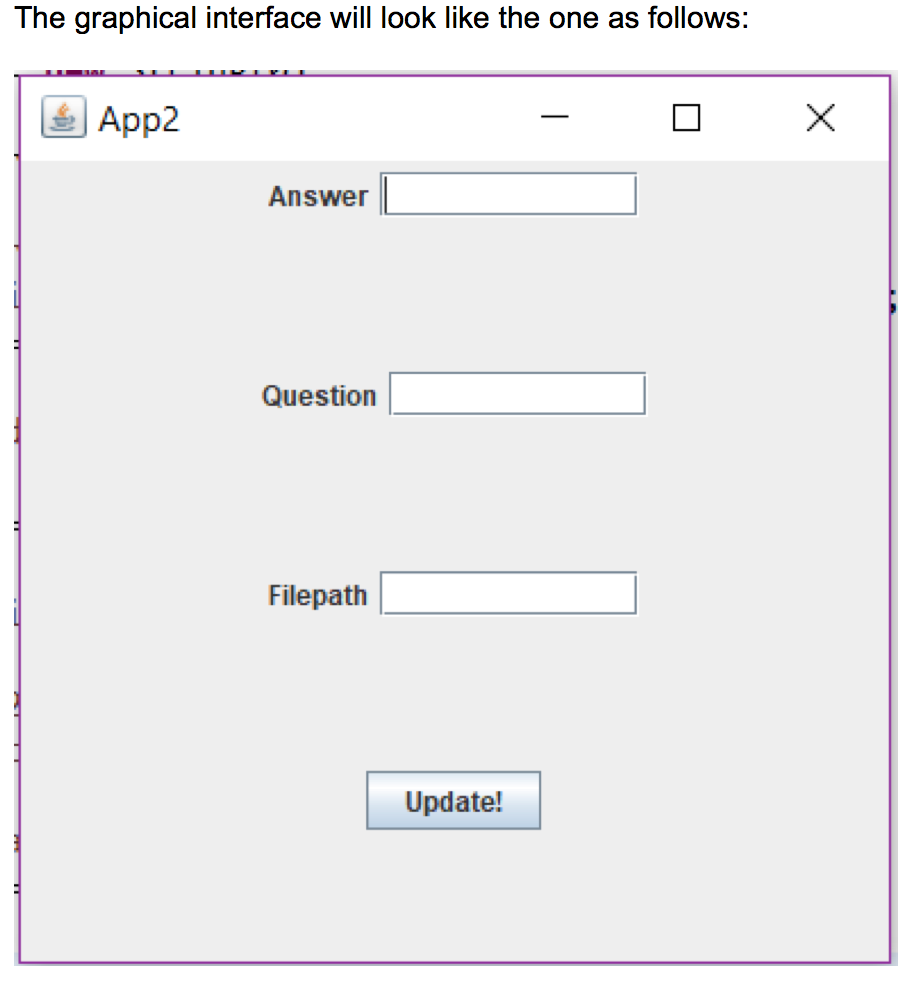
The graphical interface will look like the one as follows: App2 Answer Question Filepath Update
Step by Step Solution
There are 3 Steps involved in it

Get step-by-step solutions from verified subject matter experts
 Study Help