







Question: java import java.awt.*; import javax.swing.*; import javax.swing.border.Border; public class MySite { public static void main(String[] args){ JFrame frame = new JFrame(Le Qi); frame.setVisible(true); frame.setDefaultCloseOperation(JFrame.EXIT_ON_CLOSE); frame.setSize(300,400);
java
import java.awt.*;
import javax.swing.*;
import javax.swing.border.Border;
public class MySite {
public static void main(String[] args){
JFrame frame = new JFrame("Le Qi");
frame.setVisible(true);
frame.setDefaultCloseOperation(JFrame.EXIT_ON_CLOSE);
frame.setSize(300,400);
JPanel panel = new JPanel();
panel.setLayout(new GridLayout(0,1,0,0));
JButton label1 = new JButton("label1");
JButton label2 = new JButton("label2");
panel.add(label1);
panel.add(label2);
frame.add(panel);
label1.setBorder(BorderFactory.createEmptyBorder(10, 20, 10, 20));
label2.setBorder(BorderFactory.createEmptyBorder(10, 20, 10, 20));
}
}
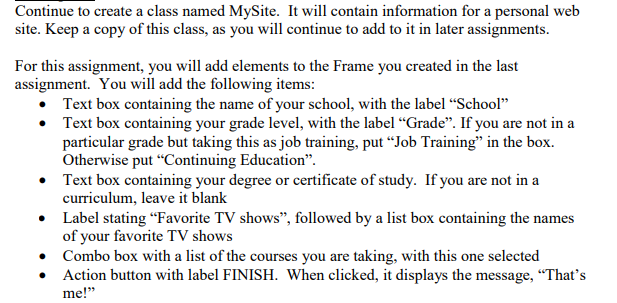
Continue to create a class named MySite. It will contain information for a personal web site. Keep a copy of this class, as you will continue to add to it in later assignments. For this assignment, you will add elements to the Frame you created in the last assignment. You will add the following items Text box containing the name of your school, with the label "School" Text box containing your grade level, with the label "Grade". If you are not ina particular grade but taking this as job training, put "Job Training" in the box. Otherwise put "Continuing Education". Text box containing your degree or certificate of study. If you are not in a curriculum, leave it blank Label stating "Favorite TV shows", followed by a list box containing the names of your favorite TV shows Combo box with a list of the courses you are taking, with this one selected me!" Action button with label FINISH. When clicked, it displays the message, "That's . . . * *
Step by Step Solution
There are 3 Steps involved in it

Get step-by-step solutions from verified subject matter experts
 Study Help