







Question: JAVA In this Lab Assignment you will implement a sample application using the elements discussed in the lecture: . . . . JButton JLabel JTextField
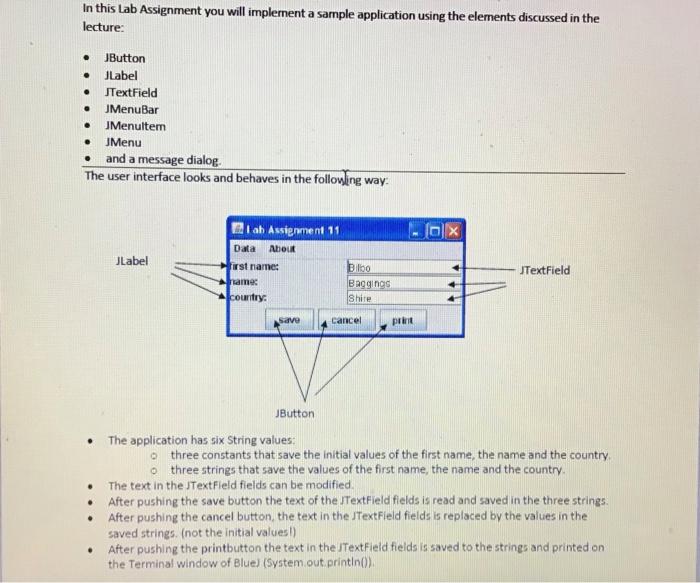
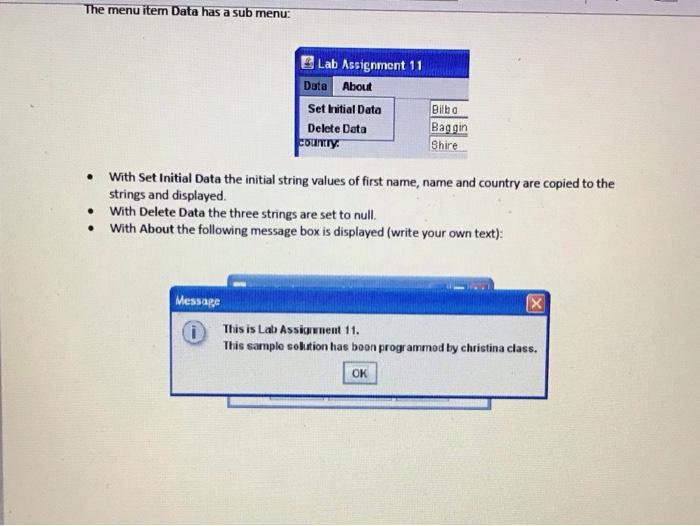
In this Lab Assignment you will implement a sample application using the elements discussed in the lecture: . . . . JButton JLabel JTextField JMenuBar JMenuitem JMenu and a message dialog The user interface looks and behaves in the following way. . . OX JLabel I ab Assignment 11 Data About first name: name: country: JTextField Dlo Baggings Shire Save Cancel print JButton The application has six String values: three constants that save the initial values of the first name, the name and the country o three strings that save the values of the first name, the name and the country. The text in the JTextField fields can be modified After pushing the save button the text of the JTextField fields is read and saved in the three strings. After pushing the cancel button the text in the JTextField fields is replaced by the values in the saved strings. (not the initial values!) After pushing the printbutton the text in the JTextField fields is saved to the strings and printed on the Terminal window of Blue) (System.out.printlno) . The menu item Data has a sub menu: E Lab Assignment 11 Data About Set initial Data Delete Data country Bilha Baggin Shire With Set Initial Data the initial string values of first name, name and country are copied to the strings and displayed With Delete Data the three strings are set to null. With About the following message box is displayed (write your own text): . x Message This is Lab Assignment 11. This sample solution has boon programmed by christina class. OK
Step by Step Solution
There are 3 Steps involved in it

Get step-by-step solutions from verified subject matter experts
 Study Help