







Question: Java Jam HTML Assignment Task 1: Create Lab6 folder There will be an images folder within the Lab6 folder (images are heroroad.jpg, heromugs.jpg, heroguitar.jpg). There
Java Jam HTML Assignment
Task 1: Create Lab6 folder
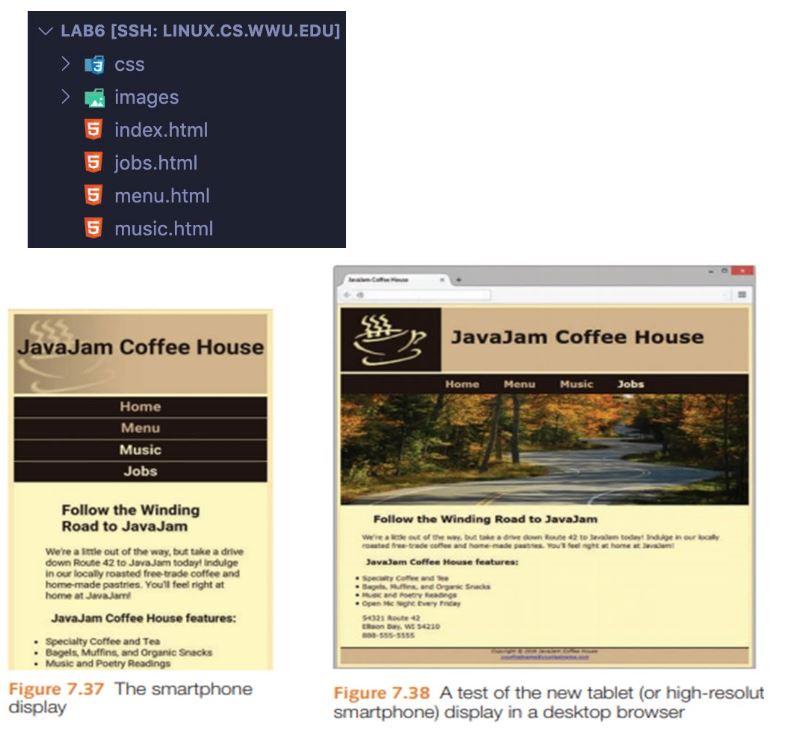
There will be an images folder within the Lab6 folder (images are heroroad.jpg, heromugs.jpg, heroguitar.jpg).
There is also a css folder for the javajam.css file.
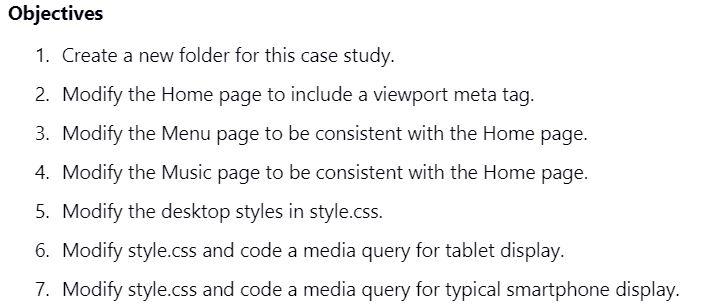
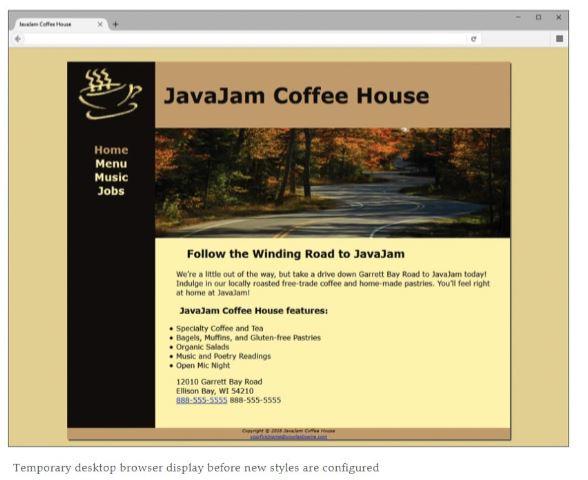
index.html: (may not be completely correct)
JavaJam Coffee House
- Home
- Menu
- Music
- Jobs
Follow the Winding Road to JavaJam
We're a little out of the way, but take a drive down Garrett Bay Road to JavaJam today! Indulge in our locally roasted free-trade coffee and home-made pastries. You'll feel right at home at JavaJam!
JavaJam Coffee House features:
- Specialty Coffee and Tea
- Bagels, Muffins, and Gluten-free Pastries
- Organic Salads
- Music and Poetry Readings
- Open Mic Night
12010 Garrett Bay Road
Ellison Bay, WI 54210
888-555-5555
Copyright © 2018 JavaJam Coffee House
yourfirstname@yourlastname.com
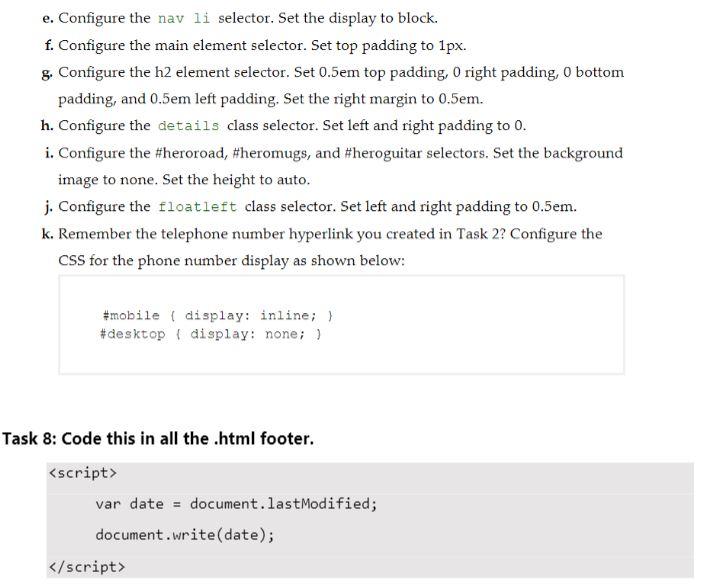
var date = document.lastModified;
document.write(date);
javajam.css
* {
box-sizing: border-box;
}
.clearfix::after {
content: "";
clear: both;
display: table;
}
.floatleft {
float: left;
padding: 0 0 20px 20px;
}
body{
background-color: #FCEBB6;
color: #221811;
font-family: Arial, Helvetica, sans-serif;
background-image: url(../images/background.gif);
}
header{
background-color: #D2B48C;
height: 150px;
background-image: url(../images/javajamlogo.jpg);
background-repeat: no-repeat;
}
main{
padding: 0em 0em 2em;
margin-left: 200px;
background-color: #FEF6C2;
display: block;
}
main h2, main h3, main h4, main p, main div, main ul, main dl {
padding-left: 3em;
padding-right: 2em;
}
h1{
padding-top: 45px;
padding-left: 220px;
font-size: 3em;
}
nav{
float: left;
width: 200px;
text-align:center;
font-weight: bold;
font-size: 1.5em;
padding-top: 10px;
}
nav a{
text-decoration: none;
}
nav a:link {
color: #FEF6C2;
}
nav a:visited {
color: #D2B48C;
}
nav a:hover {
color: #CC9933;
}
nav ul {
list-style-type: none;
padding-left: 0;
}
.details{
padding-left: 20%;
padding-right: 20%;
overflow: auto;
}
img{
padding-right: 10px;
padding-left: 10px;
}
footer{
background-color: #D2B48C;
font-size: .60em;
font-style:italic;
text-align: center;
padding-bottom: 10px;
border-top: solid 2px #221811;
}
h4{
background-color: #D2B48C;
font-size: 1.2em;
padding-left: .5em;
padding-bottom: .25em;
text-transform: uppercase;
border-bottom: #221811;
border-bottom: solid 1px #221811;
padding-bottom:0;
overflow: auto;
}
dt{
font-weight: bold;
}
/* ID */
#wrapper{
width: 80%;
margin-right:auto;
margin-left:auto;
background-color: #231814;
min-width: 900px;
max-width: 1280px;
box-shadow: 5px 5px 5px #828282;
}
#heroroad {
background-image: url("../images/heroroad.jpg");
background-size: 100%;
height: 250px;
}
#heromugs {
background-image: url("../images/heromugs.jpg");
background-size: 100%;
height: 250px;
}
#heroguitar {
background-image: url("../images/heroguitar.jpg");
background-size: 100%;
height: 250px;
}
header, nav, main, footer { display: block; };
Let me know if you need more info!
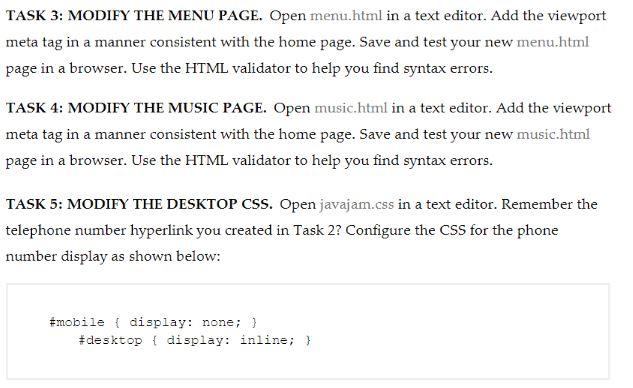
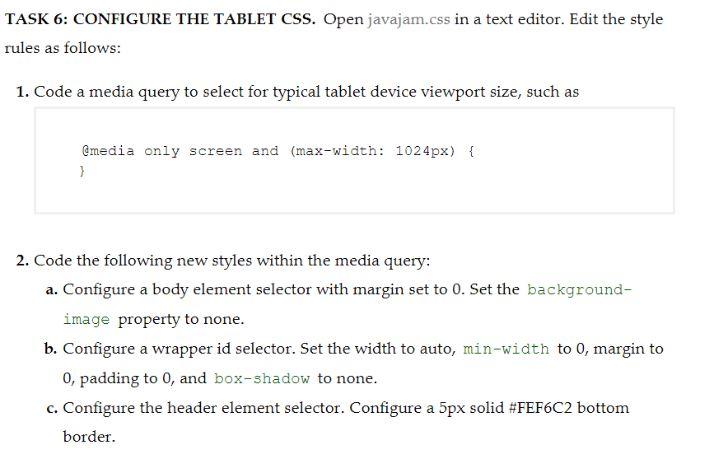
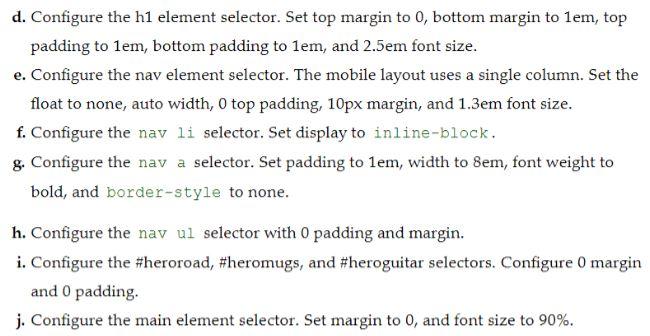
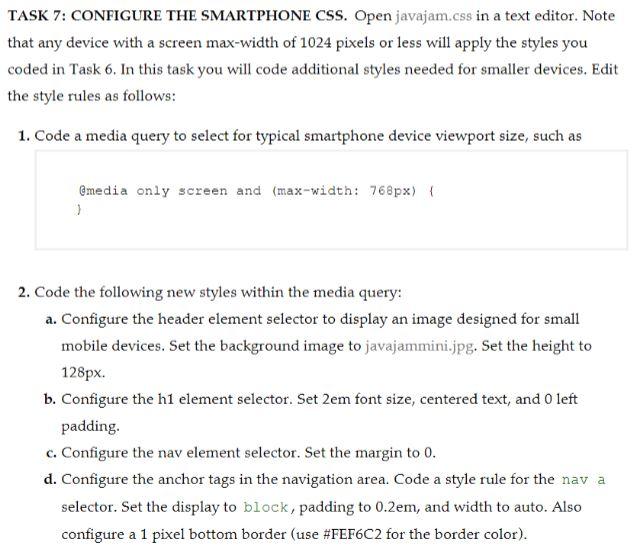
LAB6 (SSH: LINUX.CS.WWU.EDU] 13 CSS images 5 index.html 5 jobs.html 5 menu.html 5 music.html Java Jam Coffee House JavaJam Coffee House Home Menu Music Jobs Home Menu Music Jobs Follow the Winding Road to JavaJam www.metode trade home made them JavaJom Coffee House features: Soy de Band OS Oy Follow the Winding Road to JavaJam Were a little out of the way, but take a drive down Route 42 to Javojam today indulge in our localy roasted free trade coffee and homemade pastries. You'll feel right at home a Java Java Jam Coffee House features: Specialty Coffee and Tea Bagels, Muffins, and Organic Snacks Music and Poetry Readings Figure 7.37 The smartphone display S0242 how $4230 SSSSSS Figure 7.38 A test of the new tablet (or high-resolut smartphone) display in a desktop browser Objectives 1. Create a new folder for this case study. 2. Modify the Home page to include a viewport meta tag. 3. Modify the Menu page to be consistent with the Home page. 4. Modify the Music page to be consistent with the Home page. 5. Modify the desktop styles in style.css. 6. Modify style.css and code a media query for tablet display. 7. Modify style.css and code a media query for typical smartphone display. Coffee JavaJam Coffee House Home Menu Music Jobs Follow the Winding Road to JavaJam We're a little out of the way, but take a drive down Garrett Bay Road to Java Jam today! Indulge in our locally roasted free trade coffee and homemade pastries. You'll feel right at home at Javadam JavaJam Coffee House features: Specialty Coffee and Tea Bagels, Muffins, and Gluten-free Pastries Organic Salads Music and Poetry Readings Open Mic Night 12010 Garrett Bay Road Ellison Bay, WI 54210 888-555-5555 888-555-5555 Temporary desktop browser display before new styles are configured TASK 3: MODIFY THE MENU PAGE. Open menu.html in a text editor. Add the viewport meta tag in a manner consistent with the home page. Save and test your new menu.html page in a browser. Use the HTML validator to help you find syntax errors. TASK 4: MODIFY THE MUSIC PAGE. Open music.html in a text editor. Add the viewport meta tag in a manner consistent with the home page. Save and test your new music.html page in a browser. Use the HTML validator to help you find syntax errors. TASK 5: MODIFY THE DESKTOP CSS. Open javajam.css in a text editor. Remember the telephone number hyperlink you created in Task 2? Configure the CSS for the phone number display as shown below: #mobile { display: none; } #desktop { display: inline; } TASK 6: CONFIGURE THE TABLET CSS. Open javajam.css in a text editor. Edit the style rules as follows: 1. Code a media query to select for typical tablet device viewport size, such as Gmedia only screen and (max-width: 1024px) { } 2. Code the following new styles within the media query: a. Configure a body element selector with margin set to 0. Set the background- image property to none. b. Configure a wrapper id selector. Set the width to auto, min-width to 0, margin to 0, padding to 0, and box-shadow to none. c. Configure the header element selector. Configure a 5px solid #FEF6C2 bottom border. d. Configure the h1 element selector. Set top margin to 0, bottom margin to 1em, top padding to lem, bottom padding to 1em, and 2.5em font size. e. Configure the nav element selector. The mobile layout uses a single column. Set the float to none, auto width, 0 top padding, 10px margin, and 1.3em font size. f. Configure the nav li selector. Set display to inline-block. g. Configure the nav a selector. Set padding to lem, width to Bem, font weight to bold, and border-style to none. h. Configure the nav ul selector with 0 padding and margin. i. Configure the #heroroad, #heromugs, and #heroguitar selectors. Configure o margin and 0 padding. j. Configure the main element selector. Set margin to 0, and font size to 90%. TASK 7: CONFIGURE THE SMARTPHONE CSS. Open javajam.css in a text editor. Note that any device with a screen max-width of 1024 pixels or less will apply the styles you coded in Task 6. In this task you will code additional styles needed for smaller devices. Edit the style rules as follows: 1. Code a media query to select for typical smartphone device viewport size, such as @media only screen and (max-width: 768px) { 2. Code the following new styles within the media query: a. Configure the header element selector to display an image designed for small mobile devices. Set the background image to javajammini.jpg. Set the height to 128px. b. Configure the h1 element selector. Set 2em font size, centered text, and O left padding c. Configure the nav element selector. Set the margin to 0. d. Configure the anchor tags in the navigation area. Code a style rule for the nav a selector. Set the display to block, padding to 0.2em, and width to auto. Also configure a 1 pixel bottom border (use #FEF6C2 for the border color). e. Configure the nav li selector. Set the display to block. f. Configure the main element selector. Set top padding to 1px. & Configure the h2 element selector. Set 0.5em top padding, O right padding, O bottom padding, and 0.5em left padding, Set the right margin to 0.5em. h. Configure the details class selector. Set left and right padding to 0. i. Configure the #heroroad, #heromugs, and #heroguitar selectors. Set the background image to none. Set the height to auto. j. Configure the floatieft class selector. Set left and right padding to 0.5em. k. Remember the telephone number hyperlink you created in Task 2? Configure the CSS for the phone number display as shown below: #mobile ( display: inline; } #desktop { display: none; ) Task 8: Code this in all the .html footer.
Step by Step Solution
There are 3 Steps involved in it

Get step-by-step solutions from verified subject matter experts
 Study Help