







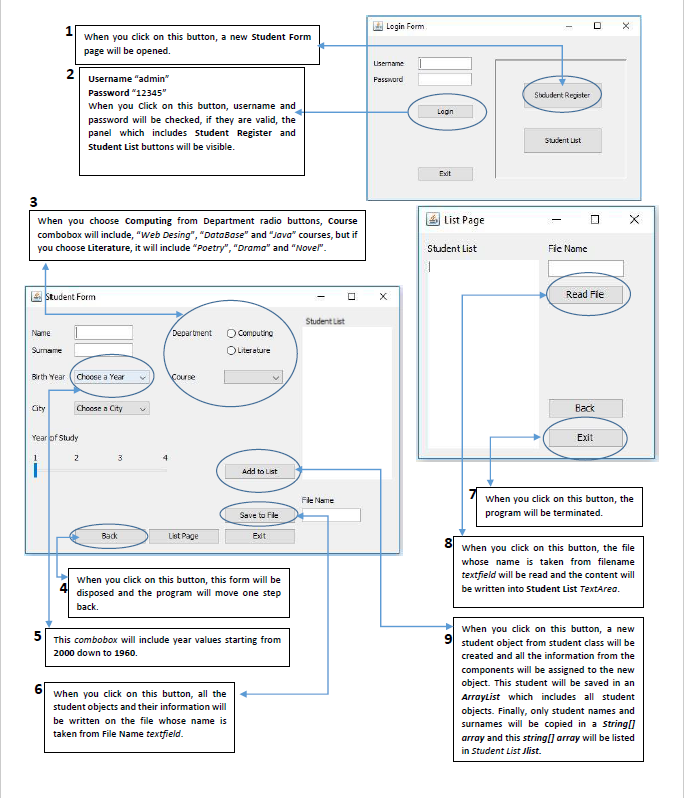
Question: Java Language Login Form D When you click on this button, a new Student Form page will be opened Username 2 Password Student Register Username
Java Language
Login Form D When you click on this button, a new Student Form page will be opened Username 2 Password Student Register Username "admin" Password "12345" when you click on this button, username and password will be checked, if they are valid, the panel which includes Student Register and Student List buttons will be visible. Login Student List Ext 3 when you choose Computing from Department radio buttons, Course combobox will include, "Web Desing","Database" and "Java" courses, but if you choose Literature, it will include "Poetry", "Drama" and "Novel". List Page X Student List Fic Name Student Form X Read Fie Student List Name Department Computing Literature Sumame Birth Year Choose a Year Course Gity Cheese a City Back Year of Study Exit 1 2 3 4 Add to List File Name When you click on this button, the program will be terminated. Save to file Back List Page Exit When you click on this button, the file whose name is taken from filename textfield will be read and the content will be written into Student List TextArea. When you click on this button, this form will be disposed and the program will move one step back. 5 This combobox will include year values starting from 2000 down to 1960. 9 When you click on this button, all the student objects and their information will be written on the file whose name is taken from File Name textfield. When you click on this button, a new student object from student class will be created and all the information from the components will be assigned to the new object. This student will be saved in an ArrayList which includes all student objects. Finally, only student names and surnames will be copied in a stringl array and this string[] array will be listed in Student List Jlist. Login Form D When you click on this button, a new Student Form page will be opened Username 2 Password Student Register Username "admin" Password "12345" when you click on this button, username and password will be checked, if they are valid, the panel which includes Student Register and Student List buttons will be visible. Login Student List Ext 3 when you choose Computing from Department radio buttons, Course combobox will include, "Web Desing","Database" and "Java" courses, but if you choose Literature, it will include "Poetry", "Drama" and "Novel". List Page X Student List Fic Name Student Form X Read Fie Student List Name Department Computing Literature Sumame Birth Year Choose a Year Course Gity Cheese a City Back Year of Study Exit 1 2 3 4 Add to List File Name When you click on this button, the program will be terminated. Save to file Back List Page Exit When you click on this button, the file whose name is taken from filename textfield will be read and the content will be written into Student List TextArea. When you click on this button, this form will be disposed and the program will move one step back. 5 This combobox will include year values starting from 2000 down to 1960. 9 When you click on this button, all the student objects and their information will be written on the file whose name is taken from File Name textfield. When you click on this button, a new student object from student class will be created and all the information from the components will be assigned to the new object. This student will be saved in an ArrayList which includes all student objects. Finally, only student names and surnames will be copied in a stringl array and this string[] array will be listed in Student List Jlist
Step by Step Solution
There are 3 Steps involved in it

Get step-by-step solutions from verified subject matter experts
 Study Help