







Question: *JAVA Modify the Area and Perimeter Calculator In this exercise, you?ll modify the Area and PerimeterCalculator so it allows the user to enter the length
*JAVA
Modify the
Area and Perimeter
Calculator
In this exercise, you?ll modify the Area and PerimeterCalculator so it
allows the user to
enter the length and width on the same line.
Review the application
1.
Open the project named ch09_ex4_AreaAndPerimeter
in the extra_ex_starts directory.
2.
Open the Main class and review its code.
3.
Run the application to make sure it works correctly.
Modify the application so it allows two entries on thesame line
4.
In the Main class, modify the code that gets the
length and the width so it prompts the user to
enter the length and width
on the same line.
Then, parse the string that?s entered
by the user to get
one String object for the length and another for the width.
5.
Modify the code that displays the data for the
Rectangle object so that it includes the length
and width.
6.
Run the application to make sure it works correctly.
If the user enters 100 and 20, the
data that?s printed to the console should look something likethis:
Enter length and width: 100 20
Length: 100.0
Width: 20.0
Area: 2,00
0.000
Perimeter: 240.000
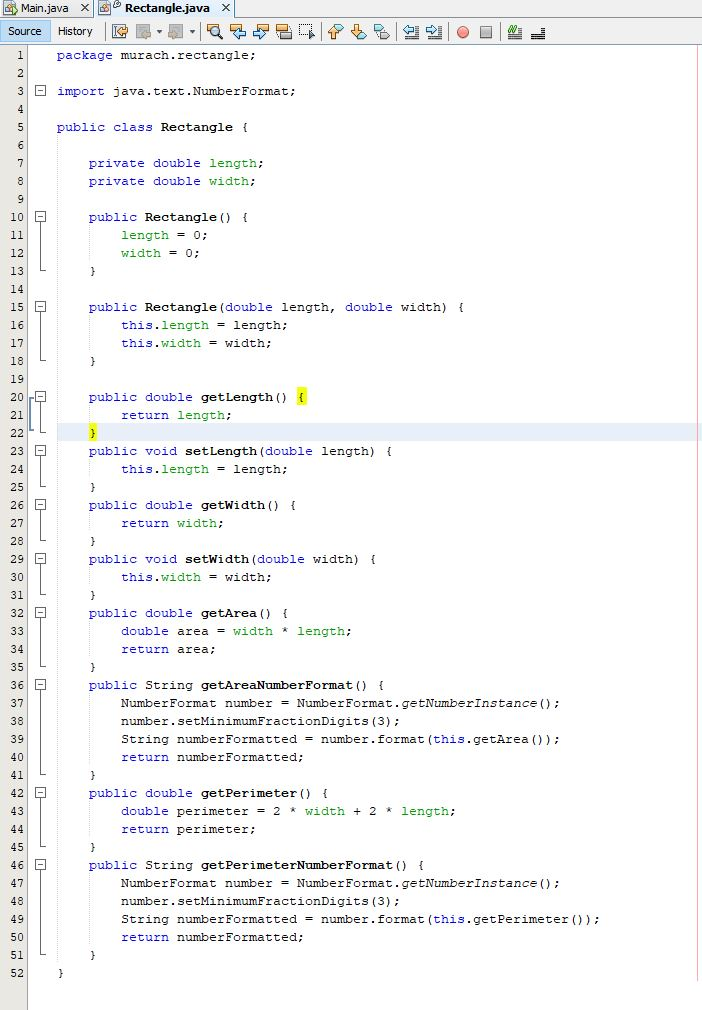
Here is the code:
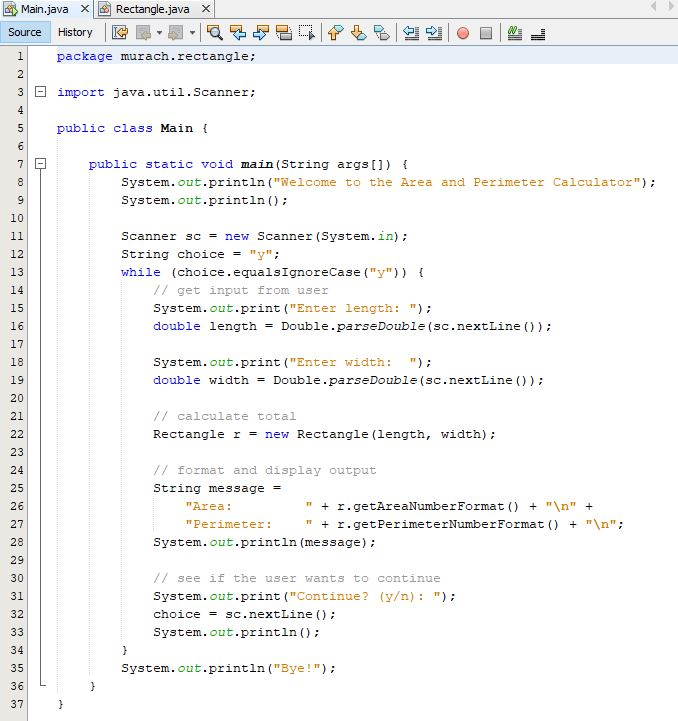
Main.java X Rectangle.java X Source History 1 package murach. rectangle; 2 3 import java.util.Scanner; 4 5 649 8 9 10 11 12 13 O NM 14 15 5 6 16 17 18. 19 20 21 22 23 24 25 26 27 28 29 30 31 32 33 N 09 3 4 3 34 5 3 35 36 37 public class Main ( public static void main(String args[]) { System.out.println("Welcome to the Area and Perimeter Calculator"); System.out.println(); Scanner sc = new Scanner (System.in); String choice = "y"; while (choice.equals IgnoreCase ("y")) { // get input from user } System.out.print("Enter length: "); double length = Double.parseDouble (sc.nextLine()); System.out.print("Enter width: "); double width = Double.parse Double (sc.nextLine()); // calculate total Rectangle r = new Rectangle (length, width); // format and display output String message = "Area: U " + r.getAreaNumber Format () + " " + " + r.getPerimeter Number Format () + " "; "Perimeter: System.out.println (message); // see if the user wants to continue System.out.print("Continue? choice sc.nextLine(); (y/n): "); System.out.println(); System.out.println("Bye!");
Step by Step Solution
3.53 Rating (163 Votes )
There are 3 Steps involved in it
Rectanglejava is same package murachrectangle import javatextNumberFormat class Rectangle private do... View full answer

Get step-by-step solutions from verified subject matter experts
 Study Help