







Question: java netbeans Create a class called Invoice that a hardware store might use to represent an invoice for an item sold at the store. An
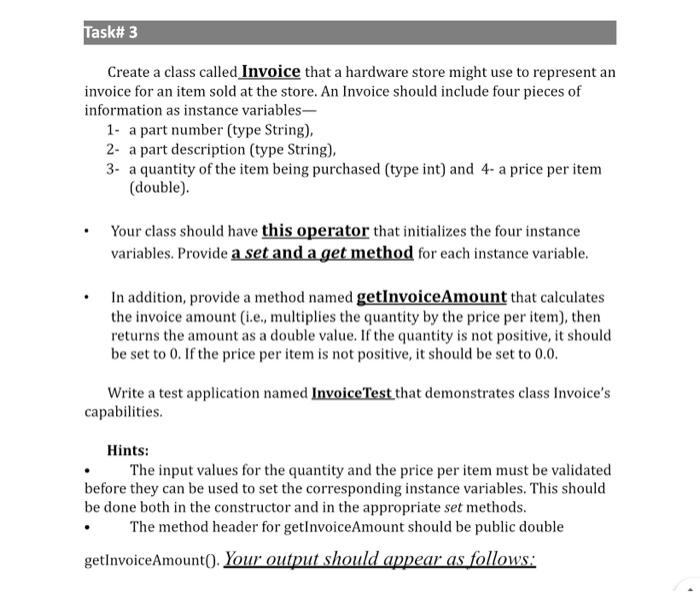
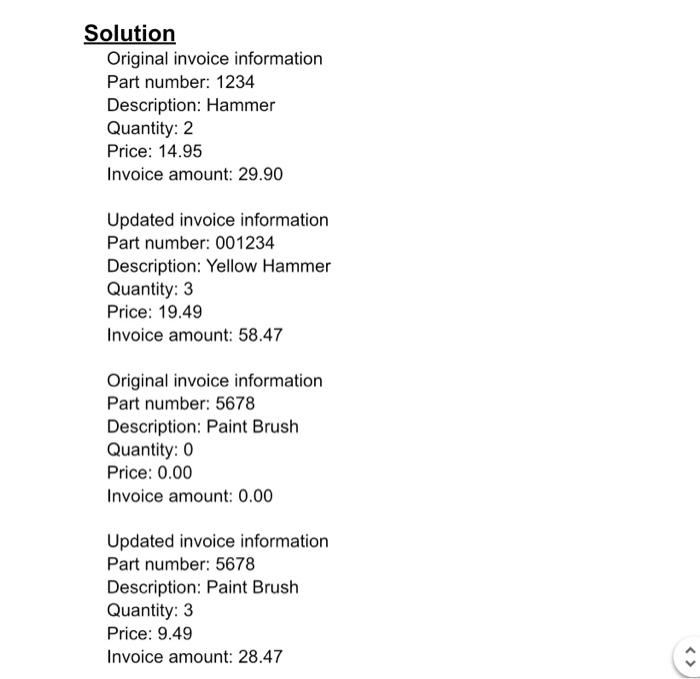
Create a class called Invoice that a hardware store might use to represent an invoice for an item sold at the store. An Invoice should include four pieces of information as instance variables- 1- a part number (type String), 2- a part description (type String), 3- a quantity of the item being purchased (type int) and 4- a price per item (double). - Your class should have this operator that initializes the four instance variables. Provide a set and a get method for each instance variable. - In addition, provide a method named getInvoiceAmount that calculates the invoice amount (i.e., multiplies the quantity by the price per item), then returns the amount as a double value. If the quantity is not positive, it should be set to 0 . If the price per item is not positive, it should be set to 0.0. Write a test application named InvoiceTest that demonstrates class Invoice's capabilities. Hints: - The input values for the quantity and the price per item must be validated before they can be used to set the corresponding instance variables. This should be done both in the constructor and in the appropriate set methods. - The method header for getInvoiceAmount should be public double getInvoiceAmount(). Your output should appear as follows: orition Original invoice information Part number: 1234 Description: Hammer Quantity: 2 Price: 14.95 Invoice amount: 29.90 Updated invoice information Part number: 001234 Description: Yellow Hammer Quantity: 3 Price: 19.49 Invoice amount: 58.47 Original invoice information Part number: 5678 Description: Paint Brush Quantity: 0 Price: 0.00 Invoice amount: 0.00 Updated invoice information Part number: 5678 Description: Paint Brush Quantity: 3 Price: 9.49 Invoice amount: 28.47
Step by Step Solution
There are 3 Steps involved in it

Get step-by-step solutions from verified subject matter experts
 Study Help