







Question: java oop2 Task 2: Create a GUI using NetBeans Builder for Temperature Conversion. Temperature conversion Temperature Converter Cart The application should read one temperature from
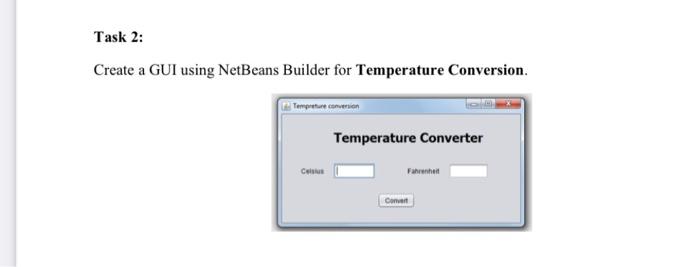
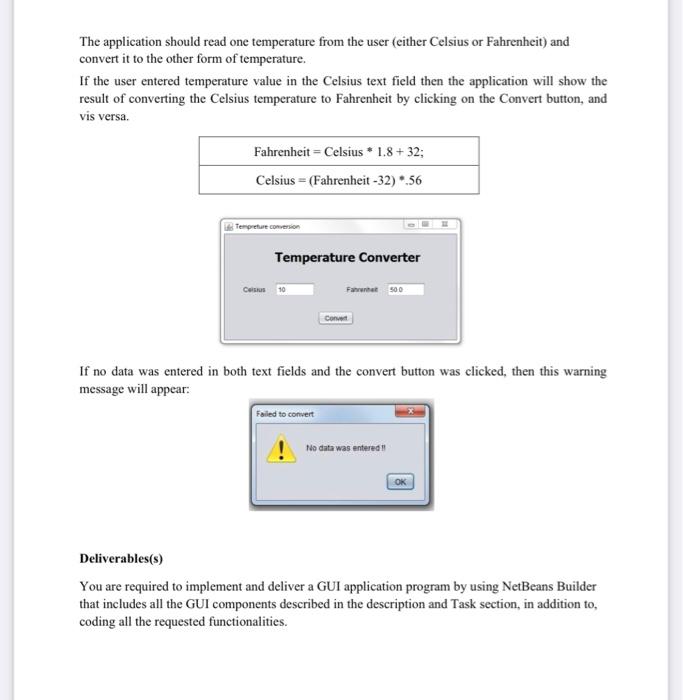
Task 2: Create a GUI using NetBeans Builder for Temperature Conversion. Temperature conversion Temperature Converter Cart The application should read one temperature from the user (either Celsius or Fahrenheit) and convert it to the other form of temperature. If the user entered temperature value in the Celsius text field then the application will show the result of converting the Celsius temperature to Fahrenheit by clicking on the Convert button, and vis versa. Fahrenheit - Celsius * 1.8 +32; Celsius = (Fahrenheit -32) *.56 Tempere conversion Temperature Converter Celsius 10 Farurat 500 Cont If no data was entered in both text fields and the convert button was clicked, then this warning message will appear: Failed to convert No data was entered Deliverables(s) You are required to implement and deliver a GUI application program by using NetBeans Builder that includes all the GUI components described in the description and Task section, in addition to, coding all the requested functionalities
Step by Step Solution
There are 3 Steps involved in it

Get step-by-step solutions from verified subject matter experts
 Study Help