







Question: java Part 2: Exploring Colors and Hexadecimal Values Objective: Activity: Hexadecimal numbers are used on web pages to set colors. A color can be made
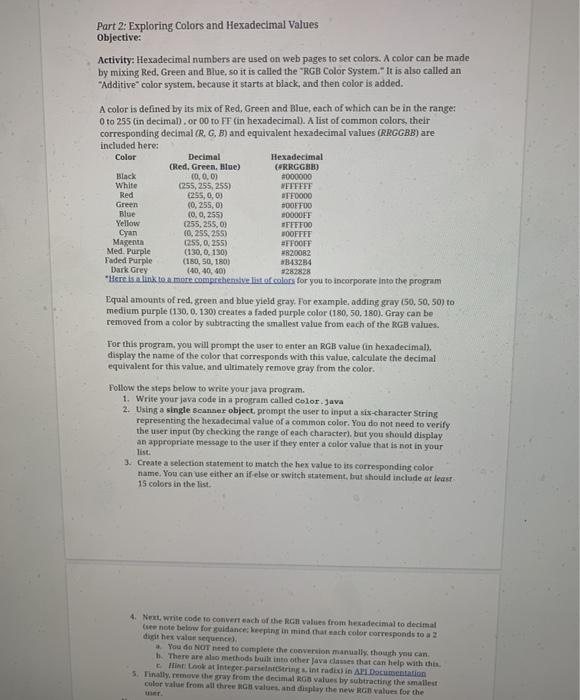
Part 2: Exploring Colors and Hexadecimal Values Objective: Activity: Hexadecimal numbers are used on web pages to set colors. A color can be made by mixing Red Green and Blue, so it is called the "RGB Color System." It is also called an "Additive" color system, because it starts at black, and then color is added. A color is defined by its mix of Red, Green and Blue, each of which can be in the range: Oto 255 (in decimal). or 00 to FF (in hexadecimall. A list of common colors, their corresponding decimal (R. G. B) and equivalent hexadecimal values (RRGGBB) are included here: Color Decimal Hexadecimal (Red. Green, Blue) CARRGGHS) Black (0,0,0) #000000 White (255,255, 255) WEFEFFE Red 255, 0, 0) OFF0000 Green (0,255,0) BOOFTOO Blue (0, 0, 255) DODFE Yellow (255,255,00 FITTOO Cyan (0,255, 255) HOOFFFE Magenta (255,0.255) #FFOOFF Med. Purple (130,0.130) *820082 Faded Purple (180, 50, 180) 3343284 Dark Grey (40,40,400 3282828 Here is a link to a more competensive list of colors for you to incorporate into the program Equal amounts of red, green and blue yield gray. For example, adding gray(50.50, 50) to medium purple (130,0.130) creates a faded purple color (180,50.180). Gray can be removed from a color by subtracting the smallest value from each of the RGB values. Tor this program, you will prompt the user to enter an RGB value in hexadecimal). display the name of the color that corresponds with this value, calculate the decimal equivalent for this value, and ultimately remove gray from the color. Follow the steps below to write your java program. 1. Write your java code in a program called Color.java 2. Using a single scanner object, prompt the user to input a six-character String representing the hexadecimal value of a common color. You do not need to verify the user input (by checking the range of each character), but you should display an appropriate message to the user if they enter a color value that is not in your list. 3. Create a selection statement to match the hex value to its corresponding color name. You can use either an if-else or switch statement, but should include at least 15 colors in the list 4. Next white code to convert each of the RGB values from hexadecimal to decimal Gree note below for guidance keeping in mind that each color corresponds to a 2 dit hex vale sequence You do NOT need to complete the conversion manually though you can t. There are also methods built into other java causes that can help with this Hine Look at integer.parseIntradix in All Documentation 3. Tinally remove the pray from the decimal RGB values by subtracting the smallest color value from all three values and display the new RGB values for the
Step by Step Solution
There are 3 Steps involved in it

Get step-by-step solutions from verified subject matter experts
 Study Help