







Question: Hello. I need to make this code run per these instructions but I'm not sure how to go about it. As a reference, I use
Hello. I need to make this code run per these instructions but I'm not sure how to go about it. As a reference, I use this website to check if code runs properly: https://www.onlinegdb.com/online_c++_compiler
Instructions:
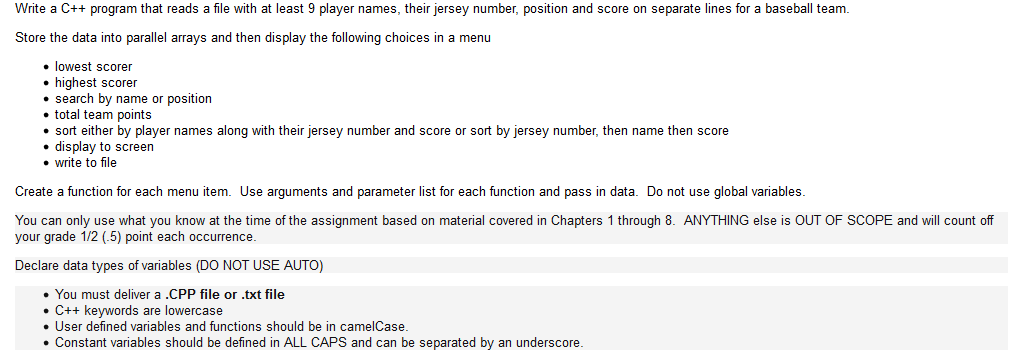
Code:
//baseballscores.cpp #include
using namespace std;
void menu(); int loadFile(string file,string names[],int jNo[],int pos[],int scores[]); //function reads from file to parallel arrays string lowestScorer(string names[],int scores[],int size);//function gets name of lowest scrorer string highestScorer(string names[],int scores[],int size);//function gets name of highest scrorer void searchByName(string names[],int jNo[],int pos[],int scores[],int size);//function searches by name //int searchByPosition(string names[],int jNo[],int pos[],int scores[],int size);//function searches by position int totalPoints(int scores[],int size);//function gets total team points void sortByPlayerName(string names[],int jNo[],int pos[],int scores[],int size);//function sorts by player name along with jercy no, and score void displayToScreen(string names[],int jNo[],int pos[],int scores[],int size);//function displays all player details void writeToFile(string filename,string names[],int jNo[],int pos[],int scores[],int size);//function writes data to file
const int MAX=25; //declare maximum array size is 25
int main() { //declare parallel arrays string names[MAX]; int jNo[MAX],pos[MAX],scores[MAX]; string filename; int ch=0; cout>filename; //read file name int size=loadFile(filename,names,jNo,pos,scores); //calls the function for reading file while(ch!=8) //repeat until menu choice exit { menu(); cin>>ch;//input choice switch(ch) //check each choice { case 1: cout>filename; //input file to write writeToFile(filename,names,jNo,pos,scores,size);//writing data to file break; case 8: cout
//Function displays menu void menu() { cout
//function reads from file to parallel arrays int loadFile(string file,string names[],int jNo[],int pos[],int scores[]) { ifstream infile(file.c_str());//open file for reading int count=0;//initially count is 0 infile>>names[count]>>jNo[count]>>pos[count]>>scores[count];//read first record while(!infile.eof()) //read until end of file { count++;//increment count infile>>names[count]>>jNo[count]>>pos[count]>>scores[count];//read next records } infile.close(); //close the file return count;//finally return count }
//function gets name of lowest scrorer string lowestScorer(string names[],int scores[],int size) { int score=scores[0];//get startup 0th score string name; for(int i=0;i
//function gets name of highest scrorer string highestScorer(string names[],int scores[],int size) { int score=scores[0];//get startup 0th score string name; for(int i=0;i //function searches by name void searchByName(string names[],int jNo[],int pos[],int scores[],int size) { string name; bool flag=false; cout>name;//input name here for(int i=0;i //function gets total team points int totalPoints(int scores[],int size) { int total=0; for(int i=0;i //function sorts by player name along with jercy no, and score void sortByPlayerName(string names[],int jNo[],int pos[],int scores[],int size) { //using bubble sort for(int i=0;i //function writes data to file void writeToFile(string filename,string names[],int jNo[],int pos[],int scores[],int size) { ofstream outfile(filename.c_str());//open file for writing for(int i=0;i //function displays all player details void displayToScreen(string names[],int jNo[],int pos[],int scores[],int size) { for(int i=0;i //scores.txt Rock 5 2 3 Kevin 2 10 2 John 8 1 4 Ram 7 8 3 Kittu 3 4 5 Krishna 9 8 3 Wills 12 7 2 Bush 8 1 2 Pebbel 4 6 4
Step by Step Solution
There are 3 Steps involved in it

Get step-by-step solutions from verified subject matter experts
 Study Help