







Question: java processing The following are the flags of Hungary. Germany and Austria. Write a program that draws a rectangle of width 300 and height 200
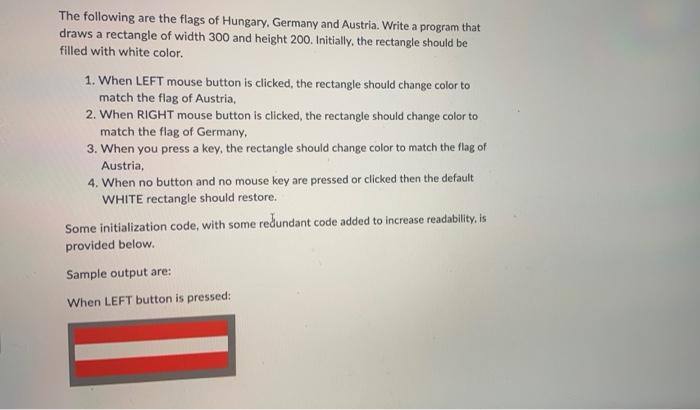
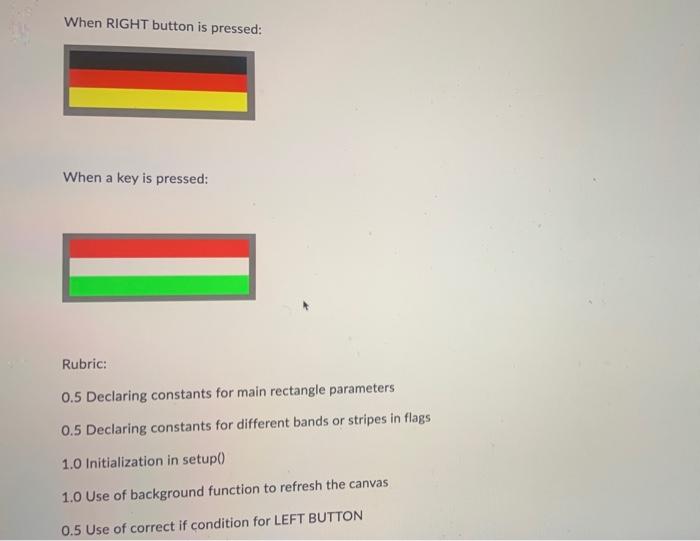
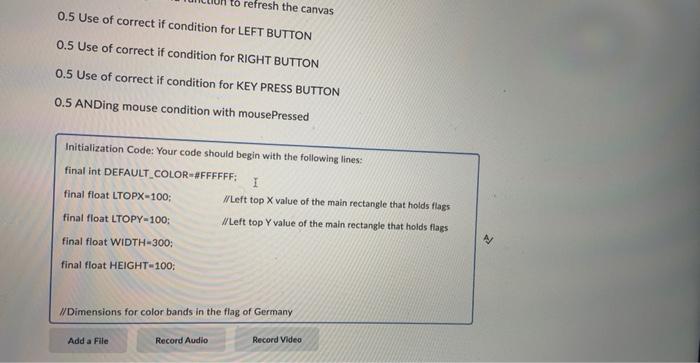
The following are the flags of Hungary. Germany and Austria. Write a program that draws a rectangle of width 300 and height 200 . Initially, the rectangle should be filled with white color. 1. When LEFT mouse button is clicked, the rectangle should change color to match the flag of Austria, 2. When RIGHT mouse button is clicked, the rectangle should change color to match the flag of Germany, 3. When you press a key, the rectangle should change color to match the flag of Austria, 4. When no button and no mouse key are pressed or clicked then the default WHITE rectangle should restore. Some initialization code, with some redundant code added to increase readability, is provided below. Sample output are: When LEFT button is pressed: When RIGHT button is pressed: When a key is pressed: Rubric: 0.5 Declaring constants for main rectangle parameters 0.5 Declaring constants for different bands or stripes in flags 1.0 Initialization in setup() 1.0 Use of background function to refresh the canvas 0.5 Use of correct if condition for LEFT BUTTON 0.5 Use of correct if condition for LEFT BUTTON 0.5 Use of correct if condition for RIGHT BUTTON 0.5 Use of correct if condition for KEY PRESS BUTTON 0.5 ANDing mouse condition with mousePressed Initialization Code: Your code should begin with the following lines: final int DEFAULT_COLOR=\#FFFFFF; final float LTOPX=100; ILLeft top X value of the main rectangle that holds flags final float LTOPY=100: AlLeft top Y value of the main rectangle that holds flags final float WIDTH=300: final float HEIGHT= 100; /IDimensions for color bands in the flag of Germany
Step by Step Solution
There are 3 Steps involved in it

Get step-by-step solutions from verified subject matter experts
 Study Help