







Question: Java program 3 Robot Teleoperation (35 points) The robot you be controlling is a flying quadrotor, the Parrot ARDrone. There is a fair amount of
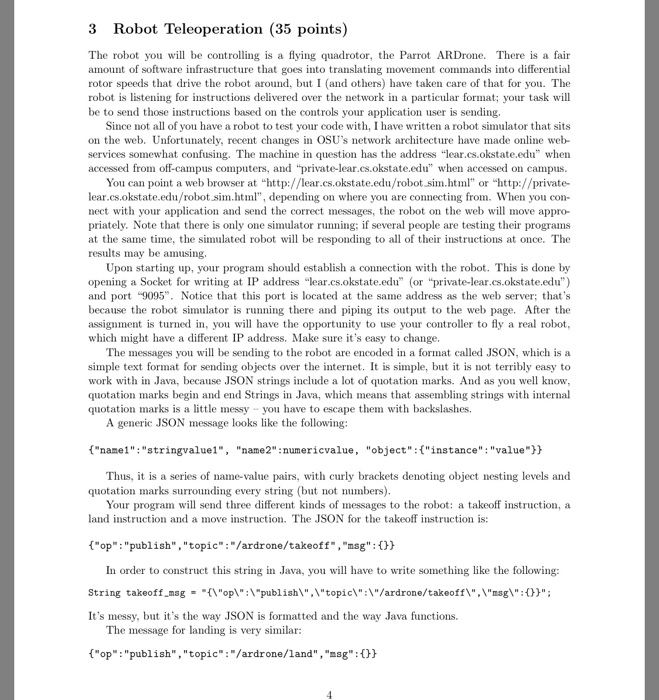
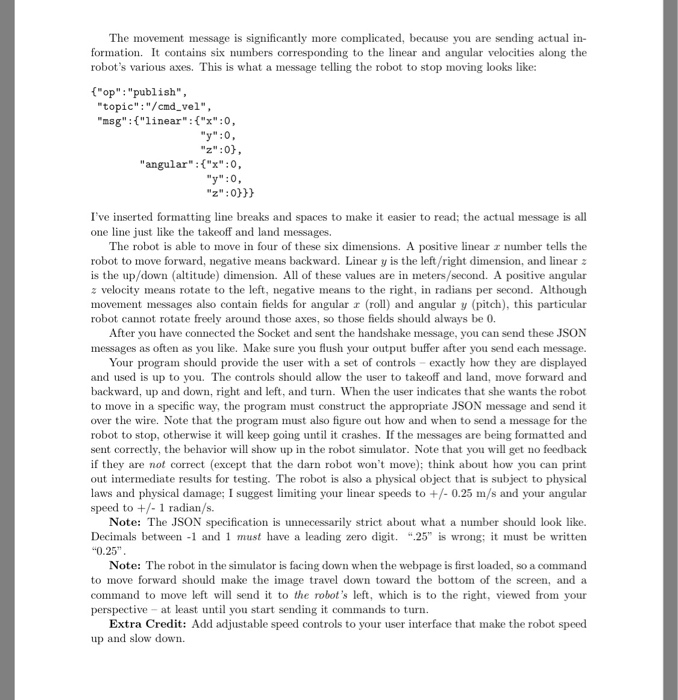
3 Robot Teleoperation (35 points) The robot you be controlling is a flying quadrotor, the Parrot ARDrone. There is a fair amount of software infrastructure that goes into translating movement commands into differential rotor speeds that drive the robot around, but I and others) have taken care of that for you. The robot is listening for instructions delivered over the network in a particular format; your task will be to send those instructions based on the controls your application user is sending. Since not all of you have a robot to test your code with, I have written a robot simulator that sits on the web. Unfortunately, recent changes in OSU's network architecture have made online web services somewhat confusing. The machine in question has the address "lear.cs.okstate.edu" when accessed from off-campus computers, and "private-lear.cs.okstate.edu" when accessed on campus. You can point a web browser at "http://lear.cs.okstate.edu/robot.sim.ht or "http://private- lear.cs.okstate.edu/robot sim.ht, depending on where you are connecting from. When you con nect with your application and send the correct messages, the robot on the web will move appro- priately, Note that there is only one simulator running: if several people are testing their programs at the same time, the simulated robot will be responding to all of their instructions at once. The results may be amusing Upon starting up, your program should establish a connection with the robot. This is done by opening a Socket for writing at IP address "lear.cs.okstate.edu"or "private-lear.cs.okstate.edu") and port "9095". Notice that this port is located at the same address as the web server; that's because the robot simulator is running there and pipi ts output to the web page. After the assignment is turned in, you will have the opportunity to use your controller to fly a real robot which might have a differ IP address. Make sure it's easy to change. The messages you will be sending to the robot are encoded in a format called JSON, which is a simple text format for sending objects over the internet. It is simple, but it is not terribly easy to work with in Java, because JSON strings include a lot of quotation marks. And as you we know quotation marks begin and end Strings in Java, which means that assembling strings with internal quotation marks is a little messy you have to escape them with backslashes. A generic JSON message looks like the following: ("namel" "stringvaluel", "name2":numericvalue, "object":("instance":"value)h Thus, is a series of name-value pairs, with curly brackets denoting object nesting levels and quotation marks surounding every string (but not numbers) Your program will send three different kinds of messages to the robot: a takeoff instruction, a land instruction and a move instruction. The JSON for the takeoff instruction is: "op "publish","topic": "/ardrone/takeoff, "msg": In order to construct this string in Java, you will have to write something like the following: String takeoff msgop"publish\","topic\":\"/ardrone/takeoff"msg": It's messy, but it's the way JSON is formatted and the way Java functions. The message for landing is very similar: "op: "publish", "topic": "/ardrone/land", "sg": 3 Robot Teleoperation (35 points) The robot you be controlling is a flying quadrotor, the Parrot ARDrone. There is a fair amount of software infrastructure that goes into translating movement commands into differential rotor speeds that drive the robot around, but I and others) have taken care of that for you. The robot is listening for instructions delivered over the network in a particular format; your task will be to send those instructions based on the controls your application user is sending. Since not all of you have a robot to test your code with, I have written a robot simulator that sits on the web. Unfortunately, recent changes in OSU's network architecture have made online web services somewhat confusing. The machine in question has the address "lear.cs.okstate.edu" when accessed from off-campus computers, and "private-lear.cs.okstate.edu" when accessed on campus. You can point a web browser at "http://lear.cs.okstate.edu/robot.sim.ht or "http://private- lear.cs.okstate.edu/robot sim.ht, depending on where you are connecting from. When you con nect with your application and send the correct messages, the robot on the web will move appro- priately, Note that there is only one simulator running: if several people are testing their programs at the same time, the simulated robot will be responding to all of their instructions at once. The results may be amusing Upon starting up, your program should establish a connection with the robot. This is done by opening a Socket for writing at IP address "lear.cs.okstate.edu"or "private-lear.cs.okstate.edu") and port "9095". Notice that this port is located at the same address as the web server; that's because the robot simulator is running there and pipi ts output to the web page. After the assignment is turned in, you will have the opportunity to use your controller to fly a real robot which might have a differ IP address. Make sure it's easy to change. The messages you will be sending to the robot are encoded in a format called JSON, which is a simple text format for sending objects over the internet. It is simple, but it is not terribly easy to work with in Java, because JSON strings include a lot of quotation marks. And as you we know quotation marks begin and end Strings in Java, which means that assembling strings with internal quotation marks is a little messy you have to escape them with backslashes. A generic JSON message looks like the following: ("namel" "stringvaluel", "name2":numericvalue, "object":("instance":"value)h Thus, is a series of name-value pairs, with curly brackets denoting object nesting levels and quotation marks surounding every string (but not numbers) Your program will send three different kinds of messages to the robot: a takeoff instruction, a land instruction and a move instruction. The JSON for the takeoff instruction is: "op "publish","topic": "/ardrone/takeoff, "msg": In order to construct this string in Java, you will have to write something like the following: String takeoff msgop"publish\","topic\":\"/ardrone/takeoff"msg": It's messy, but it's the way JSON is formatted and the way Java functions. The message for landing is very similar: "op: "publish", "topic": "/ardrone/land", "sg
Step by Step Solution
There are 3 Steps involved in it

Get step-by-step solutions from verified subject matter experts
 Study Help