







Question: Java Program DESCRIPTION Write a GUI (Graphical User Interface) application that will have the following GUI components: 1. A read-only JTextField object about 10 columns
Java Program
DESCRIPTION
Write a GUI (Graphical User Interface) application that will have the following GUI components:
1. A read-only JTextField object about 10 columns wide.
2. A JButton object labeled Click Me.
3. A JButton object labeled Click Me Too.
When the user clicks the button Click Me the first time message Hello 1will show in the text field. When the user clicks the button a second time, the message Hello 2 will show in the text field. Each time the user clicks the button Click Me, the number in the message increments. If the user clicks the button Click Me Too, the number in the message decrements. The number in the message can become positive or negative depending upon the sequence in which the two buttons are pressed.
In the example below, we press the button Click Me two times. Then we click the button Click Me Too three times.
Hello 1
Hello 2
Hello 1
Hello 0
Hello -1
In the example below, we press the button Click Me Too two times. Then we click the button Click Me three times.
Hello -1
Hello -2
Hello -1
Hello 0
Hello 1
Sample output:
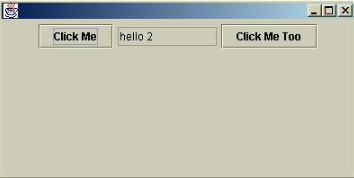
IMPLEMENTATION
Create the following two classes.
Class JFrameExt
Create a class JFrameExt that extends the JFrame and implements interface ActionListener. The class will provide the following:
A private instance variable JButton with label Click Me.
A private instance variable JButton with label Click Me Too.
A private instance variable JTextField of size 10 columns.
A constructor to create the GUI.
An event handler to handle button click events.
Constructor.
In the constructor of the JFrameExt class do the following:
Get the container content pane.
Create a FlowLayout object.
Call the containers setLayout method and pass it the FlowLayout object.
Call the containers add method and add the Click Me JButton object.
Call the containers add method and add the JTextField object.
Call the containers add method and add the Click Me Too JButton object.
Call the setEditable method of JTextField object and pass it false.
Call Click Me JButtons addActionListener method and register yourself for listening button click events.
Call Click Me Too JButtons addActionListener method and register yourself for listening button click events.
Event Handler
Write an event handler actionPerformed in the class JFrameExt for handling button click events.
Code this handler to display a message in the JTextField object.
Class TestJFrameExt
Create a class TestJFrameExt containing the main method. In the main method do the following:
Create a JFrameExt object.
Set the size of JFrameExt object to 400 by 300.
Make the JFrameExt object show up.
- Click Me hello 2 Click Me Too
Step by Step Solution
There are 3 Steps involved in it

Get step-by-step solutions from verified subject matter experts
 Study Help