







Question: *Needed File(s)* Kiloconverter.java : import javax.swing.*; // Needed for Swing classes import java.awt.event.*; // Needed for ActionListener Interface /** The KiloConverter class displays a JFrame
*Needed File(s)*
Kiloconverter.java :
import javax.swing.*; // Needed for Swing classes import java.awt.event.*; // Needed for ActionListener Interface
/** The KiloConverter class displays a JFrame that lets the user enter a distance in kilometers. When the Calculate button is clicked, a dialog box is displayed with the distance converted to miles. */
public class KiloConverter extends JFrame { private JPanel panel; // To reference a panel private JLabel messageLabel; // To reference a label private JTextField kiloTextField; // To reference a text field private JButton calcButton; // To reference a button private final int WINDOW_WIDTH = 310; // Window width private final int WINDOW_HEIGHT = 100; // Window height
/** Constructor */
public KiloConverter() { // Set the window title. setTitle("Kilometer Converter");
// Set the size of the window. setSize(WINDOW_WIDTH, WINDOW_HEIGHT);
// Specify what happens when the close button is clicked. setDefaultCloseOperation(JFrame.EXIT_ON_CLOSE);
// Build the panel and add it to the frame. buildPanel();
// Add the panel to the frame's content pane. add(panel);
// Display the window. setVisible(true); }
/** The buildPanel method adds a label, text field, and and a button to a panel. */
private void buildPanel() { // Create a label to display instructions. messageLabel = new JLabel("Enter a distance " + "in kilometers");
// Create a text field 10 characters wide. kiloTextField = new JTextField(10);
// Create a button with the caption "Calculate". calcButton = new JButton("Calculate");
// Add an action listener to the button. calcButton.addActionListener(new CalcButtonListener());
// Create a JPanel object and let the panel // field reference it. panel = new JPanel();
// Add the label, text field, and button // components to the panel. panel.add(messageLabel); panel.add(kiloTextField); panel.add(calcButton); }
/** CalcButtonListener is an action listener class for the Calculate button. */
private class CalcButtonListener implements ActionListener { /** The actionPerformed method executes when the user clicks on the Calculate button. @param e The event object. */
public void actionPerformed(ActionEvent e) { final double CONVERSION = 0.6214; String input; // To hold the user's input double miles; // The number of miles
// Get the text entered by the user into the // text field. input = kiloTextField.getText(); // For debugging, display the text entered, and // its value converted to a double. System.out.println("Reading " + input + " from the text field."); System.out.println("Converted value: " + Double.parseDouble(input));
// Convert the input to miles. miles = Double.parseDouble(input) * CONVERSION;
// Display the result. JOptionPane.showMessageDialog(null, input + " kilometers is " + miles + " miles.");
// For debugging, display a message indicating // the application is ready for more input. System.out.println("Ready for the next input."); } } // End of CalcButtonListener class
/** The main method creates an instance of the KiloConverter class, which displays its window on the screen. */
public static void main(String[] args) { new KiloConverter(); } }
Create a GUI (Graphical User Interface) application where the user enters the wholesale cost of an item and its markup percentage into two text fields. (For example, if an items wholesale cost is $5 and its markup percentage is 100 percent then its retail price is $10) The application should have a button that displays the items retail price when clicked.
The following GUI illustrates how your Retail Price Calculator might look and function when it is working. It shows an example where the wholesale cost is 100 and the markup percentage is 25.5% giving a retail price of $125.50 when the Calculate Retail Price button is pressed.
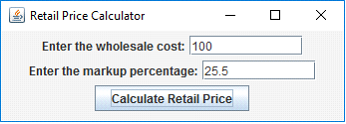
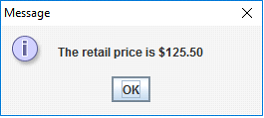
You are also provided with the completed working example Kiloconverter.java phase-3 which is developed in stages in our textbook on pages 767-784. It is an excellent guide to follow as you develop your own solution. Here is an example of this program showing the input form and an output message box with the converted value.
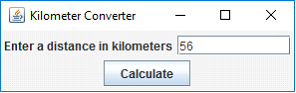
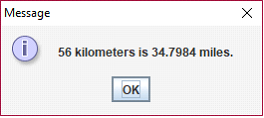
The output message box follows here:
What to hand in:
Please demonstrate your working program.
Then post your solution.
Retail Price Calculator Enter the wholesale cost: 100 Enter the markup percentage: 25.5 Calculate Retail Price
Step by Step Solution
There are 3 Steps involved in it
To create the Retail Price Calculator GUI application you can follow the structure of the KiloConverter example and modify it to handle wholesale cost ... View full answer

Get step-by-step solutions from verified subject matter experts
 Study Help