







Question: Java Program The goal of this assignment is to develop an event-based game. You are going to develop a Pong Game. The game board is
Java Program
The goal of this assignment is to develop an event-based game. You are going to develop a Pong Game.
The game board is a rectangle with a ball bouncing around. On the right wall, you will have a rectangular paddle (1/3 of the wall height). The paddle moves with up and down arrows. Next to the game board, there will be a score board. It will show the count of goals, and count of hits to the paddle. In the beginning of the game, the paddle will be on the center of the right wall.
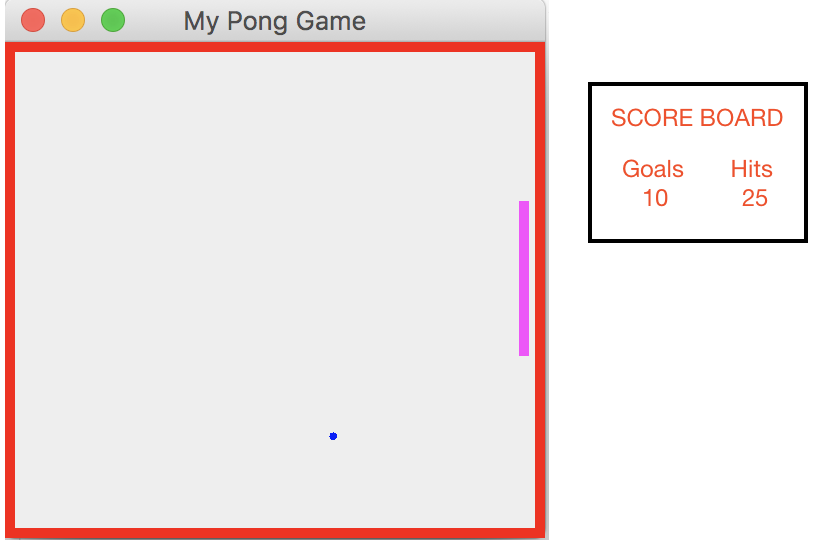
You can develop a two-player game, and it will count for extra 2 points bonus.
You can arrange the color and the style of the board/paddle/ball/Score Board as you prefer.
package javaapplication93;
import java.awt.BorderLayout;
import java.awt.Color;
import java.awt.Graphics;
import java.util.Random;
import java.util.Timer;
import java.util.TimerTask;
import javax.swing.JFrame;
import javax.swing.JPanel;
class Point{
public float mX;
public float mY;
public Point(float x, float y){
mX = x;
mY = y;
}
}
enum WallType{
top, bottom, left, right, none;
};
class Ball{
public Point mPos;
public Point mDir;
public int mLife;
public Ball(float y){
mPos = new Point(0.f, y);
mDir = new Point(1.f, 1.f);
mLife = 0;
}
public void move(){
mPos.mX += mDir.mX;
mPos.mY += mDir.mY;
mLife++;
}
public WallType hit(){
if (mPos.mX
return (WallType.left);
}
else if (mPos.mY
return (WallType.top);
}
else if (mPos.mX >= 263){
return (WallType.right);
}
else if (mPos.mY >= 241){
return (WallType.bottom);
}
return (WallType.none);
}
public void rotate(WallType wallType){
switch (wallType){
case bottom:
mDir.mY *= -1;
break;
case top:
mDir.mY *= -1;
break;
case left:
mDir.mX *= -1;
break;
case right:
mDir.mX *= -1;
break;
}
}
}
/**
*
* @author neslisah
*/
public class PongGame extends JPanel {
Ball mBall;
public PongGame(){
super();
Random rand = new Random();
float y = rand.nextInt(200);
mBall = new Ball(y);
}
@Override
protected void paintComponent(Graphics g) {
super.paintComponents(g); //To change body of generated methods, choose Tools | Templates.
g.setColor(Color.red);
g.fillRect(0, 0, 270, 5);
g.setColor(Color.red);
g.fillRect(0, 0, 5, 270);
g.setColor(Color.red);
g.fillRect(0, 243, 270, 5);
g.setColor(Color.red);
g.fillRect(265, 0, 5, 250);
g.setColor(Color.blue);
g.fillOval((int)mBall.mPos.mX, (int)mBall.mPos.mY, 4, 4);
}
/**
* @param args the command line arguments
*/
public static void main(String[] args) {
// TODO code application logic here
JFrame myFrame = new JFrame("My Pong Game");
myFrame.setLayout(new BorderLayout());
myFrame.setDefaultCloseOperation(JFrame.EXIT_ON_CLOSE);
PongGame pong = new PongGame();
myFrame.add(pong, BorderLayout.CENTER);
TimerTask moveBall = new TimerTask() {
@Override
public void run() {
pong.mBall.move();
if (pong.mBall.mLife > 5){
WallType hit = pong.mBall.hit();
if (hit != WallType.none){
pong.mBall.rotate(hit);
System.out.println(hit);
pong.mBall.mLife = 0;
}
}
pong.repaint();
}
};
Timer timer = new Timer();
timer.scheduleAtFixedRate(moveBall, 0, 5);
myFrame.setSize(270, 270);
myFrame.setVisible(true);
}
}
My Pong Game SCORE BOARD Goals Hits 10 25
Step by Step Solution
There are 3 Steps involved in it

Get step-by-step solutions from verified subject matter experts
 Study Help