







Question: java program.I need code and output screenshot. UML class diagram of two classes are given below. Contact class holds the information of a contact person,
java program.I need code and output screenshot.
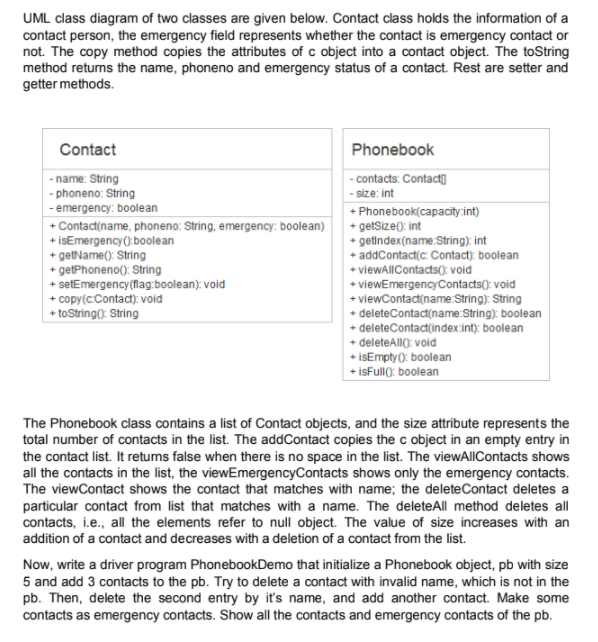
UML class diagram of two classes are given below. Contact class holds the information of a contact person, the emergency field represents whether the contact is emergency contact or not. The copy method copies the attributes of c object into a contact object. The toString method returns the name, phoneno and emergency status of a contact. Rest are setter and getter methods. Contact - name: String -phoneno: String - emergency: boolean + Contact(name, phoneno: String, emergencyboolean) +isEmergency:boolean + getName(): String + getPhoneno(): String + setEmergency(flag:boolean): void + copy(Contact): void + toString: String Phonebook - contacts: Contacto -size:int + Phonebook(capacity:int) + getSize(): int getIndex(name:String): int + addContact Contact): boolean + viewAllContacts(): void + viewEmergency Contacts(): void + viewContact(name String): String + delete Contact(name:String): boolean + delete Contact/index:int); boolean + deleteAll(): void + isEmpty(): boolean +isFull(: boolean The Phonebook class contains a list of contact objects, and the size attribute represents the total number of contacts in the list. The addContact copies the c object in an empty entry in the contact list. It returns false when there is no space in the list. The viewAllContacts shows all the contacts in the list, the viewEmergency Contacts shows only the emergency contacts. The viewContact shows the contact that matches with name; the delete Contact deletes a particular contact from list that matches with a name. The delete All method deletes all contacts, i.e., all the elements refer to null object. The value of size increases with an addition of a contact and decreases with a deletion of a contact from the list. Now, write a driver program PhonebookDemo that initialize a Phonebook object, pb with size 5 and add 3 contacts to the pb. Try to delete a contact with invalid name, which is not in the pb. Then, delete the second entry by it's name, and add another contact. Make some contacts as emergency contacts. Show all the contacts and emergency contacts of the pb
Step by Step Solution
There are 3 Steps involved in it

Get step-by-step solutions from verified subject matter experts
 Study Help