







Question: JAVA! Screenshot your output. Our submission instructions read: Submit your Person / RegisteredPerson / OCCCPerson hierarchy and a testPerson program that exercises every behavior in
JAVA! Screenshot your output.
Our submission instructions read: "Submit your Person / RegisteredPerson / OCCCPerson hierarchy and a testPerson program that exercises every behavior in all three classes. Please provide ample opportunity for the user to enter information as needed to create objects of each type." Essentially, write those three particular classes and make a testPerson class to test them all out, then write an OCCCDate class to implement into those same three particular classes.
Our Homework for these instructions read as follows:
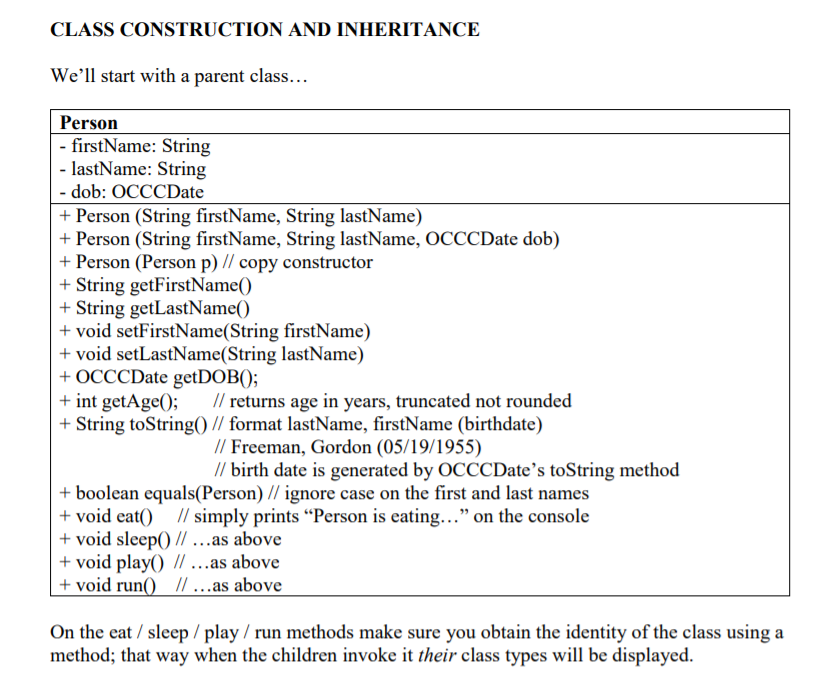
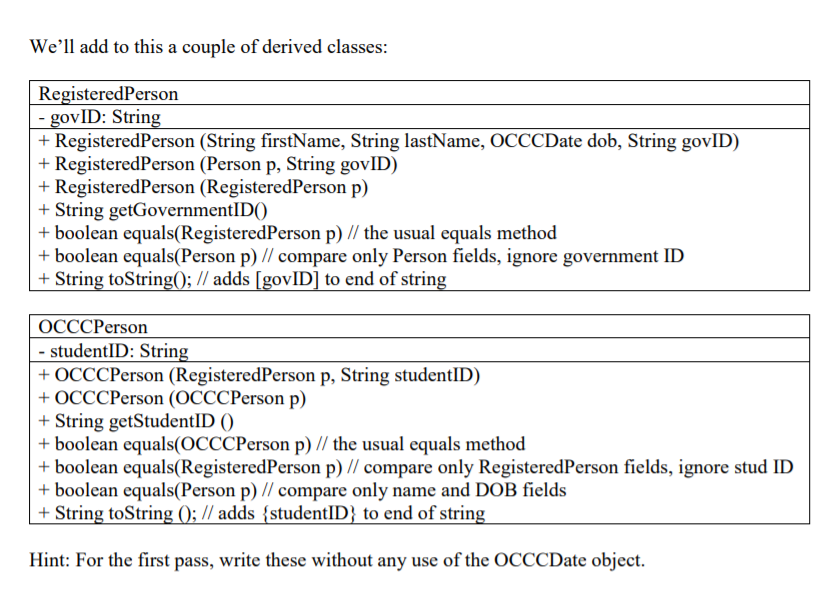
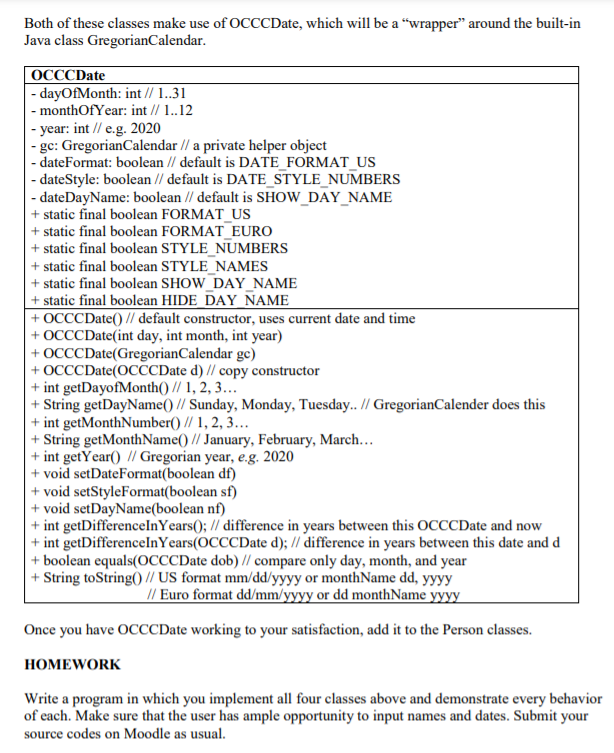
We were given an example of a what a testPerson class would look like. It should be able to be compatible with this code:
public class TestPerson { public static void main(String[] paramArrayOfString) { String str1 = "Montgomery"; String str2 = "Scott"; Person person1 = new Person(str1, str2); Person person2 = new Person("Hikaru", "Sulu"); Person person3 = new Person("Pavel", "Chekov"); RegisteredPerson registeredPerson1 = new RegisteredPerson("James", "Kirk", "SF00001"); RegisteredPerson registeredPerson2 = new RegisteredPerson(person1, "ABCDEFG"); OCCCPerson oCCCPerson1 = new OCCCPerson(registeredPerson1, "SF43434"); OCCCPerson oCCCPerson2 = new OCCCPerson(new RegisteredPerson(person3, "FED9999"), "SF9999"); Person person4 = new Person("Leonard", "McCoy"); System.out.println(" P1 is : " + person1.toString()); System.out.println(" P2 is : " + person2.toString()); System.out.println("RP1 is : " + registeredPerson1.toString()); System.out.println("RP2 is : " + registeredPerson2.toString()); System.out.println("OP1 is : " + oCCCPerson1.toString()); System.out.println("OP2 is : " + oCCCPerson2.toString()); person4.eat(); } }Test this code, test your own code, paste it and screenshot the output. CODE IN JAVA
CLASS CONSTRUCTION AND INHERITANCE We'll start with a parent class... Person - firstName: String - lastName: String - dob: OCCCDate + Person (String firstName, String lastName) + Person (String firstName, String lastName, OCCCDate dob) + Person (Person p) // copy constructor + String getFirstName() + String getLastName() + void setFirstName(String firstName) + void setLastName(String lastName) + OCCCDate getDOB(); + int getAge(); // returns age in years, truncated not rounded + String toString() // format lastName, firstName (birthdate) // Freeman, Gordon (05/19/1955) // birth date is generated by OCCCDate's toString method + boolean equals(Person) // ignore case on the first and last names + void eat() // simply prints Person is eating... on the console + void sleep() // ...as above + void play() // ...as above + void run() 11 ... as above On the eat / sleep/play/ run methods make sure you obtain the identity of the class using a method; that way when the children invoke it their class types will be displayed. We'll add to this a couple of derived classes: RegisteredPerson - govID: String + RegisteredPerson (String firstName, String lastName, OCCCDate dob, String govID) + RegisteredPerson (Person p, String govID) + RegisteredPerson (RegisteredPerson p) + String getGovernmentIDO + boolean equals(RegisteredPerson p) // the usual equals method + boolean equals(Person p) // compare only Person fields, ignore government ID + String toString(); // adds [govID] to end of string OCCCPerson - studentID: String + OCCCPerson (RegisteredPerson p, String studentID) + OCCCPerson (OCCCPerson p) + String getStudentID () + boolean equals(OCCCPerson p) // the usual equals method + boolean equals(RegisteredPerson p) // compare only RegisteredPerson fields, ignore stud ID + boolean equals(Person p) // compare only name and DOB fields + String toString (); // adds studentID} to end of string Hint: For the first pass, write these without any use of the OCCCDate object. Both of these classes make use of OCCCDate, which will be a "wrapper around the built-in Java class GregorianCalendar. OCCCDate - dayOfMonth: int // 1..31 - monthOfYear: int // 1..12 - year: int // e.g. 2020 -ge: GregorianCalendar // a private helper object - dateFormat: boolean // default is DATE_FORMAT_US - dateStyle: boolean // default is DATE_STYLE_NUMBERS - dateDayName: boolean // default is SHOW_DAY_NAME + static final boolean FORMAT_US + static final boolean FORMAT EURO + static final boolean STYLE NUMBERS + static final boolean STYLE_NAMES + static final boolean SHOW DAY NAME + static final boolean HIDE DAY NAME + OCCCDate() // default constructor, uses current date and time + OCCCDate(int day, int month, int year) + OCCCDate(GregorianCalendar ge) + OCCCDate(OCCCDate d) // copy constructor + int getDayOfMonth() // 1, 2, 3... + String getDayName() // Sunday, Monday, Tuesday.. // GregorianCalender does this + int getMonthNumber() // 1, 2, 3... + String getMonthName() // January, February, March... + int getYear() // Gregorian year, e.g. 2020 + void setDateFormat(boolean df) + void setStyleFormat(boolean sf) + void setDayName(boolean nf) + int getDifferenceInYears(); // difference in years between this OCCCDate and now + int getDifferenceInYears(OCCCDate d); // difference in years between this date and d + boolean equals(OCCCDate dob) // compare only day, month, and year + String toString() // US format mm/dd/yyyy or monthName dd, yyyy // Euro format dd/mm/yyyy or dd monthName yyyy Once you have OCCCDate working to your satisfaction, add it to the Person classes. HOMEWORK Write a program in which you implement all four classes above and demonstrate every behavior of each. Make sure that the user has ample opportunity to input names and dates. Submit your source codes on Moodle as usual
Step by Step Solution
There are 3 Steps involved in it

Get step-by-step solutions from verified subject matter experts
 Study Help