







Question: Java Script The goal of this assignment is to create a customized greeting and Happy Birthday song based on user input. The output will look
Java Script
The goal of this assignment is to create a customized greeting and Happy Birthday song based on user input.
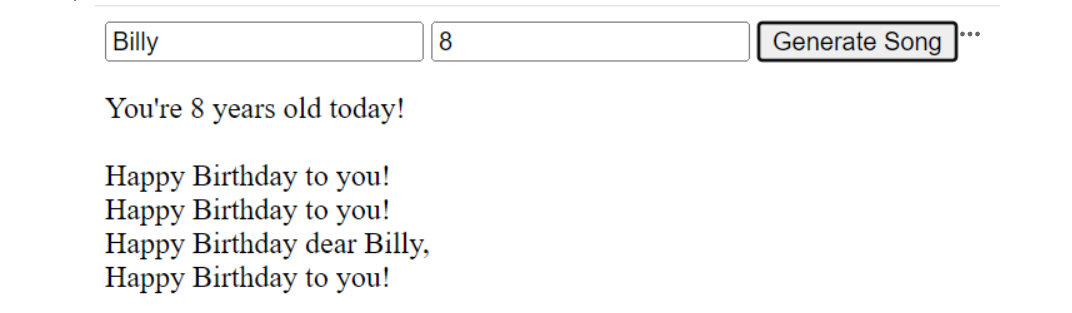
The output will look as follows:
You're years old today!
Happy Birthday to you!
Happy Birthday to you!
Happy Birthday dear Billy,
Happy Birthday to you!
The start file attached above includes input fields for the user to enter their name and age. When the "Generate Song" button is clicked, JavaScript code is executed to generate a personalized message and birthday song for the user.
Open the provided start file in a code editor.
Inside the tag, you will find comments that outline the tasks you need to complete.
Your goal is to write the necessary JavaScript code to accomplish these tasks:
Create a function named happyBirthday that outputs the message "Happy Birthday to you!" using the innerHTML property.
Create a function named birthdayName that receives an argument from the nameInput input field.
Use the received name to output a personalized message "Happy Birthday dear name using the innerHTML property.
Create a function named personalizedSong that receives two arguments, age and name
Inside this function, implement the following steps:
Output the message "You're age years old today!" using the innerHTML property, replacing age with the actual age received as an argument then skip a line
Call the happyBirthday function.
Call the happyBirthday function again.
Call the birthdayName function, passing the actual name received from the user as an argument.
Call the happyBirthday function one last time.
Add an event listener to the myButton element that triggers an anonymous function when clicked.
In the anonymous function, implement the following steps:
Clear the contents of the output element's innerHTML
Retrieve the values entered in the nameInput and ageInput input fields and assign them to local variables.
Call the personalizedSong function, passing the local variables as arguments.
Test your code by opening the start file in a web browser. Enter a name and age, then click the "Generate Song" button.
Verify that the personalized birthday song is displayed in the output element.
Once you have completed the tasks, save the modified file with your JavaScript code.
Upload the modified file to your space on the WCET server.
Submit the link to this submission area.
Rubric:
Task
Points
Create a function named happyBirthday correctly
Create a function named birthdayName correctly
Create a function named personalizedSong correctly and implements steps inside it correctly
Add an event listener to myButton element correctly and implement steps inside the anonymous function correctly
Correct retrieval and usage of nameInput and ageInput values in the personalizedSong function
Functionality: All functions work as expected with no errors
Note: Only files uploaded to the WCET server and submitted as a link to this submission area will be accepted.
Step by Step Solution
There are 3 Steps involved in it
1 Expert Approved Answer
Step: 1 Unlock

Question Has Been Solved by an Expert!
Get step-by-step solutions from verified subject matter experts
Step: 2 Unlock
Step: 3 Unlock
 Study Help