







Question: Java, SQL. Please follow only with the existing code, do not come up with a new entire Java code, because you found the source somewhere
Java, SQL.
Please follow only with the existing code, do not come up with a new entire Java code, because you found the source somewhere else. If you know how to do it then follow up and I will give good rate.
Question:
A pharmacy manager requests a report of the quantity of drugs that have been used to fill prescriptions by the pharmacy. The report will contain the names of drugs used and the quantity of each drug used. Input is pharmacy id and a start and end date range. Connect Java inputs to the database scheme.
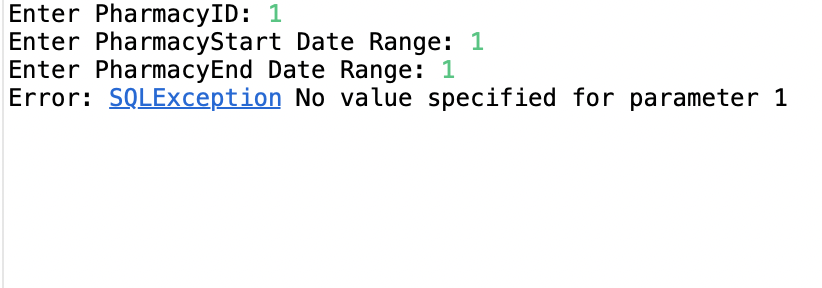
The error I get with the current code is:
Here is Java code.
package com.mypackage;
import java.sql.Connection;
import java.sql.DriverManager;
import java.sql.PreparedStatement;
import java.sql.ResultSet;
import java.sql.SQLException;
import java.util.Random;
import java.util.Scanner;
/**
* This is an example of a JDBC Java application.
* Run this program as a Java application.
*/
public class pharmacy_data {
static final String DBURL = "jdbc:mysql://localhost:yours"; // database URL
static final String USERID = "root";
static final String PASSWORD = "yourpass";
//Connection conn = null;
public static void main(String[] args) {
// Connect to mysql server.
try (Connection conn = DriverManager.getConnection(DBURL, USERID, PASSWORD);) {
PreparedStatement ps;
ResultSet rs;
// Asking user to enter Pharmacy id.
Scanner keyboard = new Scanner(System.in);
System.out.print("Enter PharmacyID: ");
int pharmacy_id = keyboard.nextInt();
// Asking user to input start date range.
System.out.print("Enter PharmacyStart Date Range: ");
int start_date = keyboard.nextInt();
// Asking user to input end date range.
System.out.print("Enter PharmacyEnd Date Range: ");
int end_date = keyboard.nextInt();
// To select from sql.
String sqlSELECT = "select drug_id, drug_name, sum(quantity) as quantity "
+ "from prescription where pharmacy_id=? group by drug_name order by drug_name";
ps = conn.prepareStatement(sqlSELECT);
rs = ps.executeQuery();
while (rs.next()) {
String drug_name = rs.getString("drug_name");
int quantity = rs.getInt("quantity");
System.out.printf("drug_name, ", "+quantity);
}
} catch (SQLException e) {
System.out.println("Error: SQLException "+e.getMessage());
}
}
}
And here is the pharmacy_scheme.
CREATE SCHEMA myscheme;
USE myscheme;
CREATE TABLE Pharmacy(
pharmacy_id VARCHAR(10) NOT NULL,
drug_name VARCHAR(100) NOT NULL,
quantity VARCHAR(100) NOT NULL,
start_date DATE NOT NULL,
end_date DATE NOT NULL,
PRIMARY KEY(pharmacy_id, drug_name)
);
INSERT INTO Pharmacy (pharmacy_id, drug_name, quantity, start_date, end_date)
VALUES ('cst363','Tylenol with Codeine', '10', '01/01/2022', '12/12/2022', 1 );
INSERT INTO `Pharmacy` VALUES
(1,'Tylenol with Codeine','acetaminophen and codeine'),
(2,'Proair Proventil','albuterol aerosol'),
(3,'Accuneb','albuterol HFA');
INSERT INTO Pharmacy
VALUES ('cst363','Tylenol with Codeine', '10', '01/01/2022', '12/12/2022', 1 );
Enter PharmacyID: 1 Enter PharmacyStart Date Range: 1 Enter PharmacyEnd Date Range: 1 Error: SQLException No value specified for parameter 1
Step by Step Solution
There are 3 Steps involved in it

Get step-by-step solutions from verified subject matter experts
 Study Help