







Question: java swing, just simple answers (to be written on a4) needed not the whole program code Prepare the project below. Only write the action performed'
java swing, just simple answers (to be written on a4) needed not the whole program code
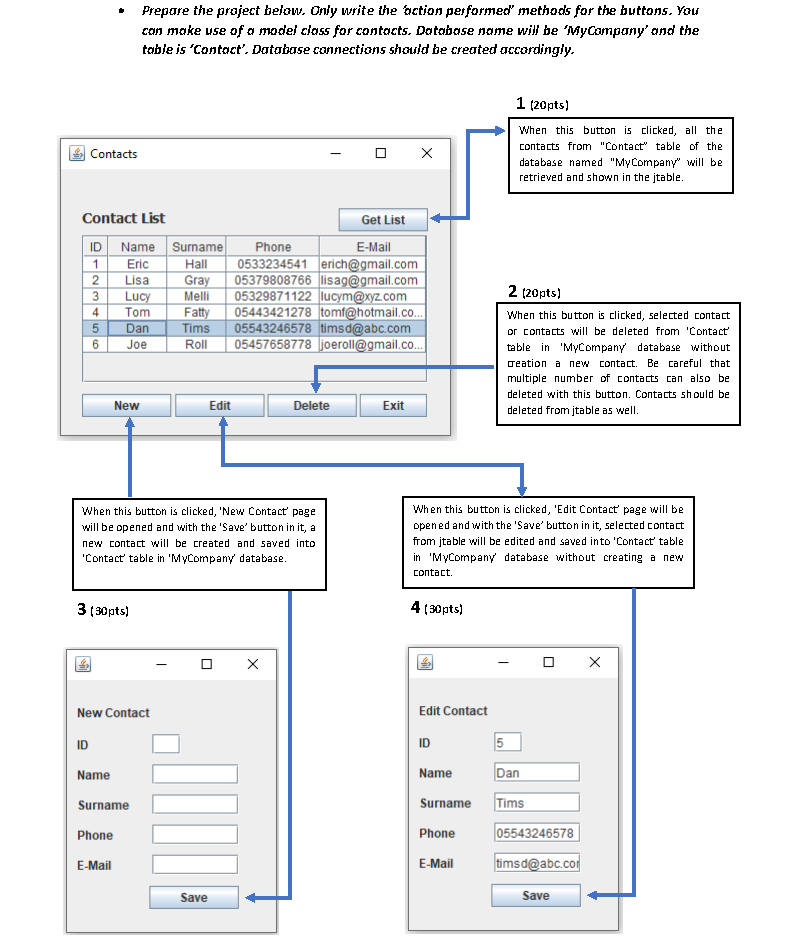
Prepare the project below. Only write the action performed' methods for the buttons. You can make use of a model class for contacts. Databose name will be 'My Company' and the table is 'Contact'. Database connections should be created accordingly. 1 20pts) Contacts x When this button is clicked, all the contacts from "Contact" table of the database named "My Company" will be retrieved and shown in the jtable. Contact List ID Name 1 Eric 2 Lisa 3 Lucy 4 Tom 5 Dan 6 Joe Surname Hall Gray Melli Fatty Tims Roll Get List Phone E-Mail 0533234541 erich@gmail.com 05379808766 lisag@gmail.com 05329871122 lucym@xyz.com 05443421278 tomf@hotmail.co... 05543246578 timsd@abc.com 05457658778 joeroll@gmail.co... 2 20pts) When this button is clicked, selected contact or contacts will be deleted from 'Contact table in 'MyCompany database without creation a new contact. Be careful that multiple number of contacts can also be deleted with this button. Contacts should be deleted from jtable as well. New Edit Delete Exit When this button is clicked, 'New Contact page will be opened and with the 'Save' button in it, a new contact will be created and saved into 'Contact' table in 'My Company database. When this button is clicked, 'Edit Contact Page will be opened and with the 'Save' button in it, selected contact from itable will be edited and saved into 'Contact' table in 'My Company database without creating a new contact. 3 (30pts) 4 (30 pts) x New Contact Edit Contact ID 5 ID Name Name Dan Surname Surname Tims Phone Phone 05543246578 E-Mail E-Mail timsd@abc.co Save Save Prepare the project below. Only write the action performed' methods for the buttons. You can make use of a model class for contacts. Databose name will be 'My Company' and the table is 'Contact'. Database connections should be created accordingly. 1 20pts) Contacts x When this button is clicked, all the contacts from "Contact" table of the database named "My Company" will be retrieved and shown in the jtable. Contact List ID Name 1 Eric 2 Lisa 3 Lucy 4 Tom 5 Dan 6 Joe Surname Hall Gray Melli Fatty Tims Roll Get List Phone E-Mail 0533234541 erich@gmail.com 05379808766 lisag@gmail.com 05329871122 lucym@xyz.com 05443421278 tomf@hotmail.co... 05543246578 timsd@abc.com 05457658778 joeroll@gmail.co... 2 20pts) When this button is clicked, selected contact or contacts will be deleted from 'Contact table in 'MyCompany database without creation a new contact. Be careful that multiple number of contacts can also be deleted with this button. Contacts should be deleted from jtable as well. New Edit Delete Exit When this button is clicked, 'New Contact page will be opened and with the 'Save' button in it, a new contact will be created and saved into 'Contact' table in 'My Company database. When this button is clicked, 'Edit Contact Page will be opened and with the 'Save' button in it, selected contact from itable will be edited and saved into 'Contact' table in 'My Company database without creating a new contact. 3 (30pts) 4 (30 pts) x New Contact Edit Contact ID 5 ID Name Name Dan Surname Surname Tims Phone Phone 05543246578 E-Mail E-Mail timsd@abc.co Save Save
Step by Step Solution
There are 3 Steps involved in it

Get step-by-step solutions from verified subject matter experts
 Study Help