







Question: Java test code: package sudokuplayer; import javax.swing.*; import javax.swing.text.*; import javax.swing.event.*; import java.awt.*; class SudokuPlayer extends JFrame { public SudokuPlayer(String start, String solution) { sudoku

Java
test code:
package sudokuplayer;
import javax.swing.*; import javax.swing.text.*; import javax.swing.event.*; import java.awt.*;
class SudokuPlayer extends JFrame { public SudokuPlayer(String start, String solution) { sudoku = new Sudoku(start); setSize(300, 350); setTitle("Sudoku"); setDefaultCloseOperation(JFrame.EXIT_ON_CLOSE);
JPanel grid = new JPanel(); grid.setLayout(new GridLayout(3, 3)); add(grid, BorderLayout.CENTER);
for (int i = 0; i
statusLabel = new JLabel("Welcome to Sudoku!"); statusLabel.setHorizontalAlignment(SwingConstants.CENTER); add(statusLabel, BorderLayout.SOUTH);
}
private final Sudoku sudoku; private final JLabel statusLabel;
class GridListener implements DocumentListener {
private int row; private int col;
public GridListener(int row, int col) { this.row = row; this.col = col; }
public void changedUpdate(DocumentEvent e) { updateSudoku(e); }
public void insertUpdate(DocumentEvent e) { updateSudoku(e); }
public void removeUpdate(DocumentEvent e) { updateSudoku(e); }
private void updateSudoku(DocumentEvent e) { Document document = e.getDocument(); char val; if (document.getLength() == 0) { val = ' '; } else { try { val = document.getText(0, 1).charAt(0); } catch (BadLocationException ex) { // If I can't get character one, that means we are empty val = ' '; } }
sudoku.setSquare(row, col, val); if (sudoku.isSolved()) { statusLabel.setText("Congratulations!"); } else if (sudoku.isValid()) { statusLabel.setText(" "); } else { statusLabel.setText("Invalid solution!"); } } }
public static void main(String[] args) { String solution = ""; solution += "435269781 "; solution += "682571493 "; solution += "197834562 "; solution += "826195347 "; solution += "374682915 "; solution += "951743628 "; solution += "519326874 "; solution += "248957136 "; solution += "763418259 ";
String start = ""; start += " 26 7 1 "; start += "68 7 9 "; start += "19 45 "; start += "82 1 4 "; start += " 46 29 "; start += " 5 3 28 "; start += " 93 74 "; start += " 4 5 36 "; start += "7 3 18 ";
SudokuPlayer player = new SudokuPlayer(start, solution); player.setVisible(true);
} }
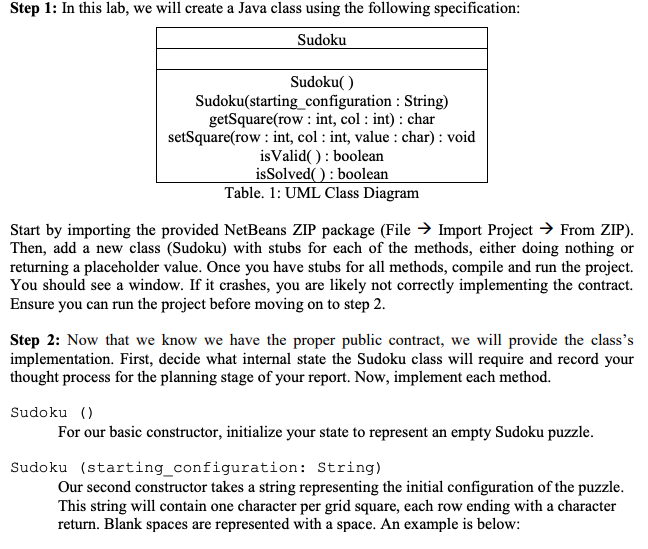
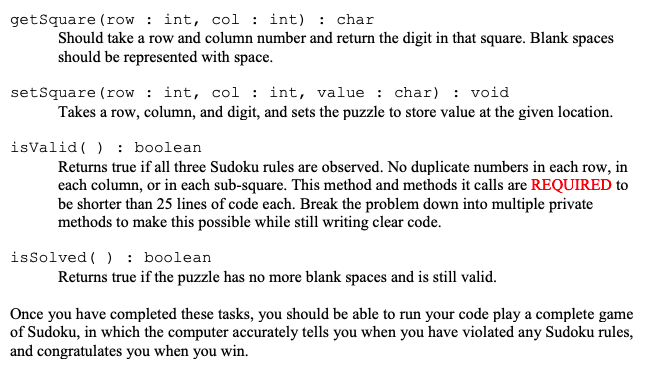
Step 1: In this lab, we will create a Java class using the following specification Sudoku Sudoku() Sudoku(starting_ configuration : String) getSquare(row : int, col : int) : char setSquare(row : int, col: int, value : char) : void isValid(): boolean isSolved): boolean Table. 1: UML Class Diagram Start by importing the provided NetBeans ZIP package (File > Import Project -> From ZIP) Then, add a new class (Sudoku) with stubs for each of the methods, either doing nothing or returning a placeholder value. Once you have stubs for all methods, compile and run the project. You should see a window. If it crashes, you are likely not correctly implementing the contract. Ensure you can run the project before moving on to step 2 Step 2: Now that we know we have the proper public contract, we will provide the class's implementation. First, decide what internal state the Sudoku class will require and record your thought process for the planning stage of your report. Now, implement each method. Sudoku () For our basic constructor, initialize your state to represent an empty Sudoku puzzle Sudoku (starting_configuration: String) Our second constructor takes a string representing the initial configuration of the puzzle This string will contain one character per grid square, each row ending with a character return. Blank spaces are represented with a space. An example is below String start -"; start+8 27 1n"; start += " 6 2 8 1 "; start +4742 "; start 2 73 1 "; start+9 7 31 "; start "5 617 1n"; start += " 6 7 21 "; start +"218 7 31 "; start+"62 6 73 1 "; getSquare (row: int, col : int) : char Should take a row and column number and return the digit in that square. Blank spaces should be represented with space. setSquare (row : int, col: int, value : char) : void Takes a row, column, and digit, and sets the puzzle to store value at the given location. isValid boolean Returns true if all three Sudoku rules are observed. No duplicate numbers in each row, in each column, or in each sub-square. This method and methods it calls are REQUIRED to be shorter than 25 lines of code each. Break the problem down into multiple private methods to make this possible while still writing clear code isSolved boolean Returns true if the puzzle has no more blank spaces and is still valid. Once you have completed these tasks, you should be able to run your code play a complete game of Sudoku, in which the computer accurately tells you when you have violated any Sudoku rules, and congratulates you when you win. Step 1: In this lab, we will create a Java class using the following specification Sudoku Sudoku() Sudoku(starting_ configuration : String) getSquare(row : int, col : int) : char setSquare(row : int, col: int, value : char) : void isValid(): boolean isSolved): boolean Table. 1: UML Class Diagram Start by importing the provided NetBeans ZIP package (File > Import Project -> From ZIP) Then, add a new class (Sudoku) with stubs for each of the methods, either doing nothing or returning a placeholder value. Once you have stubs for all methods, compile and run the project. You should see a window. If it crashes, you are likely not correctly implementing the contract. Ensure you can run the project before moving on to step 2 Step 2: Now that we know we have the proper public contract, we will provide the class's implementation. First, decide what internal state the Sudoku class will require and record your thought process for the planning stage of your report. Now, implement each method. Sudoku () For our basic constructor, initialize your state to represent an empty Sudoku puzzle Sudoku (starting_configuration: String) Our second constructor takes a string representing the initial configuration of the puzzle This string will contain one character per grid square, each row ending with a character return. Blank spaces are represented with a space. An example is below String start -"; start+8 27 1n"; start += " 6 2 8 1 "; start +4742 "; start 2 73 1 "; start+9 7 31 "; start "5 617 1n"; start += " 6 7 21 "; start +"218 7 31 "; start+"62 6 73 1 "; getSquare (row: int, col : int) : char Should take a row and column number and return the digit in that square. Blank spaces should be represented with space. setSquare (row : int, col: int, value : char) : void Takes a row, column, and digit, and sets the puzzle to store value at the given location. isValid boolean Returns true if all three Sudoku rules are observed. No duplicate numbers in each row, in each column, or in each sub-square. This method and methods it calls are REQUIRED to be shorter than 25 lines of code each. Break the problem down into multiple private methods to make this possible while still writing clear code isSolved boolean Returns true if the puzzle has no more blank spaces and is still valid. Once you have completed these tasks, you should be able to run your code play a complete game of Sudoku, in which the computer accurately tells you when you have violated any Sudoku rules, and congratulates you when you win
Step by Step Solution
There are 3 Steps involved in it

Get step-by-step solutions from verified subject matter experts
 Study Help