







Question: Java Use radio buttons to allow the user to choose the formula of their choosing. Hide any text boxes that are not needed. Change the
Java
Use radio buttons to allow the user to choose the formula of their choosing. Hide any text boxes that are not needed. Change the labels according to when the radio button is pushed. Write the formulas as separate functions. Use try and catch statements appropriately display any error messages in a label. Include a menu that allows the user to quit.
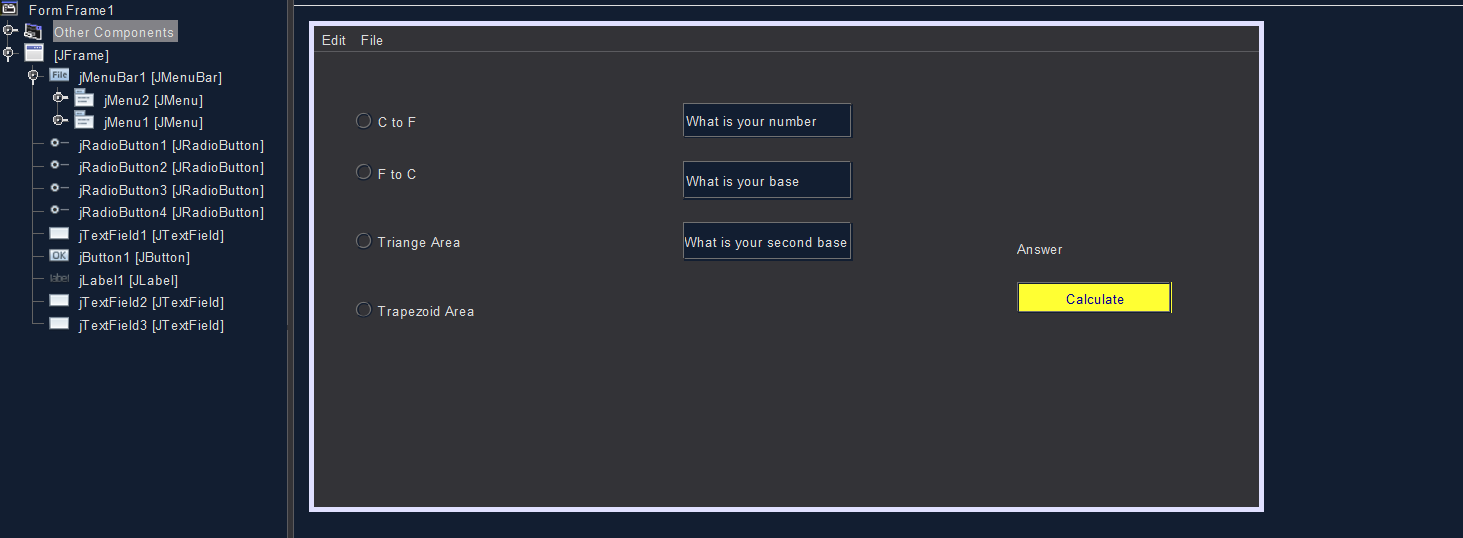
This is my design but now I have errors. Pls, help.
And my code down below
import javax.swing.ButtonGroup;
public class Frame1 extends javax.swing.JFrame {
/** * Creates new form Frame1 */ public Frame1() { initComponents(); //create a button group ButtonGroup rbGroup = new ButtonGroup(); rbGroup.add(jRadioButton1); rbGroup.add(jRadioButton2); rbGroup.add(jRadioButton3); rbGroup.add(jRadioButton4); //seta default button jRadioButton1.setSelected(true); //set focus jTextField1.requestFocus(); } private void CtoF() { double C, ans; try { C = Double.parseDouble(jTextField1.getText()); ans = (C * 1.8) + 32; jLabel1.setText(String.valueOf(ans)); }catch (NumberFormatException e) { jLabel1.setText("You had an error - Please try again."); jTextField1.setText(""); jTextField2.setText(null); jTextField3.setText(null); jTextField1.requestFocus(); } } private void FtoC() { double F, ans; try { F = Double.parseDouble(jTextField1.getText()); ans = (F -32) * 5/9; jLabel1.setText(String.valueOf(ans)); }catch (NumberFormatException e) { jLabel1.setText("You had an error - Please try again."); jTextField1.setText(""); jTextField2.setText(null); jTextField3.setText(null); jTextField1.requestFocus(); } } private void triangle() { double num1, ans, b; try { num1 = Double.parseDouble(jTextField1.getText()); b = Double.parseDouble(jTextField2.getText()); ans = (num1 * b) / 2; jLabel1.setText(String.valueOf(ans)); }catch (NumberFormatException e) { jLabel1.setText("You had an error - Please try again."); jTextField1.setText(""); jTextField2.setText(null); jTextField3.setText(null); jTextField1.requestFocus(); } } private void trapezoid() { double h, ans, b, a; try { h = Double.parseDouble(jTextField1.getText()); b = Double.parseDouble(jTextField2.getText()); a = Double.parseDouble(jTextField3.getText()); ans = (a + b) * h / 2; jLabel1.setText(String.valueOf(ans)); }catch (NumberFormatException e) { jLabel1.setText("You had an error - Please try again."); jTextField1.setText(""); jTextField2.setText(null); jTextField3.setText(null); jTextField1.requestFocus(); } }
private void jButton1ActionPerformed(java.awt.event.ActionEvent evt) { if(jRadioButton1.isSelected()) { CtoF();
} else if(jRadioButton2.isSelected()){ FtoC();
} else if(jRadioButton3.isSelected()){ triangle();
} else if(jRadioButton4.isSelected()){ trapezoid();
} }
Edit File OC to F What is your number O 9 Form Frame 1 0-6 Other Components [JFrame] O File jMenuBar 1 [JMenuBar] jMenu2 [JMenu] jMenu 1 [JMenu] jRadio Button 1 [JRadio Button] o- jRadio Button2 [JRadio Button] jRadio Button3 [JRadio Button] 0- jRadioButton4 [JRadio Button] JTextField1 [JT extField] OK Button 1 (JButton] - label jLabel1 [JLabel] jT extField2 [JTextField] jTextField3 [JTextField] O F to C What is your base O O Triange Area What is your second base Answer Calculate O Trapezoid Area
Step by Step Solution
There are 3 Steps involved in it

Get step-by-step solutions from verified subject matter experts
 Study Help