







Question: JavaFX application using GridPane and FlowPane layouts. This assignment will focus on the creation of JavaFX application that uses the GridPane and FlowPane layouts. Assignment
| JavaFX application using GridPane and FlowPane layouts. This assignment will focus on the creation of JavaFX application that uses the GridPane and FlowPane layouts. |
| Assignment 11 |
| Assignment 11 Submission |
| Follow the directions below to submit Assignment 11: 1. You will be creating a JavaFX based application. 2. The application should look identical or very similar to the image of the example application attached to this assignment (see image below).. 3. The program should consist of the following controls and panes.a. One GridPane and one FlowPane layout. b. The GridPane should have insets of 10, 10, 10, 10. c. The GridPane should have a vertical gap of 5. d. The FlowPane should have insets of 10, 10, 10, 10. e. The FlowPane alignment should be CENTER. f. The FlowPane should have a horizontal gap of 5. g. A Label for the text "Input Text:" should be placed on the GridPane in location column 0, row 0. h. A TextArea (see chapter 16 if needed) should be placed on the GridPane in location column 0, row 1. i. A Button with the text "Encrypt" and a Button with the text "Clear" and a Button with the text "Decrypt" should be added to the FlowPane. j. The FlowPane should be placed on the GridPane in location column 0, row 2. k. A Label with the text "Output Text" should be placed on the GridPane in location column 0, row 3. l. A TextArea should be placed on the GridPane in location column 0, row 4. 4. No functionality need be implemented. ------------------------------------------------------------------------------------------------------------- ***Should look like the photo below***
|
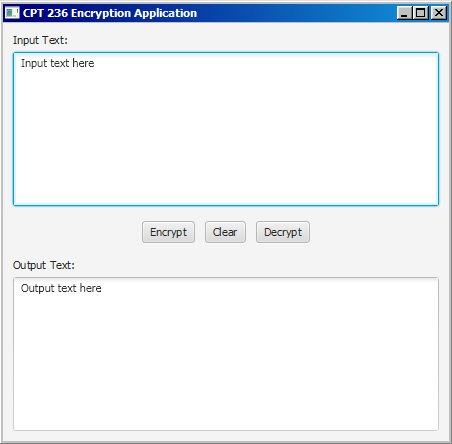
CPT 236 Encryption Application |X Input Text: Input text here Encrypt lear Decrypt Output Text: Output text here
Step by Step Solution
There are 3 Steps involved in it

Get step-by-step solutions from verified subject matter experts
 Study Help